

Get a Transcript with Timestamps
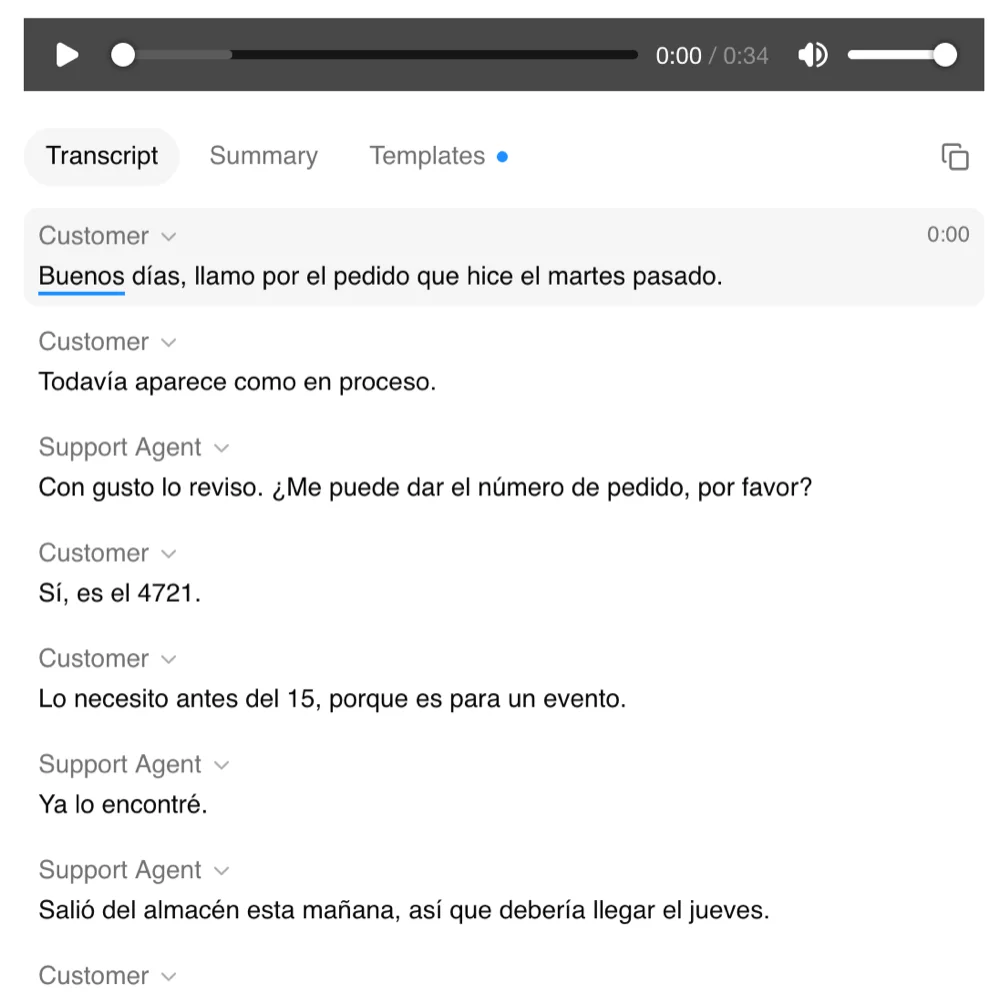
Upload an audio or video file and ScreenApp transcribes it, then lines the text up with timestamps: audio to timestamp in one step, and audio to text with timestamp you can read and search. Click any line in the transcript and the player jumps to that moment, so you can check what was said without scrubbing through the whole recording.
You get a transcript you can move around in, not just a wall of text. You get a start time on every transcript segment, about one sentence each, shown beside the segment being played. Keep it in ScreenApp for reference and citations, or export it as a subtitle file when you need timed captions (downloads are on paid plans).
What you get:
- clicking a moment in the transcript jumps the player to that point in the recording
- speaker identification for 25 of the 100+ languages ScreenApp transcribes
- Export as PDF, DOCX, TXT, SRT and VTT, on paid plans
- search across recordings by name or transcript
- AI chat with any recording
- Free plan: 2 transcriptions of recordings up to 45 minutes each
Good for podcasters, researchers and content creators who need to find and cite a moment in a recording.
Turn a Recording into a Timestamped Transcript
Drop in the file and every segment comes back with its start time, and a speaker label in the languages that support it.
- A start time on every segment, with speaker identification in 25 languages
- Click any line to hear it play
- AI chat with any recording, for finding a section
- Free plan: 2 transcriptions of recordings up to 45 minutes each
How to Transcribe Audio with Timestamps
- Upload the file. Drag in MP3, M4A, MP4A, M4B, AAC, WAV, OGG, OPUS, FLAC, AIFF, WMA, WEBMA, MKA, AC3, EAC3, WV, AMR, DSF, DFF audio, or MP4, M4V, MOV, AVI, WEBM, MKV, FLV, TS, MTS, M2TS, 3GP, 3GPP, 3G2, WMV, ASF, VOB, OGV, RM, RMVB, MPG, MPEG, M2V, F4V, MXF video.
- Let it transcribe. ScreenApp processes the audio and lines the text up with timestamps automatically.
- Play back and export. Click a line to jump the player there. On a paid plan, export the transcript as PDF, DOCX, TXT, SRT and VTT.
Accuracy depends on the audio: a clear recording with one person speaking at a time needs the least correction. See how we measure accuracy and the word error rates per language.
Video Files and MP3s Work the Same Way
A video goes through the same steps as an audio file: ScreenApp transcribes the sound and the timestamps follow the video’s own timeline. An MP3, a voice memo or a voiceover works too, so a recorded voiceover comes back as a script with a time on each segment. That’s voice to timestamp in practice.
What Is Timestamping in Transcription?
Timestamping is the act of noting when each part of a recording was spoken, right beside the words. In a timestamped transcript, times in minutes and seconds sit next to the words, which lets you jump to a line without playing the file from the top.
How often the time gets marked is where tools part ways. One might stamp every word. Another stamps each sentence or speaker turn. Some only mark it at intervals. ScreenApp gives a start time on every transcript segment, about one sentence each, shown beside the segment being played.
Time-Coded Transcripts for Video Editing
The same idea, applied to editing, gives you a time-coded transcript: read the text, pick the lines you need, then use their times to find the clips. With ScreenApp, clicking a line plays it from that point, so checking a cut is quick. Some editors call this video transcription with timecode.
Which Timestamp Format Fits Your Job
Captions for a Video
Caption lines with their times, in an SRT or VTT file, ready to upload beside the video. Downloads are on paid plans.
Quotes and Research
A start time on every segment, shown beside the one you play, and speaker labels where the language supports them, so you can find where a line falls and play it back.
YouTube Chapters
A list of topics with start times. YouTube needs the first one at 0:00, at least 3 of them, each at least 10 seconds long.
A Script with No Recording
For script to timestamp with no audio to time, the timing has to be estimated: an AI estimates timing from sentence length and reading pace, at about 4 words per second.
Tools That Transcribe Speech with Timestamps, Compared
ScreenApp
- Free Plan
- 2 transcriptions, up to 45 min each
- Timestamps
- a start time on every transcript segment, about one sentence each, shown beside the segment being played
- Click to Jump
- clicking a moment in the transcript jumps the player to that point in the recording
- Speaker Labels
- speaker identification (25 of 100+ languages)
- Export
- PDF, DOCX, TXT, SRT and VTT, on paid plans
- Paid Plan
- $19 a month billed annually
Otter.ai
- Free Plan
- 300 min a month
- Click to Jump
- clicking a word jumps to that moment in the audio
- Speaker Labels
- Speaker identification on Basic, the free plan
- Export
- mp3 and txt on the free plan, plus pdf, docx and srt from Pro, with bulk export from Business
- Paid Plan
- $8.33 a month billed annually
Descript
- Free Plan
- 60 media minutes a month
- Playback
- highlights the current word in the script during playback
- Speaker Labels
- automatic speaker detection and labels
- Where It Runs
- runs in a browser tab with no install
- Paid Plan
- $16 a month billed annually
Sonix
- Free Trial
- 30 minutes
- Timestamps
- a start and end time on every word, to the hundredth of a second
- Click to Jump
- clicking any word plays the audio from that moment
- Export
- DOCX, PDF, TXT, SRT, VTT
- Paid Plan
- $25 a month, or $10 an hour
Happy Scribe
- Free Plan
- Files up to 45 minutes
- Speaker Labels
- automatic speaker detection
- Export
- Free plan: DOCX, TXT, SRT and MP4 (watermarked)
- Paid Plan
- $8.50 a month billed annually
On Otter’s free plan you get 300 minutes a month. Pro runs $8.33 a month billed annually, or $16.99 monthly. ScreenApp’s free plan is 2 transcriptions of recordings up to 45 minutes each, and speaker labels come included for the languages that support diarization.
Descript runs in a browser tab with no install, with 60 free media minutes a month. Paid plans start at $16 a month billed annually.
Sonix wants $25 a month for Core, or you can pay as you go at $10 an hour after a 30-minute trial. Its transcripts carry a start and end time on every word, to the hundredth of a second.
Happy Scribe’s free plan accepts files up to 45 minutes. Basic starts at $8.50 a month billed annually.
Who Uses a Transcript with Timestamps
For content creators, a recording becomes a subtitle file with timing already matched, ready to go up with the video once you download it on a paid plan. The subtitle generator covers that end to end.
Researchers who cite an interview or focus group can point to where something was said rather than guess its spot in a long recording. Coding interviews across files gets its own page at research transcription.
When a student loses the thread in a lecture recording, they can jump back to that moment instead of replaying from the start. A journalist checking a quote clicks to it and listens against the transcript.
Podcasters pull timestamps into show notes and chapter markers, then hang onto the transcript for later.
YouTube Chapters from a Timestamped Transcript
YouTube turns a list of times in the video description into chapters. That list has to open at 0:00, include at least 3 times in order, and keep every chapter at least 10 seconds long. The YouTube chapter generator writes the list for you. Our guide on adding timestamps to YouTube videos covers pasting it in.
Related Transcription Features
- Subtitle generator: export the same timestamped transcript as an SRT or VTT file for captions, on paid plans
- Transcription proofreading: check the transcript against the audio and correct mistakes
- Multispeaker transcription: speaker labels on every segment for interviews and panels
- Real-time transcription: live captions during a recording rather than after upload
- Call transcription: transcripts for phone and call recordings