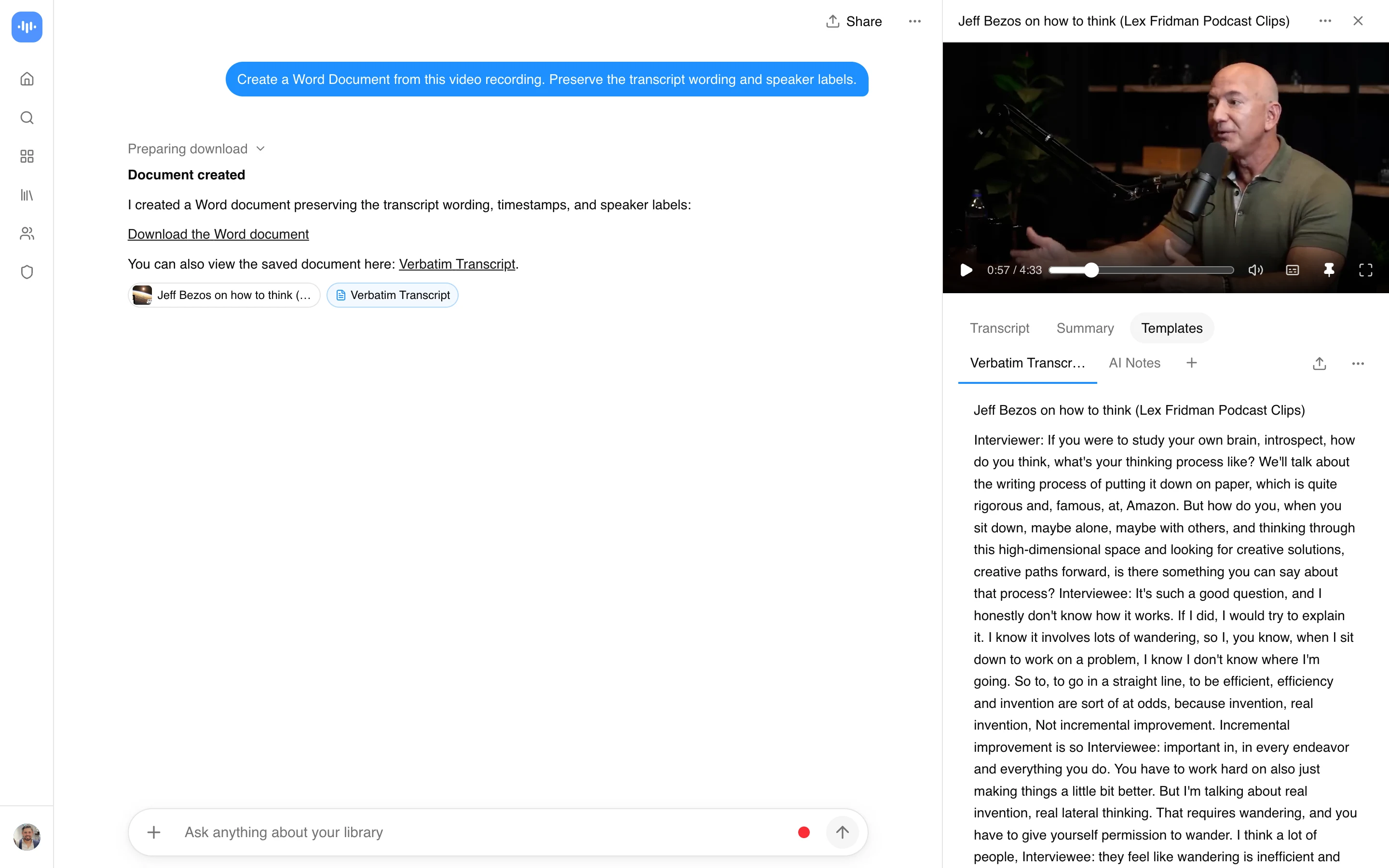
Benefits of Video to Document Converter
Convert video to document format with AI-powered transcription. Transform video presentations, lectures, meetings, and YouTube content into editable Word documents. Transcription runs on Whisper Large-v3 via Groq inference; per-language WER is on the accuracy page.
Save hours of manual work with automated conversion. One-hour videos process in under 2 minutes, delivering documents ready for editing and collaboration.
Key advantages:
- Instant video to document conversion for MP4, AVI, MOV, WMV files
- YouTube to document converter supports direct URL imports
- Convert video to Word document with automatic formatting
- Speaker identification and timestamp generation
- Export to Word, Google Docs, or Office 365
- HTTPS uploads, audio never used for model training
Your converted documents work directly across Microsoft Word, Google Docs, and Office 365. Edit, comment, track changes, and share with teams instantly.
Security & Privacy: Uploads run over encrypted HTTPS. Files are deleted per your account’s retention settings (24 hours by default). Audio is never used to train any model. Enterprise plans support BAA-eligible deployments for HIPAA workloads. Data handling and sub-processors are on the Trust Center.
Need a PDF instead? Use our Video to PDF Converter for creating permanent, printable PDF documents from any video.
How to Convert Video Into Document
Transform any video into a professional document with our AI-powered video to document converter:
-
Upload Your Video: Drag and drop MP4, AVI, MOV, WMV files or paste YouTube URLs to convert video to document format instantly.
-
Choose Document Style: Select from meeting minutes, transcripts, summaries, lecture notes, or structured notes with timestamps.
-
AI Processing: Advanced AI transcribes speech, identifies speakers, and organizes text into paragraphs with proper punctuation in under 60 seconds.
-
Refine Content: Edit with built-in tools. Add highlights, adjust formatting, translate into multiple languages, or insert notes.
-
Download & Share: Export as Word document (.docx), Google Docs, or Office 365 for full editing and collaboration.
Multi-language speech recognition combines with text formatting to convert video to document files. The system detects speakers, adds punctuation, and organizes content into readable paragraphs.
Convert Video to Word Document
Converting video to Word document format transforms your content into editable files. AI-powered transcription handles speaker identification and formatting.
Save hours of manual work with automated processing. One-hour videos convert in under 2 minutes, letting you focus on content instead of data entry.
Key advantages:
- Instant transcription with speaker labels
- Support for 50+ video formats (MP4, AVI, MOV)
- Direct export to Word, Google Docs, or Office 365
- Full editing and collaboration capabilities
- Automatic formatting with headings and bullet points
Your converted documents work directly across Microsoft Word, Google Docs, and Office 365. Edit, comment, track changes, and share with teams instantly.
Video to Document Converter Comparison
| Feature | ScreenApp | Rev.ai | Otter.ai | Descript |
|---|---|---|---|---|
| Pricing | Free up to 15 min, $19/month annual Pro | $0.02/min ($1.20/hr) | Free 300 min/mo, $16.99/mo | $12/mo Creator |
| Transcription engine | Whisper Large-v3 (WER per language) | Rev human + Reverb AI | Otter proprietary | Whisper-based |
| Speaker ID | Automatic | Yes ($0.04/min extra) | Up to 3 speakers free | Unlimited speakers |
| Word Export | Direct .docx export | JSON/TXT only | Copy-paste only | Limited formatting |
| Video Upload | Unlimited file size | 2 GB limit | 4 hours max | 50 GB storage cap |
| YouTube Support | Direct URL import | No | No | Plugin required |
| Processing Speed | 2 min for 1 hr video | 5-10 min turnaround | Real-time only | 3-5 min processing |
| Languages | 99 languages | 36 languages | English only free | 23 languages |
| Timestamps | Automatic | Manual export | Included | Included |
| HIPAA workloads | Enterprise (BAA) | Enterprise (BAA) | No | No |
Pricing and feature data refreshed 2026-05-22 from each vendor’s public pricing page.
Why ScreenApp beats competitors:
- Direct Word export saves 15+ minutes vs copy-paste workflows
- Unlimited video length on free plan (competitors cap at 300 min/month)
- Faster processing (2 min vs 5-10 min for hour-long videos)
- YouTube URL support built-in (no plugins needed)
- Lower cost at $19/month annual vs $16.99-$24/mo for comparable features
ChatGPT vs ScreenApp for Video to Document
Can ChatGPT convert video to document? No. ChatGPT cannot process video files or audio directly. You’d need to:
- Manually transcribe the video yourself
- Use a separate transcription tool
- Copy-paste the transcript into ChatGPT for formatting
Can Gemini convert video to Word? Gemini 1.5 Pro can analyze video content but doesn’t create Word documents. You receive:
- Text responses in chat interface only
- No.docx file export
- No speaker identification
- Manual copy-paste required
ScreenApp’s advantage:
- Upload video once, get formatted Word document automatically
- Speaker labels and timestamps included
- Direct.docx export compatible with Word, Google Docs, Office 365
- No manual copy-paste or reformatting needed
- Batch processing for multiple videos
Related workflows: Many creators use transcripts from video to document conversion for text-based video editing in tools like Descript, where you edit the video by editing the transcript text.
ChatGPT and Gemini are great for summarizing existing transcripts, but ScreenApp handles the complete video-to-document workflow in one tool.
Who Needs Video to Doc Converter
Students convert lecture videos and online courses into study notes. The YouTube to document converter makes educational content searchable and organized with automatic chapter detection.
Business teams transform meetings, training sessions, and client calls into professional documents. Convert video into document format with speaker-identified transcripts and timestamps for accurate meeting minutes.
Content creators repurpose video interviews, podcasts, and tutorials into blog posts and social media content. Convert video to Word document format to expand reach and improve SEO.
Healthcare and legal professionals document consultations, depositions, and conferences. Enterprise plans support BAA-eligible deployments for HIPAA workloads; contact sales via the pricing page.
Journalists convert interview recordings and press conferences into quotable text. The video to document converter provides timestamp references and speaker identification for accurate reporting.
FAQ
How to convert video into document with AI?
Upload your video file or paste a YouTube URL. The AI video to document converter transcribes audio, identifies speakers, and formats content into Word documents in under 60 seconds. No manual typing required.
Can I convert video to document format for free?
Yes. The free video to document converter includes up to 15 minutes per video with full features. Premium plans ($19/month annual) unlock unlimited duration and batch processing. Enterprise plans support BAA-eligible deployments for HIPAA workloads.
Is ScreenApp’s video to document converter safe and secure?
Uploads run over HTTPS. Videos are deleted per your account’s retention settings (24 hours by default). Audio is never used to train any model. Enterprise plans support BAA-eligible deployments for HIPAA workloads. Data handling and sub-processors are documented on the Trust Center.
Does the YouTube to document converter work with URLs?
Yes. Paste any YouTube URL to convert video to Word document format instantly. The YouTube to document converter supports direct imports from YouTube, Vimeo, and other video platforms without downloading files first.
Can ChatGPT or Gemini convert video to document?
No. ChatGPT cannot process video files. Gemini 1.5 Pro can analyze video but doesn’t create Word documents. Both require manual copy-paste. ScreenApp converts video directly to.docx files with speaker labels and timestamps automatically.
How to convert video to PDF instead of Word?
Use our Video to PDF Converter for permanent, unchangeable PDF documents. For editable documents, use the video to document converter to create Word files you can modify.
What video formats work with the video to document file converter?
Our video to word document converter supports MP4, AVI, MOV, WMV, MKV, FLV, and WebM. Upload files up to unlimited size or paste URLs to convert video into document format instantly.
How accurate is convert video into document transcription?
Transcription runs on Whisper Large-v3 (the same model OpenAI publishes for its own Whisper API), served on Groq inference. Word error rate is low on clear English audio and higher on noisy or accented speech. The tool handles overlapping speech with speaker diarization and reconstructs punctuation. Per-language WER and the model stack are on the accuracy page.
Can I edit the Word document after using video to doc converter?
Yes. All converted documents are fully editable. Add comments, highlight key points, reorganize content, use track changes, or share with your team. Full compatibility with Word, Google Docs, and Office 365.
Can I convert video to document in different languages?
Our video to word document converter supports 99 languages including Spanish, French, German, Chinese, Japanese, and Arabic. The video to document format tool automatically detects language and creates properly formatted documents.