

Scroll tables sideways to compare both products.
MeetGeek vs ScreenApp
Consider MeetGeek for Meeting Follow-Up
Its published plans cover meeting capture, summaries, analytics and integrations. Our Basic account accepted the uploaded meeting and answered the summary and action prompts. Downloading was restricted on that account.
Consider ScreenApp for Recording and File Questions
ScreenApp combines recording and uploads with transcripts and AI chat. Our Pro account exposed the closing discussion and answered both prompts. The export menu was available, but we did not verify a downloaded transcript.
Both tools produced summaries and action responses. The difference worth checking is how they turn conversation into commitments: MeetGeek listed 2 assigned actions; ScreenApp listed 1. That difference does not establish which answer is correct.
How We Compared Them
ScreenApp publishes this comparison and has a commercial interest in the choice. On 19 October 2026, we used assisted browser interaction in Chrome Incognito on the same Mac and network to upload the same 480.04-second English product-marketing meeting. The source bytes were unchanged. Both tools received identical summary and action prompts on the first upload.
The plans were different: MeetGeek Basic Free and ScreenApp Pro. MeetGeek used English (United States) and its General meeting template; ScreenApp used default settings. We attempted 3 uploads per tool in alternating order. ScreenApp transcripts were inspected through the closing discussion on each attempt. MeetGeek showed analyzed status for each upload, but only 1 transcript was inspected through its closing passage.
The file had been used previously, caching was unknown, and processing overlapped. Capture interruptions prevent a reliable speed comparison. We have no human-corrected reference transcript, so this pilot cannot rank transcription accuracy. Pricing and the published plan features linked below were checked on 19 October 2026.
Quick Comparison
| Check | MeetGeek Basic | ScreenApp Pro |
|---|---|---|
| Uploaded Meeting | Analyzed status on all attempts; first transcript inspected through the closing discussion | Readable transcripts through the closing discussion on all attempts |
| AI Summary and Questions | Controlled summary and action prompts completed | Same controlled prompts completed |
| Speaker Labels | Speaker_00 appeared in the action response; identity unverified | Developer appeared as a speaker label; identity unverified |
| Export | Download control disabled in the tested account | TXT download requested; payload not verified |
| Sharing | Restricted access shown in sharing dialog | Read-only conversation link shown; optional recording sharing |
These are account observations, not guarantees for every plan. Sharing dialogs were inspected without sending invitations. Recipient access was not tested.
Features and Plan Differences
Published features below come from MeetGeek pricing and ScreenApp pricing. Live capture, integrations and enterprise controls were not tested in this upload pilot.
| Workflow | MeetGeek | ScreenApp |
|---|---|---|
| Recording | Bot and bot-free capture; mobile, browser extension and desktop options | Screen, webcam and microphone recording, uploads and links |
| Meeting Follow-Up | Summaries, meeting analytics and AI chat; Pro adds integrations and templates | Transcriptions and AI chats/templates with separate plan allowances |
| Team Work | Business adds team spaces, comments and team analytics | Read-only sharing observed; broader team permissions not tested |
| Automation | Pro lists integrations and workflow automation | API and webhooks listed; no native Slack, Notion or Zapier apps |
| Enterprise Administration | Enterprise lists SSO, SCIM and custom retention | Custom contracts; SSO and SAML are not available today |
| Storage | Basic lists 3 months of transcripts and 1 month of audio | Retention was not tested in this pilot |
Sources, checked 2026-10-19: meetgeek.ai/pricing
MeetGeek supports video workflows. Uploading a video and generating notes also does not establish that either tool understood slides or other visual content; we did not test visual comprehension.
Strengths and Trade-Offs
MeetGeek
Basic handled our upload and produced both requested answers. Published paid plans offer meeting-focused automation and team workflows. The tested account blocked downloads, and the action answer used absolute timestamps on the upload date rather than simple positions in the source file.
ScreenApp
The tested Pro account exposed the closing discussion and gave a relative timestamp for its assigned action. Its subscription meters transcriptions and AI chats separately. Speaker identity and task classification remain unverified, and a visible export option did not establish a successful downloaded file.
Pricing and Allowances
USD list prices below exclude any checkout-specific taxes or discounts. MeetGeek prices are per user. Annual rates are monthly equivalents with annual billing, not a month-to-month subscription. Check the linked pricing page for your account before buying.
| Plan | Monthly Billing | Annual Billing, Per Month | Main Allowance or Difference |
|---|---|---|---|
| MeetGeek Basic | Free | Free | 3 transcription hours/month |
| MeetGeek Pro | $15.99 | $9.99 | 20 transcription hours/month; downloads, integrations and templates |
| MeetGeek Business | $27 | $17 | Unlimited transcription listed; team workflows and video storage |
| MeetGeek Enterprise | Custom | Custom | Contract terms and administration |
| ScreenApp Free | $0 | $0 | 2 transcriptions and 3 uploads to try; 10 AI chats/templates monthly |
| ScreenApp Pro | $30 | $19 | 50 transcriptions, 500 uploads and 50 AI chats/templates monthly |
| ScreenApp Max | $69 | $34 | Unlimited transcriptions, uploads and AI chats/templates listed |
| ScreenApp Enterprise | From $199/month | Contract Terms | Users and usage by contract |
Sources, checked 2026-10-19: meetgeek.ai/pricing, ScreenApp pricing
MeetGeek Pro has a lower listed subscription price for an individual than ScreenApp Pro. Their usage units differ: transcription hours versus transcription and chat allowances. Compare the length and number of your recordings as well as the seat count. Our Basic-versus-Pro pilot does not measure either paid plan’s value at scale.
Same-File Test Results
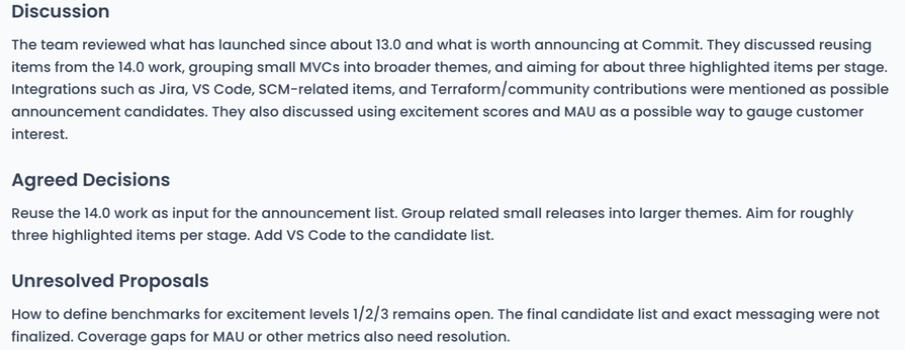
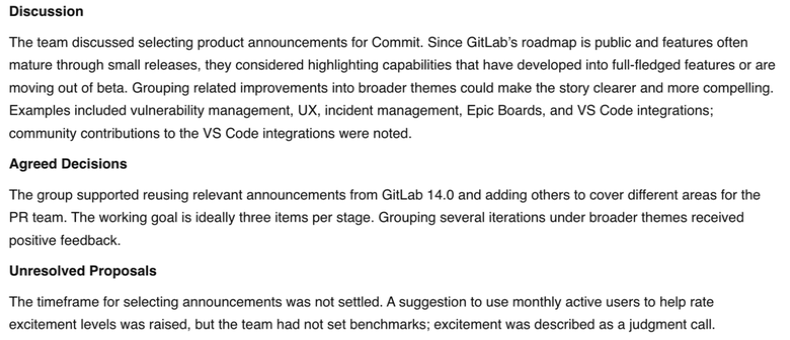
The summary prompt requested no more than 180 words under Discussion, Agreed Decisions and Unresolved Proposals. Both returned those sections. Their summaries discussed announcement selection, grouping smaller releases and unresolved excitement benchmarks. We have not checked every statement against the audio.
MeetGeek Summary Response
ScreenApp Summary Response
Action Items Need a Closer Check
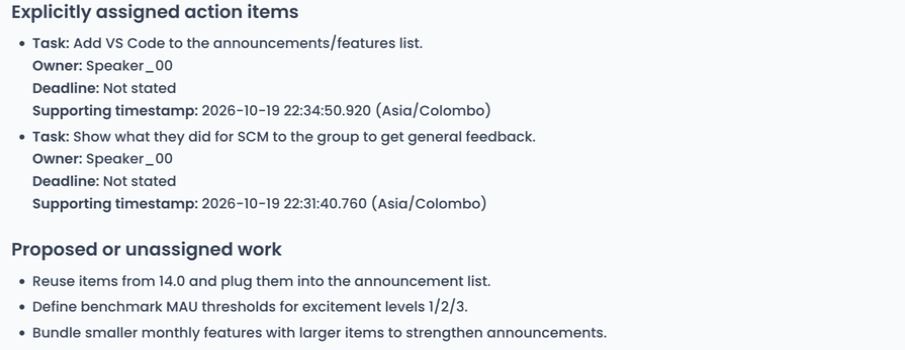
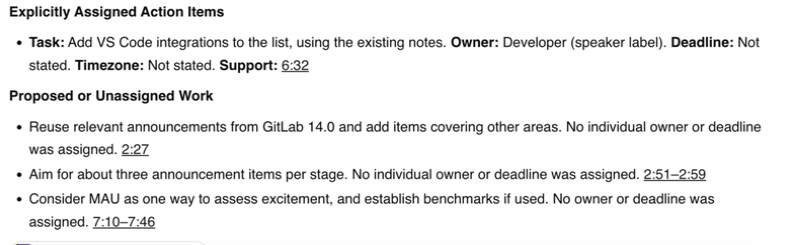
Both tools identified adding VS Code to the announcement list. ScreenApp assigned it to the label Developer and gave a relative timestamp. MeetGeek used Speaker_00 and an absolute timestamp on the upload date. Neither label establishes a person’s identity.
MeetGeek also classified showing SCM work to the group as an assigned action. We still need to listen to determine whether that was future work or something happening during the discussion. Its native Next Steps summary separately assigned team roles; we have not verified those assignments either. ScreenApp’s shorter list is not proof that it missed nothing.
MeetGeek Actions Response
ScreenApp Actions Response
Exports and Sharing
MeetGeek’s download control was disabled on the tested Basic account. Its published Pro plan includes downloads and exports. ScreenApp showed transcript download formats and accepted a TXT download request, but we did not verify the resulting file. Neither result is a completed export-quality test.
The MeetGeek sharing dialog showed Restricted access. ScreenApp showed a read-only conversation link with an option to include the recording. We did not send invitations or test the links from a recipient account.
What We Have Not Established
This upload pilot does not test live meeting bots, bot-free recording, multilingual transcription, integrations, visual understanding or enterprise security. MeetGeek’s later analyzed uploads still need transcript inspection. Neither tool has a human-verified accuracy score or a comparable processing-time result from this run. The tested plan mismatch also prevents a paid-plan quality ranking.
Frequently Asked Questions
Can MeetGeek Transcribe an Uploaded Video?
Yes. The tested Basic account accepted our MP4 and produced a readable transcript, summary and action response. We inspected its closing passage on the first upload.
Can I Download a Transcript on MeetGeek Basic?
The download control was disabled in our Basic account. MeetGeek lists downloads and exports under Pro. Check the current plan terms before relying on a free export.
Which Tool Is More Accurate or Faster?
This pilot does not establish either. We lack a human-corrected reference transcript and comparable timing observations. Different action counts are a reason to review the audio, not an accuracy score.
Does MeetGeek Only Analyze Audio?
No. MeetGeek lists audio/video uploads and video recording workflows. This test checked transcript-based outputs, not whether either product understood visual details in a video.
Which Should I Try First?
Consider MeetGeek if meeting follow-up, integrations and team analytics are central. Consider ScreenApp if you want recording, uploaded-file transcripts and AI questions together. Test the plan you would actually use, including its export and sharing behavior.
Check Your Own Recording
Open ScreenApp or explore MeetGeek. Upload the same file, confirm that you can access the closing transcript, and check the proposed owners and tasks against the recording before sharing the notes.