
Scroll tables sideways to compare both products.
Notta vs ScreenApp
Pick Notta if you want meeting notes delivered into the tools your team already uses.
It has a meeting bot for Zoom, Microsoft Teams, Google Meet and Webex, and connects to Zapier (5,000+ apps), Slack, Notion, Google Drive, Dropbox, OneDrive, Box, ClickUp and Zoho CRM. Pro is $8.17 a month on annual billing, the lower of the two.
Pick ScreenApp if you record your screen and want answers from many recordings at once.
It records screen, window, browser tab, microphone and camera, with system audio, keeps the video next to the transcript, and one AI chat can search every recording you keep.
Both handled our upload and answered the same two prompts. One short clip cannot say which is more accurate, and the method section explains why.
Choosing Between Notta and ScreenApp
Notta is a capable meeting notetaker. These are the points that usually decide it.
- The free plan is tighter than it looks. Notta Free includes 120 minutes a month, but each conversation stops at 3 minutes. That is enough to try it, not to use it. ScreenApp Free is also a trial, with 2 transcriptions and 3 uploads.
- You need the files on a cheap plan. Notta lists transcript downloads from Pro, so Free cannot download a transcript. ScreenApp exports PDF, DOCX, TXT, SRT and VTT on every plan.
- Your recordings are not all meetings. Product demos, lectures, a YouTube video. ScreenApp imports YouTube, Vimeo and direct media links, and you can question all of it in one chat.
For a wider list of options, see our Notta alternatives roundup.
When Notta Is the Better Pick
If notes need to land in a CRM or Zapier without extra work, Notta wins: it lists CRM and Zapier on Business, while for ScreenApp there are no native Slack, Notion or Zapier apps. It also has SAML SSO on Enterprise, and for ScreenApp, SSO and SAML are not available.
Quick Comparison
What we saw with the same 150-second excerpt in both accounts. Everything each product lists is in the full table below.
| Check | Notta Free | ScreenApp Pro |
|---|---|---|
| Completed Uploads | 3 | 3 |
| Full Short Transcript | Accessible after scrolling | Accessible through the final passage |
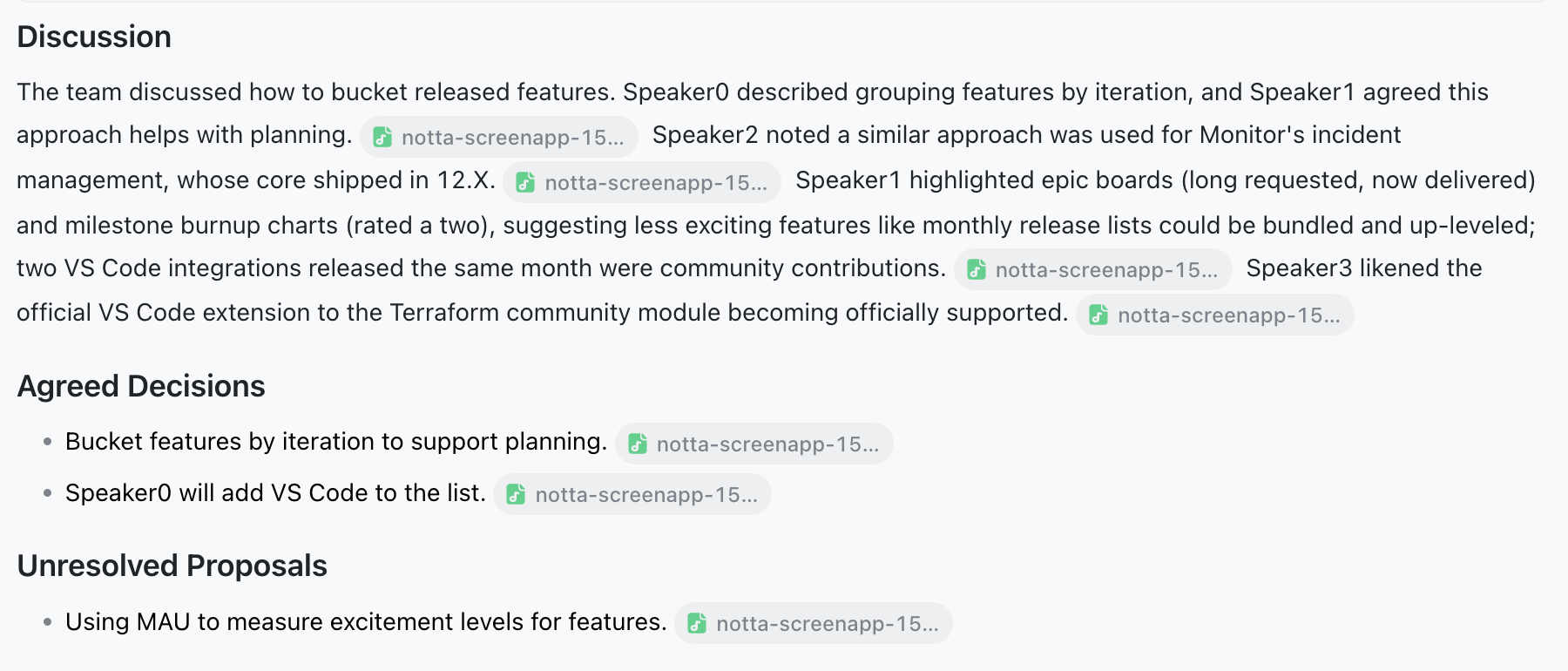
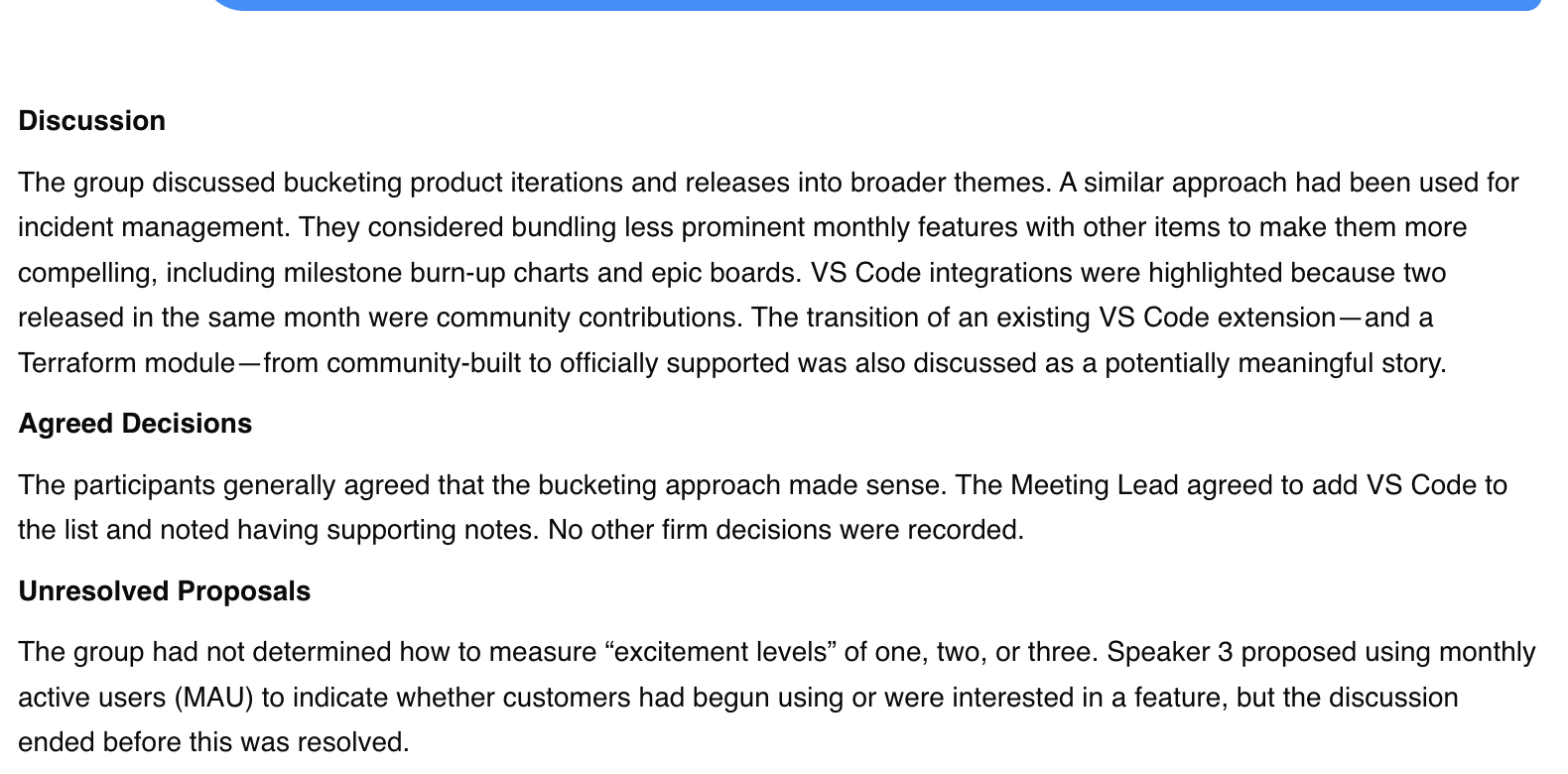
| Prompted Summary | 120 words excluding citation labels; 127 including them | 161 words |
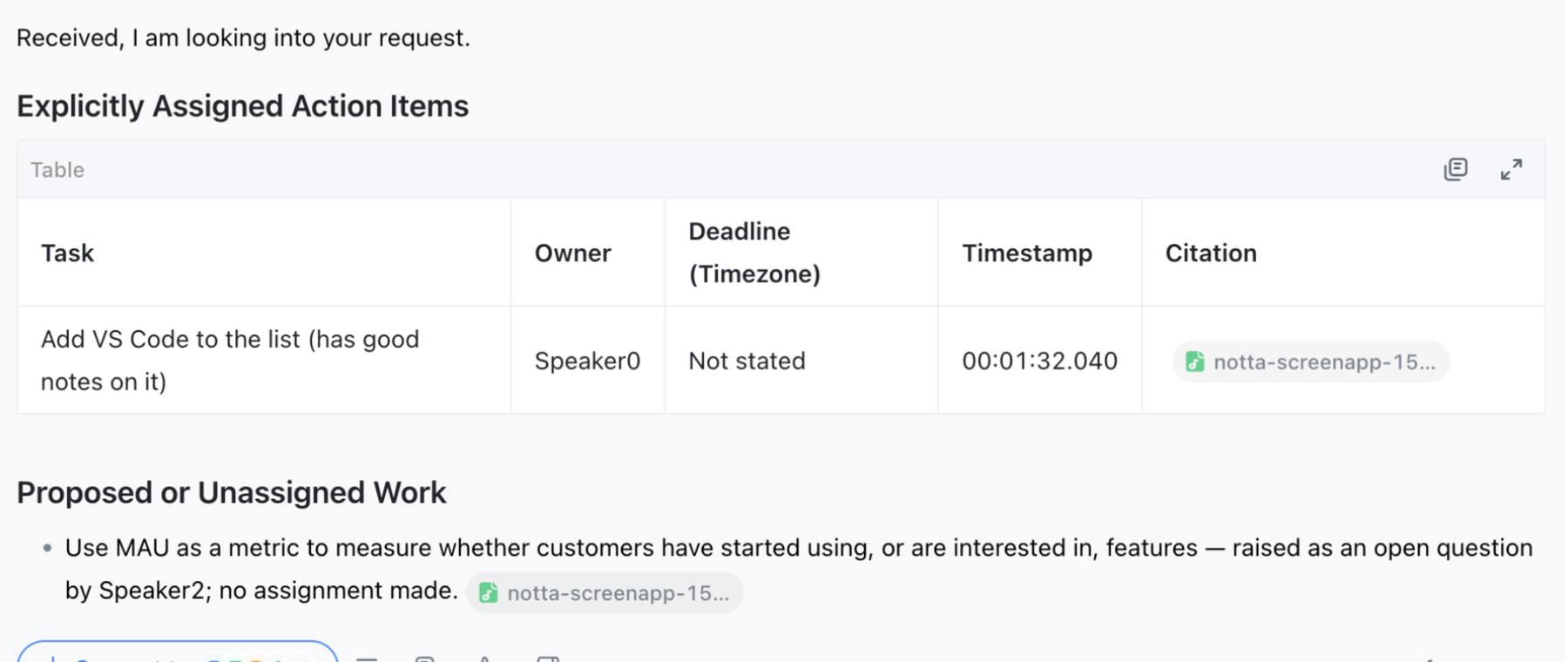
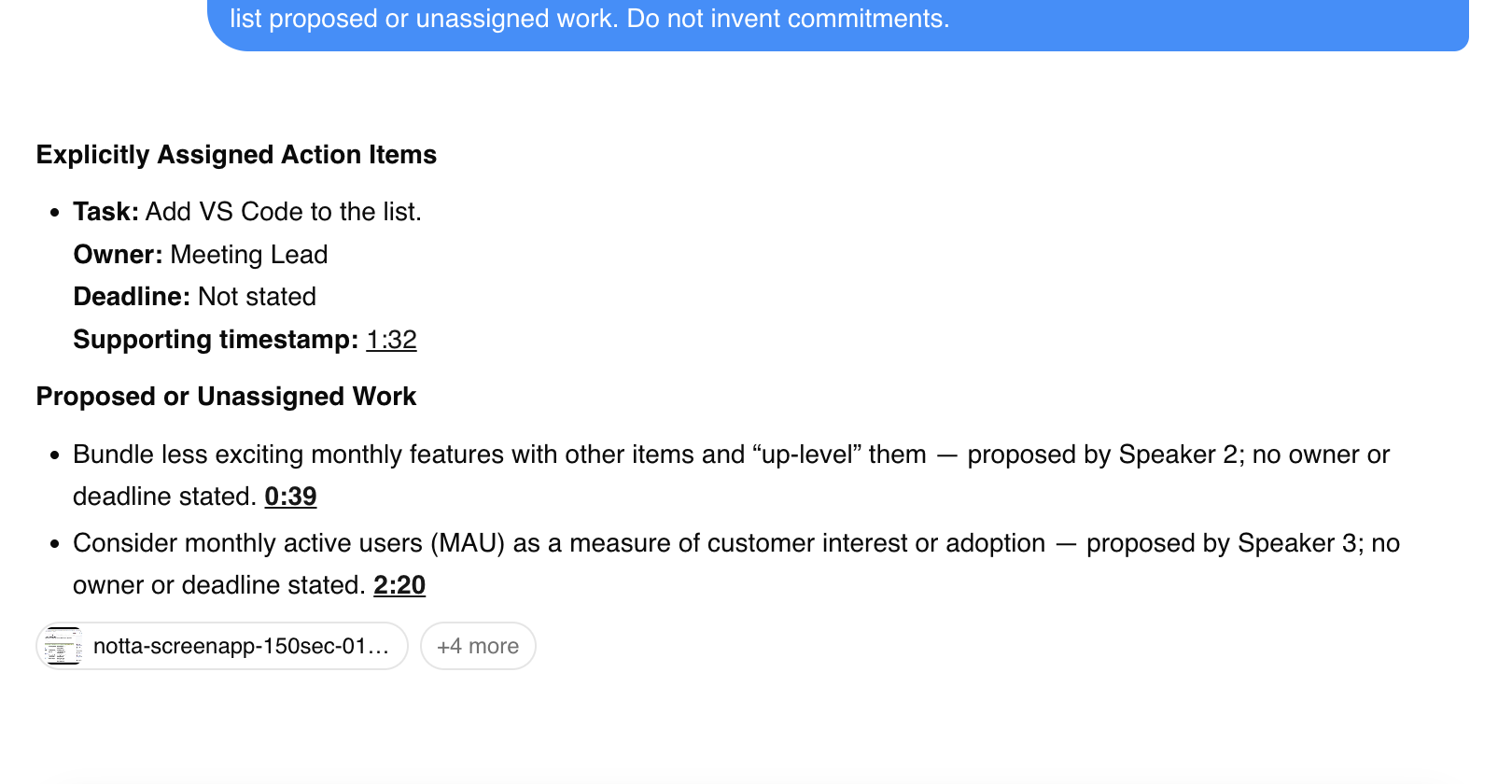
| Assigned Task | Add VS Code to the list; owner Speaker0 | Add VS Code to the list; owner Meeting Lead |
| Deadline | Not stated | Not stated |
| Retrieval Scope | Selected recording cited | Additional library recordings referenced |
Sources, checked 2026-09-24: Our upload test results
Feature Comparison
Everything each product lists, side by side. The Notta column comes from its pricing and integrations pages and its plan and import guides, checked 13 October 2026. The ScreenApp column comes from our pricing page and product documentation. “Not listed” means we did not find it on those pages, not that Notta lacks it.
| Feature | Notta | ScreenApp |
|---|---|---|
| Recording and capture | ||
| Meeting bot | Notta: Yes: a meeting bot for Zoom, Microsoft Teams, Google Meet and Webex, with meeting video on Business | ScreenApp: Yes: meeting bot for Zoom, Google Meet and Microsoft Teams, joining from Google Calendar and Microsoft Outlook calendars |
| Recording without a bot | Notta: Yes: its desktop app, browser extension, or mobile app record without a bot joining the call | ScreenApp: Yes: screen, window, browser tab, microphone and camera, with system audio |
| Apps | Notta: Yes: a web app, Mac and Windows desktop apps, a Chrome extension and iOS and Android apps | ScreenApp: Yes: Mac (Apple silicon) and Windows apps, iOS and Android apps and a Chrome extension that records tab, screen, mic and camera |
| Recording length | Notta: 3 minutes per conversation on Free, 5 hours from Pro | ScreenApp: 45 minutes on Free, 2 hours on Pro and 3 on Max |
| Files and imports | ||
| File uploads | Notta: 50 a month on Free and 100 on Pro; video up to 10 GB and 5 hours, or 3 hours with speaker recognition | ScreenApp: 500 uploads a month on Pro |
| Video links | Notta: Not listed on the Notta pages we checked | ScreenApp: Yes: YouTube, Vimeo and direct media links |
| Transcription | ||
| Transcription languages | Notta: 58 | ScreenApp: 100+ |
| Speaker labels | Notta: Yes, from Free | ScreenApp: Yes: speaker identification, with renaming |
| Custom vocabulary | Notta: Yes: custom vocabulary in English and Japanese: 3 terms on Free, 200 on Pro, 1,000 on Business | ScreenApp: Yes: custom vocabulary for transcription |
| Translation | Notta: Yes: up to 4 bilingual and 2 monolingual translation uses a month on every plan, with paid add-ons for more | ScreenApp: Yes: transcript and caption translation into 99 languages |
| AI notes and questions | ||
| AI summaries | Notta: 10 a month on Free, 100 on Pro and 200 on Business | ScreenApp: Yes: AI chat with any recording, plus action items with an owner and deadline, and decisions listed separately |
| Questions across meetings | Notta: Yes: Notta Brain, with 1,000 AI credits a month on every plan | ScreenApp: Yes: one AI chat that searches and answers from every recording in your library, or a single folder |
| AI dubbing | Notta: Not listed on the Notta pages we checked | ScreenApp: Yes: translated synthetic speech with a separate voice for each speaker, saved as a new audio or video file |
| Exports and integrations | ||
| Downloads | Notta: Yes: transcript downloads from Pro | ScreenApp: Yes: PDF, DOCX, TXT, SRT and VTT, on every plan |
| Integrations | Notta: Yes: Zapier (5,000+ apps), Slack, Notion, Google Drive, Dropbox, OneDrive, Box, ClickUp and Zoho CRM, with CRM and Zapier on Business | ScreenApp: ScreenApp works with Zapier, Slack and Notion through the API; there are no native Slack, Notion or Zapier apps |
| Connector for AI assistants | Notta: Yes: Notta MCP and CLI for AI assistants | ScreenApp: Yes: an MCP connector on every plan, including Free |
| API | Notta: Not listed on the Notta pages we checked | ScreenApp: Yes: API keys, up to 1,000 requests per minute per API key |
| Security | ||
| Certifications | Notta: Yes: SOC 2, ISO 27001, GDPR and HIPAA | ScreenApp: Yes: SOC 2 Type 2; HIPAA compliance and a BAA are not available |
| Single sign-on | Notta: Yes: SAML SSO on Enterprise | ScreenApp: No: SSO and SAML are not available |
| Model training | Notta: Notta lists no data training | ScreenApp: ScreenApp says customer content is not used to train AI models |
Sources, checked 2026-10-13: Notta pricing, Notta integrations, ScreenApp Chrome extension, ScreenApp pricing, ScreenApp meeting bot repository, ScreenApp meeting bot, Notta, ScreenApp desktop apps, ScreenApp mobile apps, ScreenApp recording limits, Notta file import guide, ScreenApp supported languages, Transcription accuracy and languages, ScreenApp audio translator, AI chat troubleshooting, AI video dubbing, Slack integration options, ScreenApp API documentation, ScreenApp trust center, Notta plan guide, ScreenApp privacy policy
Read down the Notta column and the pattern is clear: it is built around meetings and the tools notes get sent to. ScreenApp’s column is about the recording itself and asking questions across many of them.
Strengths and Trade-offs
- Its answer cited the recording we selected, so it was easy to check against the source.
- Translation is built in, with up to 4 bilingual and 2 monolingual translation uses a month on every plan, with paid add-ons for more.
- The trade-off: summaries and Notta Brain questions draw on separate allowances, so check both before you budget for heavy AI use.
- The recording, transcript and answers stayed together in one conversation, so we could replay the moment an answer pointed to.
- It goes past text: translated synthetic speech with a separate voice for each speaker, saved as a new audio or video file, and documents in Markdown, TXT, PDF, DOCX and PPTX.
- The trade-off: Pro costs more for one person, and there are no native CRM or Zapier apps.
Price Comparison
USD web prices, checked 13 October 2026 from Sri Lanka. Annual prices are monthly equivalents with annual billing. Notta prices are per seat.
Sources, checked 2026-09-24: Notta pricing, ScreenApp pricing
Minutes, Uploads and AI Allowances
| Plan | Transcription Allowance | Uploads | AI Allowance |
|---|---|---|---|
| Notta Free | 120 minutes/month; 3 accessible minutes/record | 50/month | 10 summaries/month |
| Notta Pro | 1,800 minutes/month; up to 5 hours/record | 100/month | 100 summaries/month |
| Notta Business | Unlimited minutes; per-record limits apply | 200/seat/month | 200 summaries/month |
| ScreenApp Free | 2 lifetime trial transcriptions | 3 lifetime trial uploads | 10 chats/templates per month |
| ScreenApp Pro | 50/month | 500/month | 50 chats/templates per month |
| ScreenApp Max | Unlimited | Unlimited | Unlimited, subject to fair use |
Sources, checked 2026-09-24: Notta pricing, ScreenApp pricing
Notta’s summary quota is separate from the 1,000 Notta Brain credits each plan includes. The Brain add-on lists 8,000 credits a month for $93.59 a year. ScreenApp chats and templates share one allowance. Sources: Notta pricing and ScreenApp pricing.
Test Results
We uploaded the same excerpt 3 times to each product, switching which went first. Only the first pair got the matching prompts. Notta’s editor first showed part of the transcript; scrolling loaded the rest. That was not a cap.
Both summaries used the headings we asked for and stayed under the 180-word limit. Both covered feature grouping, VS Code and an open question about monthly active users. Notta’s citation labels explain why it has two word counts.
Both action-item answers found the same task, adding VS Code to the list, with no deadline. Notta named Speaker0 as the owner; ScreenApp said Meeting Lead. Those are labels, not checked identities. ScreenApp’s answer also pulled in other recordings from the library, so we cannot say it worked from this file alone.
Notta Action Items
ScreenApp Action Items
Recording, Exports and Sharing
Notta’s upload guide drops the length limit to 3 hours when speaker recognition is on, which is shorter than the paid plans’ per-recording limit. Turn it off for very long files, or split them. We did not join a live meeting, install either desktop app, download an export or open a shared link from a second account.
Privacy and Security
Both tests uploaded media to web services. Notta lists SOC 2, ISO 27001, GDPR and HIPAA, and its desktop Privacy Mode is a Pro feature we did not test. ScreenApp has SOC 2 Type 2. Neither test told us anything about retention or deletion, so read Notta security and ScreenApp security if you handle sensitive meetings. The screenshots here are cropped AI responses only.
How We Tested
Date
24 September 2026
Plans tested
Notta Free and ScreenApp Pro
Browser
Chrome incognito on macOS
Input
Same 150-second MP4
Uploads
3 per tool
Prompts
Summary, then action items
We tested on 24 September 2026, in Chrome incognito on macOS in Sri Lanka, without measuring connection speed. Notta was on Free, with English and speaker identification on, using its Universal Engine. ScreenApp was on Pro with default settings and had seen this content before. Both got identical file bytes, matched by SHA-256 hash, and “complete” meant the transcript was readable to the end.
We saved transcript text, native notes, prompt answers and screenshots. The first trial captures were discarded after a recording fault, so there is no timing data. A mistaken download click and a prompt sent without its text were logged, then corrected before the matching prompts ran.
Read the Test Prompts
Summary: Summarize this meeting in no more than 180 words. Use headings Discussion, Agreed Decisions, and Unresolved Proposals. Include only information supported by the transcript. Do not invent decisions, owners or deadlines.
Action items: List only explicitly assigned action items from this meeting. For each, give the task, owner, deadline including timezone if stated, and supporting timestamp. Write "Not stated" for missing details. Separately list proposed or unassigned work. Do not invent commitments.
What This Test Does Not Establish
Not tested in this pilot
- Long recordings
- Noisy or multilingual audio
- Live meetings
- Export contents
- Integration synchronization
- Shared-link access
The plans differed, the models and settings were not matched, and ScreenApp’s answer was not limited to one file. There is no human-checked transcript, word error rate or speed comparison. Treat this as a first look, not a score.
Frequently Asked Questions
Is Notta free?
Can Notta transcribe an uploaded video?
Yes. Our MP4 went through on Free. It accepts 16 audio and video formats, including MP3, MP4, MOV and WAV, with video up to 10 GB and 5 hours, or 3 hours with speaker recognition.
Does Notta have an MCP connector?
Yes. Notta lists Notta MCP and CLI for AI assistants. ScreenApp has an MCP connector on every plan, including Free.
Which costs less?
Notta Pro has the lower listed price on both billing periods. But Notta counts minutes and ScreenApp counts files, so compare your recording length and upload volume. Compare the plans.
How does Notta compare with Otter?
We tested Otter separately. See Otter vs ScreenApp, which used the same meeting file and prompts.
Which is more accurate?
This test cannot say. Neither transcript was checked against a human reference, and the two answers drew on different material.
Check Your Own Recording
Open ScreenApp or explore Notta. Upload the same recording to both, then check the transcript, decisions and task owners against the audio. For other tested tools, see Tactiq, Otter and Fireflies.