
Scroll tables sideways to compare both products.
Otter vs ScreenApp
Consider Otter if you want meeting transcripts and AI notes at a lower listed Pro subscription price.
Its Basic account accepted our video upload and answered both custom prompts. Check import allowances before choosing a plan: a monthly transcription allowance does not mean unlimited uploads.
Consider ScreenApp if you want to work with a recording alongside its transcript.
We opened the uploaded recording and asked for a summary and assigned tasks in the same conversation. ScreenApp Pro costs more than Otter Pro at the standard prices below; our test does not establish that it is more accurate or faster.
Both products completed the upload workflow. The useful distinction in this pilot was how they described the action item and cited its source, not a performance score.
Quick Comparison
| What We Checked | Otter Basic | ScreenApp Pro |
|---|---|---|
| Same MP4 upload | Accepted | Accepted |
| Transcript text | Available and saved | Available and saved |
| Identical summary prompt | Answer returned | Answer returned |
| Identical action-item prompt | Answer returned | Answer returned |
| Speaker identities | Not independently verified | Role labels not independently verified |
| Live meeting capture | Not tested | Not tested |
| Accuracy and speed | Not established | Not established |
Feature Comparison
Everything each product lists, side by side. The Otter column comes from Otter’s pricing page, checked 9 October 2026. The ScreenApp column comes from our pricing page and product documentation. “Not listed” means the feature does not appear on Otter’s pricing page, not that Otter definitely lacks it; “Not checked” means we have not looked. These are published features, not results of our test.
| Feature | Otter | ScreenApp |
|---|---|---|
| Recording | ||
| Screen recording | Otter: Not listed on Otter's pricing page | ScreenApp: Yes: screen, window, browser tab, microphone and camera, with system audio |
| Meeting video | Otter: Video replay for Zoom and Google Meet on the Enterprise plan | ScreenApp: Recording up to 4K, depending on the computer |
| Meeting bot | Otter: Joins Zoom, Microsoft Teams, and Google Meet; concurrent meetings: 1 on Basic, 2 on Pro and 3 on Business and Enterprise | ScreenApp: Yes: meeting bot for Zoom, Google Meet and Microsoft Teams, joining from Google Calendar and Microsoft Outlook calendars |
| Recording without a bot | Otter: Yes: the desktop app records without a bot joining the call | ScreenApp: Yes: from the web app, Chrome extension, Mac and Windows apps, or iOS and Android apps |
| Browser extension | Otter: Yes: a Chrome extension; what it records was not checked | ScreenApp: Yes: Chrome extension that records tab, screen, mic and camera |
| Desktop apps | Otter: Yes: Mac and Windows | ScreenApp: Yes: Mac (Apple silicon) and Windows apps |
| Mobile apps | Otter: Yes: iOS and Android, recording from the built-in mic, Bluetooth and AirPods | ScreenApp: Yes: iOS and Android apps |
| Offline recording | Otter: Yes: stores audio locally if the connection drops, with no live transcript | ScreenApp: Yes: records offline on iOS and Android and uploads when the connection returns |
| Files and imports | ||
| File uploads, free plan | Otter: 3 imports for the life of the account | ScreenApp: 3 trial uploads |
| File uploads, Pro | Otter: 10 a month | ScreenApp: 500 a month |
| Import from links or cloud | Otter: Yes: automatic sync of audio and video files from Dropbox and of cloud recordings from Zoom | ScreenApp: Yes: YouTube, Vimeo and direct media links |
| Transcription | ||
| Transcription languages | Otter: 6: English, Spanish, French, German, Japanese, and Chinese | ScreenApp: 100+ |
| Live transcription | Otter: Yes: live transcription in the Otter app, plus live notes and captioning for Google Meet and Zoom | ScreenApp: Yes: live transcript while recording (beta) |
| Speaker identification | Otter: Yes, from the Basic plan | ScreenApp: Yes: speaker identification, with renaming |
| Custom vocabulary | Otter: Yes: custom vocabulary for names, jargon and acronyms, 5 terms on the free Basic plan and more on paid plans | ScreenApp: Yes: custom vocabulary for transcription |
| Transcript editing | Otter: Yes: editable text and speaker tags | ScreenApp: Yes: transcript corrections, line removal and speaker reassignment saved to the recording |
| Translation | Otter: Not listed on Otter's pricing page | ScreenApp: Yes: transcript and caption translation into 99 languages |
| AI notes and questions | ||
| Summaries and action items | Otter: Yes: automated summaries with action items and outlines | ScreenApp: Yes: action items with an owner and deadline, and decisions listed separately |
| AI chat | Otter: Yes: AI Chat within and across meetings. 20 queries a month on Basic, 50 on Pro, 200 on Business | ScreenApp: Yes: AI chat with any recording, plus one AI chat that searches and answers from every recording in your library, or a single folder. 10 chats a month on Free, 50 on Pro, Unlimited on Max |
| Slides and on-screen content | Otter: Yes: automated slide capture for virtual meetings | ScreenApp: Yes: AI reads video frames, not just the audio |
| Meeting templates | Otter: Yes: AI meeting templates, standard on Basic and advanced on paid plans | ScreenApp: Yes: AI templates and documents |
| Documents and slides from a recording | Otter: Not listed on Otter's pricing page | ScreenApp: Yes: documents in Markdown, TXT, PDF, DOCX and PPTX, plus PowerPoint presentations |
| AI dubbing | Otter: Not listed on Otter's pricing page | ScreenApp: Yes: Translate the speech in your recording into another language. |
| Exports and sharing | ||
| Export formats | Otter: Yes: mp3 and txt on the free plan, plus pdf, docx and srt from Pro, with bulk export from Business | ScreenApp: Yes: PDF, DOCX, TXT, SRT and VTT, on every plan |
| Sharing | Otter: Yes: private channels and public links, plus a General channel for the whole team | ScreenApp: Yes: team workspaces and share links |
| Integrations | ||
| CRM and Zapier | Otter: Salesforce, HubSpot and Zapier from the Pro plan; Salesforce and HubSpot have user limits | ScreenApp: ScreenApp works with Zapier, Slack and Notion through the API; there are no native Slack, Notion or Zapier apps |
| API | Otter: Otter API and webhooks on the Enterprise plan | ScreenApp: Yes: API keys, up to 1,000 requests per minute per API key |
| Connector for AI assistants | Otter: Yes: an MCP server for AI assistants on every plan, including the free Basic plan | ScreenApp: Yes: an MCP connector on every plan, including Free |
| Calendar connection | Otter: Not checked | ScreenApp: Yes: Google Calendar and Microsoft Calendar |
| Security | ||
| Single sign-on | Otter: Yes: SSO and SCIM on Enterprise, with a 100-user minimum | ScreenApp: No: SSO and SAML are not available |
| HIPAA | Otter: Yes: HIPAA compliance as a paid add-on on the Enterprise plan | ScreenApp: No: HIPAA compliance and a BAA are not available |
| SOC 2 | Otter: Not checked | ScreenApp: Yes: SOC 2 Type 2 |
Sources, checked 2026-10-14: ScreenApp Chrome extension, Otter pricing, ScreenApp desktop apps, Otter meeting assistant, ScreenApp meeting bot repository, ScreenApp meeting bot, ScreenApp mobile apps, Otter offline recording guide, ScreenApp pricing, ScreenApp supported languages, Transcription accuracy and languages, Transcript cleaner, ScreenApp audio translator, Otter AI Chat FAQ, AI chat troubleshooting, Video to document, AI video dubbing, Slack integration options, ScreenApp API documentation, ScreenApp trust center
Plan availability is shown where the vendor states it. Check the plan you would buy, because several Otter features are limited to Pro, Business or Enterprise.
Strengths and Trade-Offs
Strength
The Basic account produced transcript text, a native summary and responses to both prompts. Its listed Pro price is lower than ScreenApp Pro.
Trade-off
Import limits matter for a recording library. The action-item answer also cited a different timestamp from ScreenApp, which needs checking against the audio.
Strength
The recording panel, transcript and prompted answers were available together. Its action-item response included a supporting timestamp and separated proposed work.
Trade-off
Pro costs more at the listed subscription rates. A transcript role label appeared as the task owner; we have not verified that label against the speaker.
Price Comparison
Standard USD subscription prices, checked 22 September 2026. Annual figures are monthly equivalents billed annually. Otter prices are per user. Confirm ScreenApp team terms and both vendors’ checkout totals. Regional promotions, taxes and contract pricing can change the amount paid.
Sources, checked 2026-09-16: Otter pricing, ScreenApp pricing
This table covers the entry plans and ScreenApp Max, not every enterprise or team configuration. See Otter pricing for Business and Enterprise, and ScreenApp pricing for custom contracts. The Otter page also showed regional promotional rates; those are excluded here.
Compare the Allowances
Free plans
Otter Basic lists 300 transcription minutes per month and a 30-minute conversation limit. ScreenApp Free lists 2 transcriptions to try.
Paid plans
Otter Pro lists 1,200 in-app recording minutes monthly. ScreenApp Pro lists 50 transcriptions monthly.
These are different units and should not be treated as equivalent allowances. Check file-import and AI allowances separately before subscribing. We tested Otter Basic against ScreenApp Pro, not their paid plans against each other.
Sources: Otter plans and allowances and ScreenApp plans and allowances, checked 22 September 2026. Pricing is vendor documentation, not a measured test result.
Test Results
Transcript and Summary
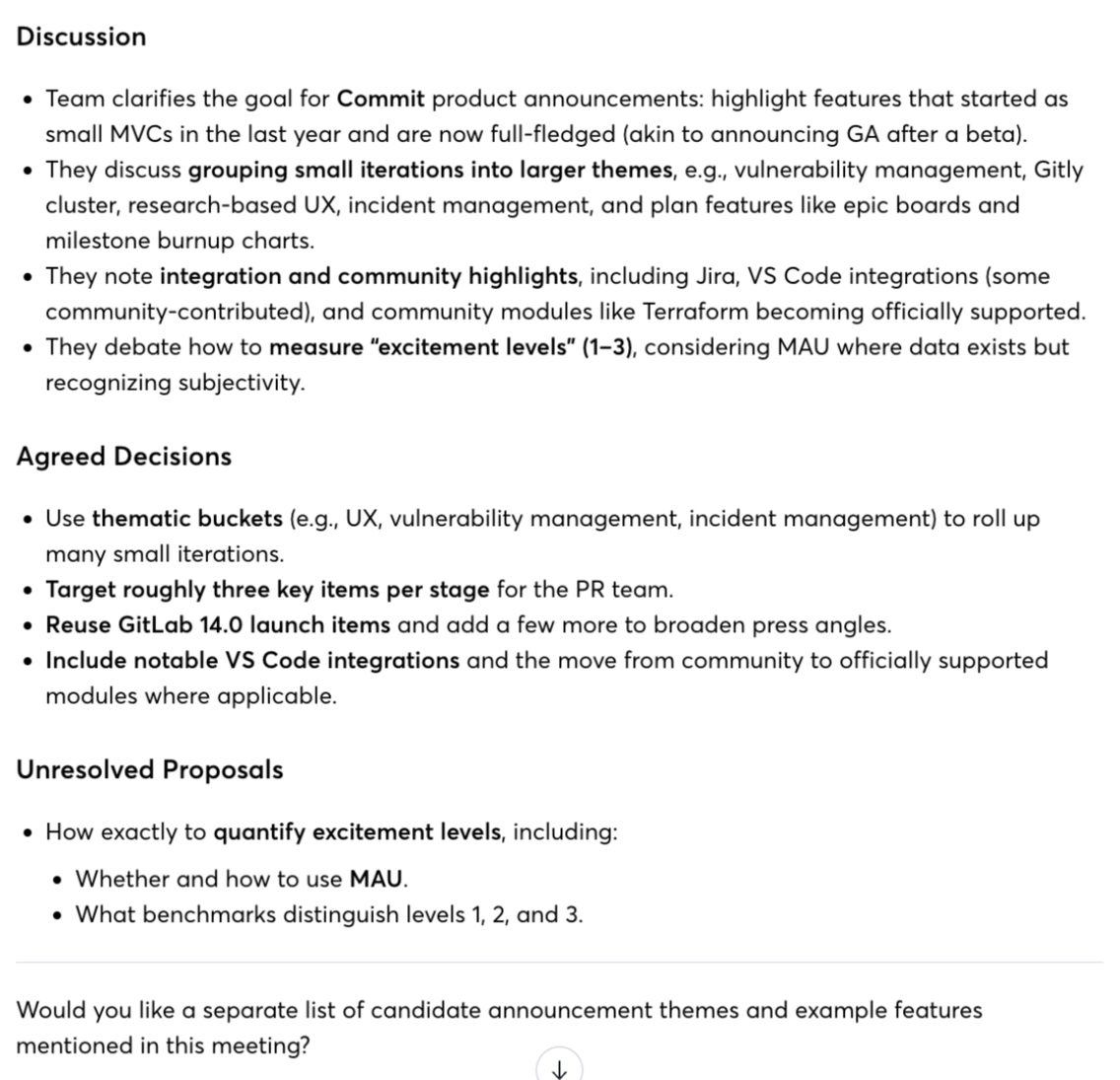
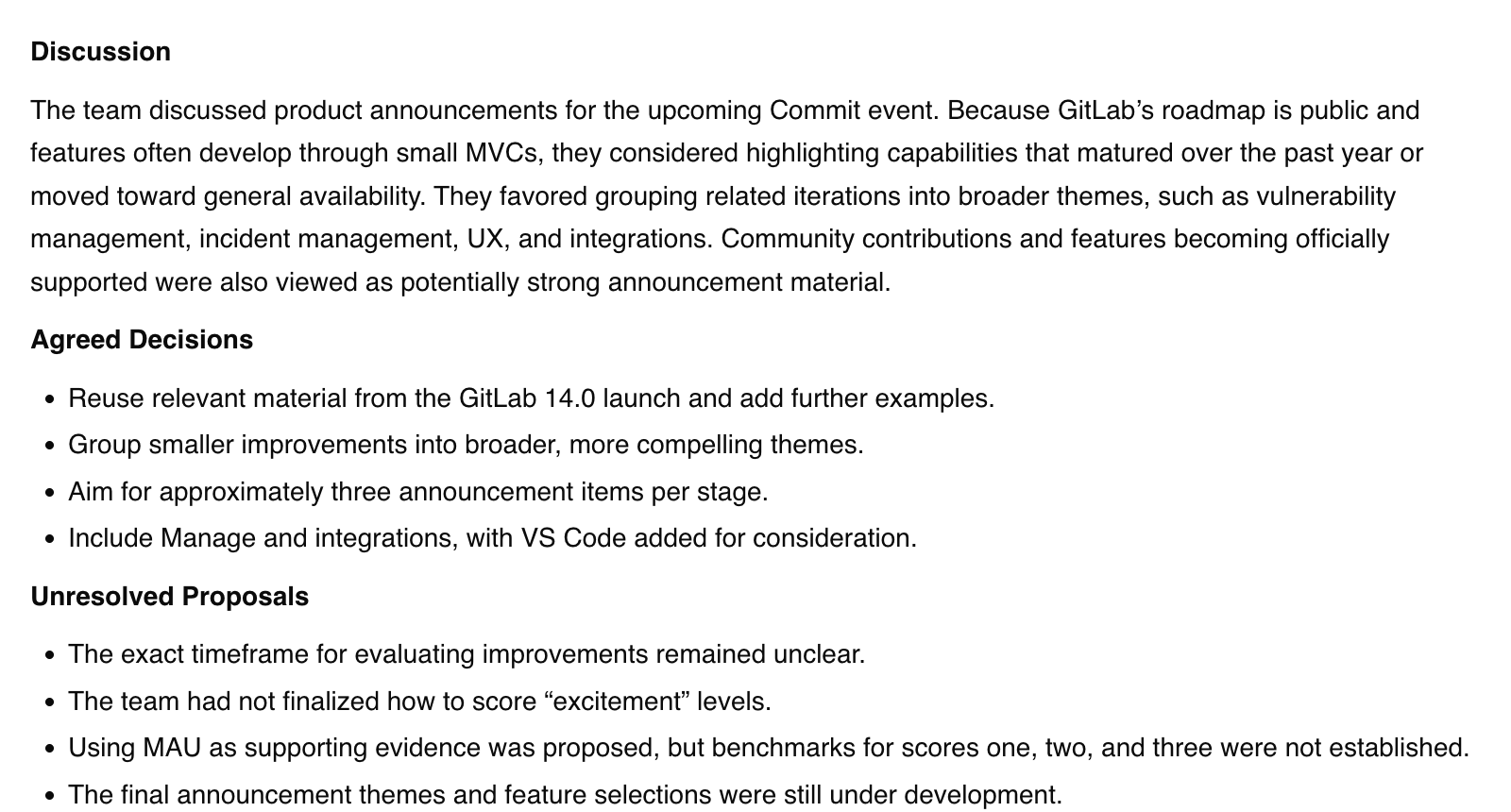
Both tools produced transcript text for the uploaded meeting. We then asked each to summarize the discussion using the same headings: Discussion, Agreed Decisions and Unresolved Proposals.
Both responses discussed grouping product announcements into themes, reusing launch material and uncertainty about measuring excitement. That overlap is an observation about their answers. We have not checked the entire audio to establish which summary omitted or misstated information.
Action Items
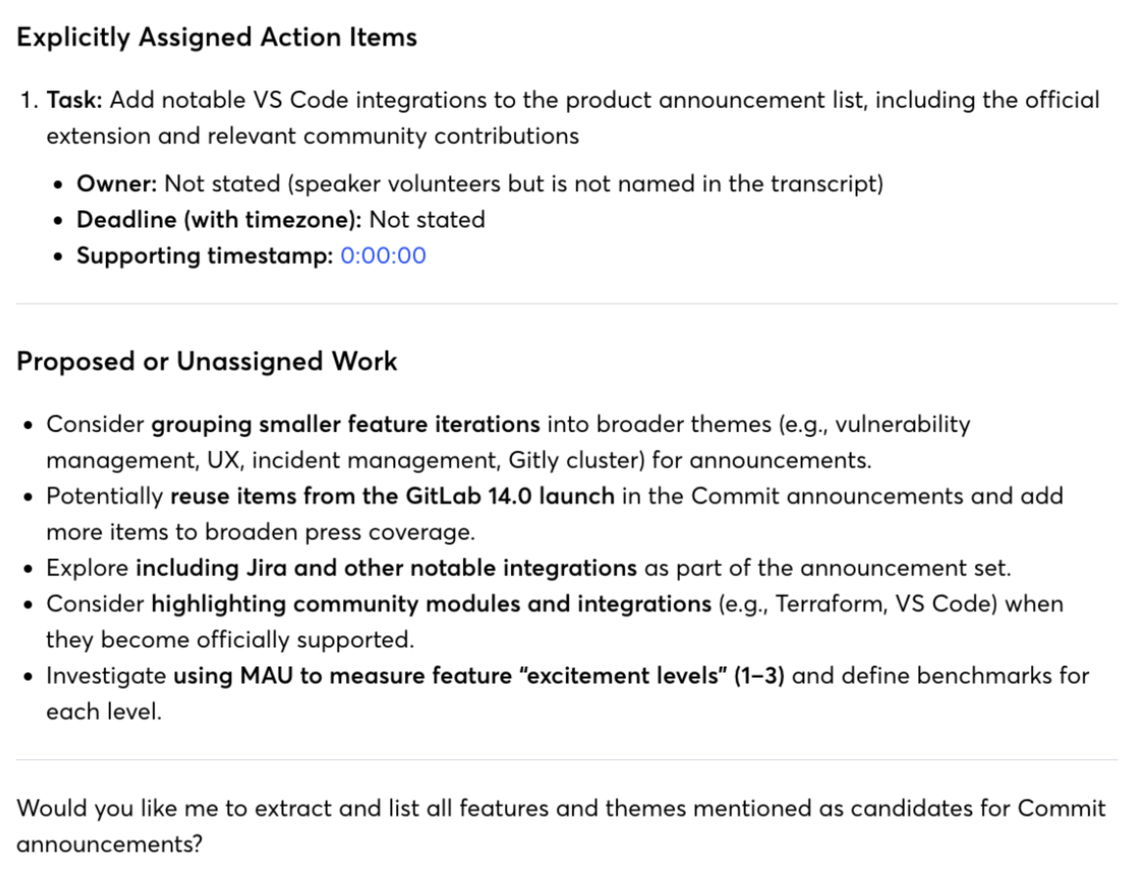
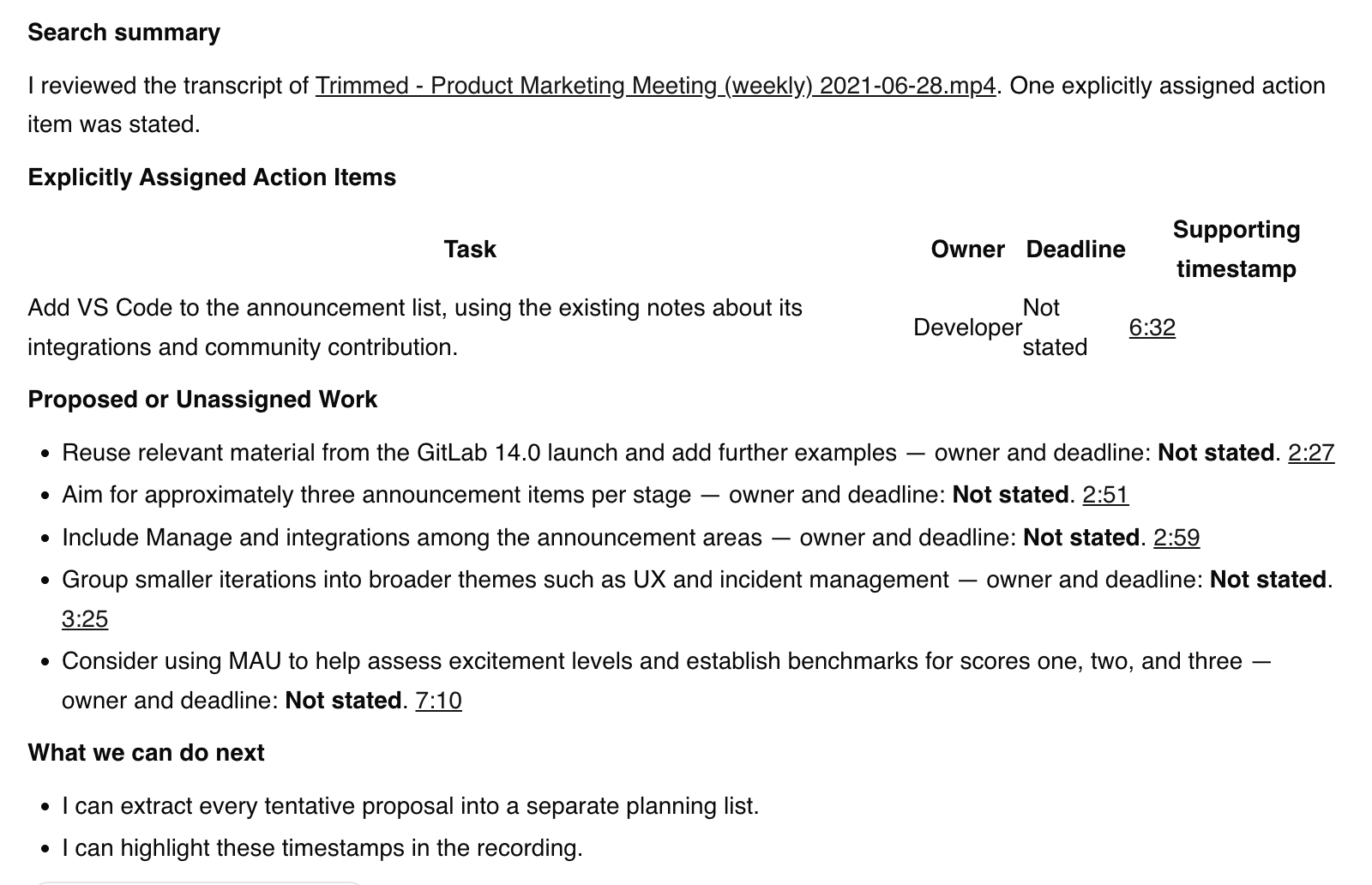
Both responses listed adding VS Code to the announcement list as an explicit action item, and both said the deadline was not stated. Otter left the owner unnamed. ScreenApp used the role label Developer.
They cited different supporting timestamps. The ScreenApp transcript text places a volunteer’s offer near its cited passage, while Otter’s answer pointed to the start of the recording. This is a discrepancy for audio review, not an overall accuracy score. A generated role label is not proof of a person’s identity.
| Action-item check | Otter Basic | ScreenApp Pro |
|---|---|---|
| VS Code listed as an explicit action item | Yes | Yes |
| Deadline | Not stated | Not stated |
| Owner | Unnamed | Developer role label |
| Supporting timestamp | Start of the recording | Near the volunteer’s offer |
Otter Action Items
ScreenApp Action Items
What Happened During Upload
Otter’s initial assisted file-selection attempts did not start an upload. The Browse Files workflow subsequently accepted the file. We preserved those retries in the internal record. ScreenApp also accepted the same file and displayed a ready transcript.
Setup retries, prior exposure to the file and different account plans make this unsuitable for a speed comparison. No processing-time figure is reported.
How We Tested
Date
22 September 2026
Plans tested
Otter Basic and ScreenApp Pro
Browser
Chrome incognito, same Mac
Input
Identical MP4 bytes
Prompts
Summary, then action items
Runs
One accepted upload per product
The exploratory run took place on 22 September 2026. AI-assisted browser actions uploaded the identical MP4 bytes to Otter Basic and ScreenApp Pro in Chrome incognito on the same Mac. Otter used English (US); ScreenApp used its default setting. The source file had previously been processed by ScreenApp.
We saved the input hash, rendered transcript text, prompts, responses and upload observations in an internal run record. Text was extracted from the test conversations, rather than validated through native file exports. No screenshots or screen recordings were collected during the original run. We later captured the existing summary and action-item responses shown on this page. These screenshots document outputs, not upload timing.
The summary prompt requested a response of no more than 180 words, with the same headings in both tools. The action-item prompt requested tasks, owners, deadlines and supporting timestamps, with unassigned work listed separately. The action prompt followed the summary prompt in each conversation.
This was one accepted upload per product. There is no full human-verified reference transcript, independent reviewer sign-off or controlled repeat benchmark. These findings describe the tested workflow and outputs only.
What We Did Not Test
Not tested in this run
- Live meeting capture
- Calendar synchronization
- Integrations
- Sharing delivery
- Native export contents
- Other languages
- Speaker identity accuracy
- Every plan, or typical processing speed
Frequently Asked Questions
Can Otter transcribe an uploaded video?
Yes. Our Otter Basic account accepted the selected MP4 and produced transcript text. That does not establish support for every file type or file size. See Otter’s import guide for its documented upload workflow.
Which tool is more accurate?
This test does not establish an accuracy winner. We saved both transcripts, but have not scored them against a reference verified through a full listen to the audio.
Is ScreenApp faster than Otter?
We do not have a valid speed comparison from this run. File-selection retries and inconsistent test conditions prevent a defensible timing claim.
Is Otter cheaper than ScreenApp?
Otter Pro has the lower standard subscription price in the table above. Allowances and billing bases differ, so check the plan limits for your workload. The accounts used in this pilot were not matched paid plans.
Where are the screenshots and test videos?
The page now includes follow-up screenshots of both tools’ saved responses. The original upload run was text-only. No screen recording or video-verified timing is available.
Try Your Own Recording
Compare both tools on your own recording
Use the same file
Upload one recording to both tools.
Check the key details
Names, decisions, owners and deadlines.
Verify against the recording
Before relying on either output.
Open ScreenApp or explore Otter to start.