
Scroll tables sideways to compare both products.
Fireflies vs ScreenApp
Pick Fireflies if a bot should take notes in every call.
It joins Zoom, Google Meet, Microsoft Teams and 10+ other meeting platforms from your calendar, and Pro costs $10 per seat a month on annual billing. On Free, our uploaded meeting came back with a transcript, a summary and answers to both of our prompts.
Pick ScreenApp if you record your screen or upload files and ask questions later.
It records screen, window, browser tab, microphone and camera, with system audio, and one AI chat can answer from every recording you keep. That library search cut both ways in our test: the action-item answer pulled from other recordings too.
Both handled the upload. Neither won on accuracy or speed, and one upload per product cannot settle that. The method section says why.
Looking for a Fireflies Alternative?
Start with the reason. Most of the ones we hear fall into a few buckets, and Fireflies already fixes some of them.
- You don’t want a bot in the call. Some clients object to a notetaker joining. Fireflies lists a Chrome extension recording without the Fireflies bot, so try that first. If you only want it gone from one platform, here is how to remove Fireflies from Zoom. ScreenApp records screen, window, browser tab, microphone and camera, with system audio from your own machine, so nothing joins the meeting.
- You need the files. Fireflies lists transcript, summary and recording downloads on Pro. ScreenApp exports PDF, DOCX, TXT, SRT and VTT on every plan.
- You’re paying per seat. Fireflies prices that way, so a five-person team on annual Pro pays five times $10 each month. ScreenApp lists plan prices without a per-seat label. Check team terms on both before you buy.
- Your recordings aren’t all meetings: product demos, lectures, a YouTube video. ScreenApp imports YouTube, Vimeo and direct media links, and you can question all of it in one chat.
Recording length is not a reason to switch. Fireflies allows 2 hours per meeting on Free and Pro, 3 on Business and 4 on Enterprise; ScreenApp allows 2 hours on Pro and 3 on Max.
When to Stay with Fireflies
If your notes need to land in a CRM, stay. Fireflies connects to 100+ apps, including Slack, Notion, HubSpot, Salesforce and Google Drive, and lists conversation intelligence and team analytics on Business. With ScreenApp, there are no native Slack, Notion or Zapier apps, so you would be wiring that up through the API yourself. The same goes if you need SSO: Fireflies has it on Enterprise, and for ScreenApp, SSO and SAML are not available.
Quick Comparison
What we actually used in the test, and what each vendor only lists. “Observed” means we did it. “Documented” means it is on the vendor’s pages but we did not try it.
| Feature | Fireflies | ScreenApp |
|---|---|---|
| Uploaded meeting | ObservedMP4 accepted on Free | Observedsame MP4 accepted on Pro |
| Transcript and playback | Observedtranscript opened; video recording is documented on Pro | Observedrecording and transcript opened together |
| AI summaries | Observednative and prompted summaries available | Observednative and prompted summaries available |
| Action items | Observedresponse separated proposed work from assignments | Observedrole and timestamp given; answer searched the library |
| Bot-free capture | Documentedbrowser extension and desktop options | Documentedscreen, webcam and microphone recording |
| Live meeting capture | Not tested in this upload pilot | Not tested in this upload pilot |
| Exports | Documented on Pro; download not completed | Controls inspected; downloaded contents not verified |
| Integrations | Documented on Pro; no synchronization test | Documented API and webhooks; no native Slack, Notion or Zapier apps |
| Team analysis | Documented on Business; not tested | Not evaluated in this pilot |
| Sharing | Observedrecording access changed to Only Owner | Controls inspected; recipient access not tested |
Sources, checked 2026-10-09: Fireflies pricing
Observed seen in our upload testDocumented from the vendor's own pages, not tested
Sources: Fireflies feature list, ScreenApp feature list and our upload test.
Feature Comparison
Everything each product lists, side by side. The Fireflies column comes from Fireflies’ pricing, security, integrations and home pages, checked 9 October 2026. The ScreenApp column comes from our pricing page and product documentation. “Not listed” means we did not find it on those pages, not that Fireflies lacks it.
| Feature | Fireflies | ScreenApp |
|---|---|---|
| Recording and capture | ||
| Meeting bot | Fireflies: Yes: Zoom, Google Meet, Microsoft Teams and 10+ other meeting platforms | ScreenApp: Yes: meeting bot for Zoom, Google Meet and Microsoft Teams, joining from Google Calendar and Microsoft Outlook calendars |
| Recording without a bot | Fireflies: Yes: Chrome extension recording without the Fireflies bot | ScreenApp: Yes: screen, window, browser tab, microphone and camera, with system audio |
| Live transcription | Fireflies: Yes: real-time notes and live transcription, listed on Free | ScreenApp: Yes: live transcript while recording (beta) |
| Apps | Fireflies: Yes: desktop, Android and iOS apps and a Chrome extension, all listed on Free | ScreenApp: Yes: Mac (Apple silicon) and Windows apps, iOS and Android apps and a Chrome extension that records tab, screen, mic and camera |
| Recording length | Fireflies: 2 hours per meeting on Free and Pro, 3 on Business and 4 on Enterprise | ScreenApp: 45 minutes on Free, 2 hours on Pro and 3 on Max |
| Files and imports | ||
| File uploads | Fireflies: Yes: MP3, MP4, WAV and M4A, up to 100 MB of video on Free and 2 GB on paid plans | ScreenApp: Yes: 500 uploads a month on Pro |
| Video links | Fireflies: Not listed on the Fireflies pages we checked | ScreenApp: Yes: YouTube, Vimeo and direct media links |
| Transcription | ||
| Transcription languages | Fireflies: 100+, with Multi-language Mode on Business | ScreenApp: 100+ |
| Speaker labels | Fireflies: Yes: speaker identification in meetings and audio files | ScreenApp: Yes: speaker identification, with renaming |
| Translation | Fireflies: Not listed on the Fireflies pages we checked | ScreenApp: Yes: transcript and caption translation into 99 languages |
| Custom vocabulary | Fireflies: Not listed on the Fireflies pages we checked | ScreenApp: Yes: custom vocabulary for transcription |
| AI notes and questions | ||
| Summaries | Fireflies: Yes: AI summaries, limited on Free and unlimited from Pro | ScreenApp: Yes: AI chat with any recording, plus action items with an owner and deadline, and decisions listed separately |
| Questions across meetings | Fireflies: Yes: AskFred, an AI assistant that answers questions about past meetings, limited on Free, plus search within a meeting and global search across meetings | ScreenApp: Yes: one AI chat that searches and answers from every recording in your library, or a single folder |
| Documents from a recording | Fireflies: Not listed on the Fireflies pages we checked | ScreenApp: Yes: documents in Markdown, TXT, PDF, DOCX and PPTX |
| AI dubbing | Fireflies: Not listed on the Fireflies pages we checked | ScreenApp: Yes: translated synthetic speech with a separate voice for each speaker, saved as a new audio or video file |
| Exports and integrations | ||
| Downloads | Fireflies: Yes: transcript, summary and recording downloads on Pro | ScreenApp: Yes: PDF, DOCX, TXT, SRT and VTT, on every plan |
| Integrations | Fireflies: Yes: 100+ apps, including Slack, Notion, HubSpot, Salesforce and Google Drive | ScreenApp: ScreenApp works with Zapier, Slack and Notion through the API; there are no native Slack, Notion or Zapier apps |
| Connector for AI assistants | Fireflies: Yes: an MCP server for Claude, Devin and ChatGPT | ScreenApp: Yes: an MCP connector on every plan, including Free |
| API | Fireflies: Yes: API access on Free, at 30 requests a minute and 500 a day | ScreenApp: Yes: API keys, up to 1,000 requests per minute per API key |
| Security | ||
| Certifications | Fireflies: Yes: SOC 2 Type II and GDPR compliance, with HIPAA compliance on Enterprise | ScreenApp: Yes: SOC 2 Type 2; HIPAA compliance and a BAA are not available |
| Single sign-on | Fireflies: Yes: SSO and SCIM on Enterprise | ScreenApp: No: SSO and SAML are not available |
| Model training | Fireflies: Fireflies says meeting data is not used for AI training by default | ScreenApp: ScreenApp says customer content is not used to train AI models |
Sources, checked 2026-10-09: Fireflies pricing, ScreenApp Chrome extension, ScreenApp pricing, Fireflies integrations, ScreenApp meeting bot repository, ScreenApp meeting bot, ScreenApp desktop apps, ScreenApp mobile apps, ScreenApp recording limits, Fireflies home page, Fireflies upload guide, Fireflies free plan guide, ScreenApp supported languages, Transcription accuracy and languages, ScreenApp audio translator, AI chat troubleshooting, Video to document, AI video dubbing, Slack integration options, ScreenApp API documentation, ScreenApp trust center, Fireflies security, ScreenApp privacy policy
Read down the Fireflies column and the pattern is plain: almost everything is about meetings, and the team features sit on Business and Enterprise. ScreenApp’s column is about recordings of any kind and asking questions across them.
Upload Limits to Check
Fireflies documents video uploads up to 100 MB on Free and 2 GB on paid plans, with a maximum duration of 150 minutes. Audio files have their own size limits. Our small MP4 went through on Free, which says nothing about a two-hour file. See the Fireflies upload requirements.
ScreenApp lists per-recording limits of 45 minutes on Free, 2 hours on Pro and 3 hours on Max. See ScreenApp recording allowances.
Price Comparison
Standard USD prices, checked 9 October 2026. Annual columns show the monthly equivalent with annual billing. Fireflies charges per seat; ScreenApp lists subscription prices without the same per-seat label. Confirm team and contract terms before purchasing.
Sources, checked 2026-10-09: Fireflies pricing, ScreenApp pricing
What Changes with the Plan
Fireflies Free includes uploads and AI summaries, limited on Free and unlimited from Pro, with 400 minutes of storage for the whole team. Pro adds video recording and downloads. Business adds conversation intelligence and team analytics. Enterprise adds SSO, SCIM and HIPAA compliance. That is what the pricing page lists; we only used Free.
ScreenApp Free lists 2 trial transcriptions and 3 trial uploads. Pro includes 50 transcriptions, 500 uploads and 50 AI chats monthly. Max lists unlimited transcriptions, uploads and AI chats, subject to its per-recording limits.
Sources checked 9 October 2026: Fireflies pricing and plan features and ScreenApp pricing and allowances.
Test Results
Upload and Transcript
ScreenApp’s upload went through first time. Fireflies took two tries. After our first manual upload, the upload and meeting lists both stayed empty, so we could not tell whether it had worked. A second, assisted upload completed and opened a transcript. An empty list is not proof that uploading is broken, but it is confusing, and you may hit it too.
Both transcripts ran to near the end of the clip. Speaker labels showed up in both. We have not checked who said what, or word accuracy, against the audio.
Summaries
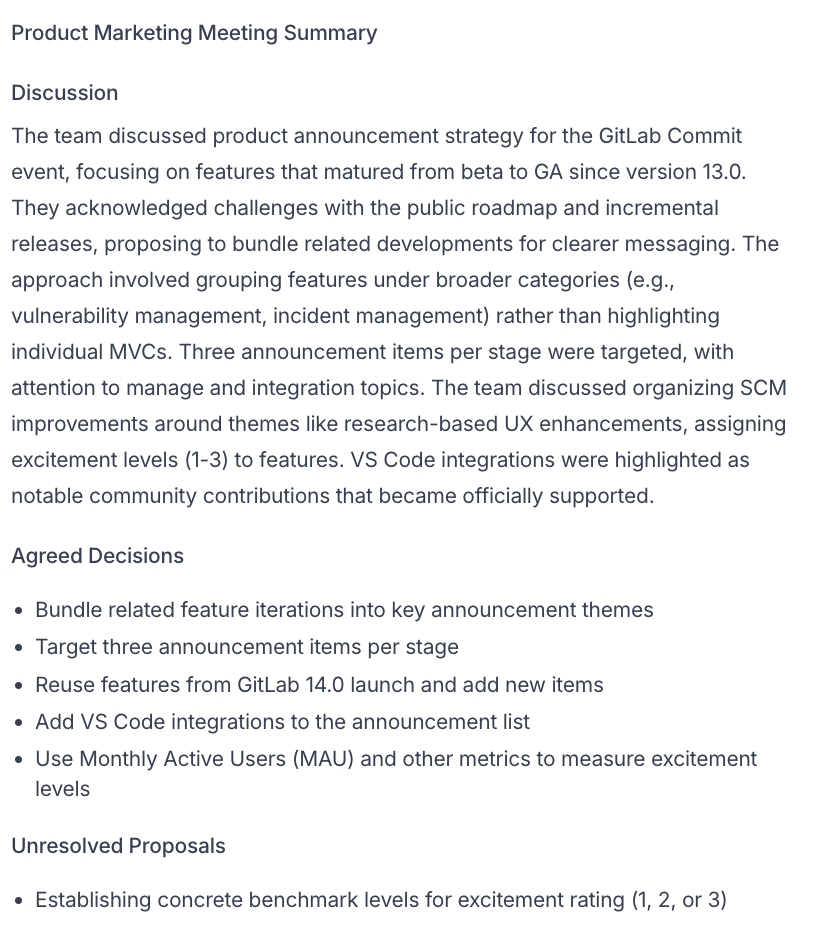
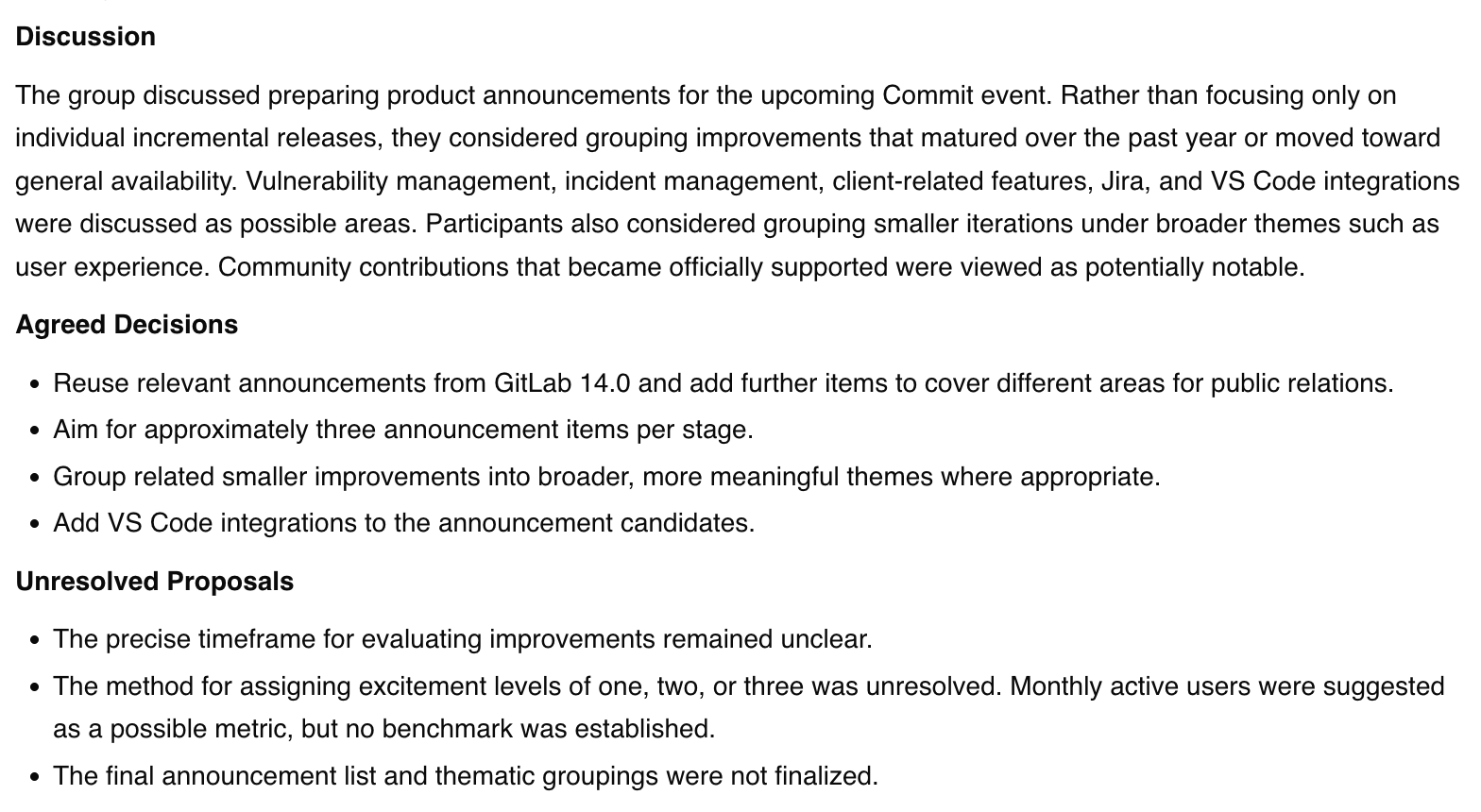
The same prompt requested Discussion, Agreed Decisions and Unresolved Proposals. Fireflies returned 168 words and ScreenApp returned 168, counting titles and headings by whitespace. Both followed the requested structure.
One real difference: monthly active users as a success metric. Fireflies filed it under agreed decisions. ScreenApp called it unresolved. Fireflies’ own transcript has the team floating it as a possible metric that still needs benchmarks, which reads closer to unresolved. We would want to hear the audio before scoring either summary.
Action Items
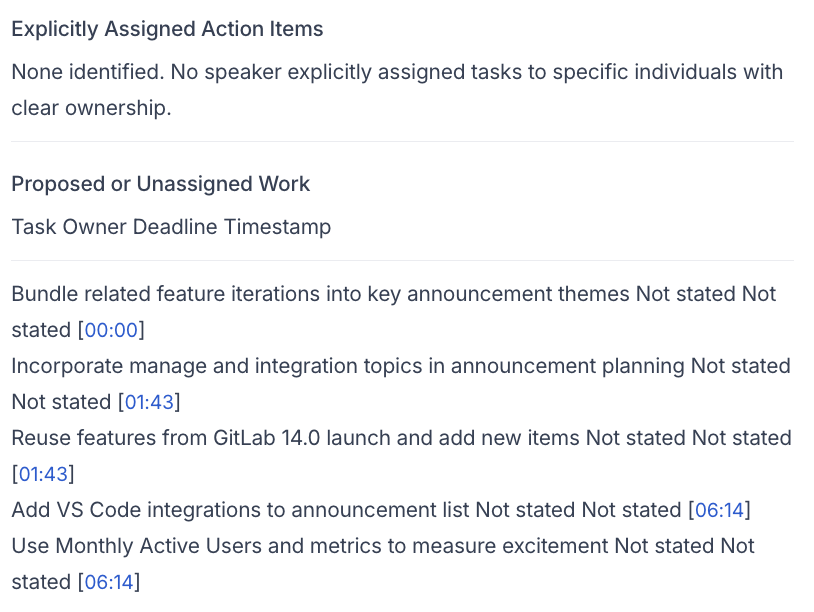
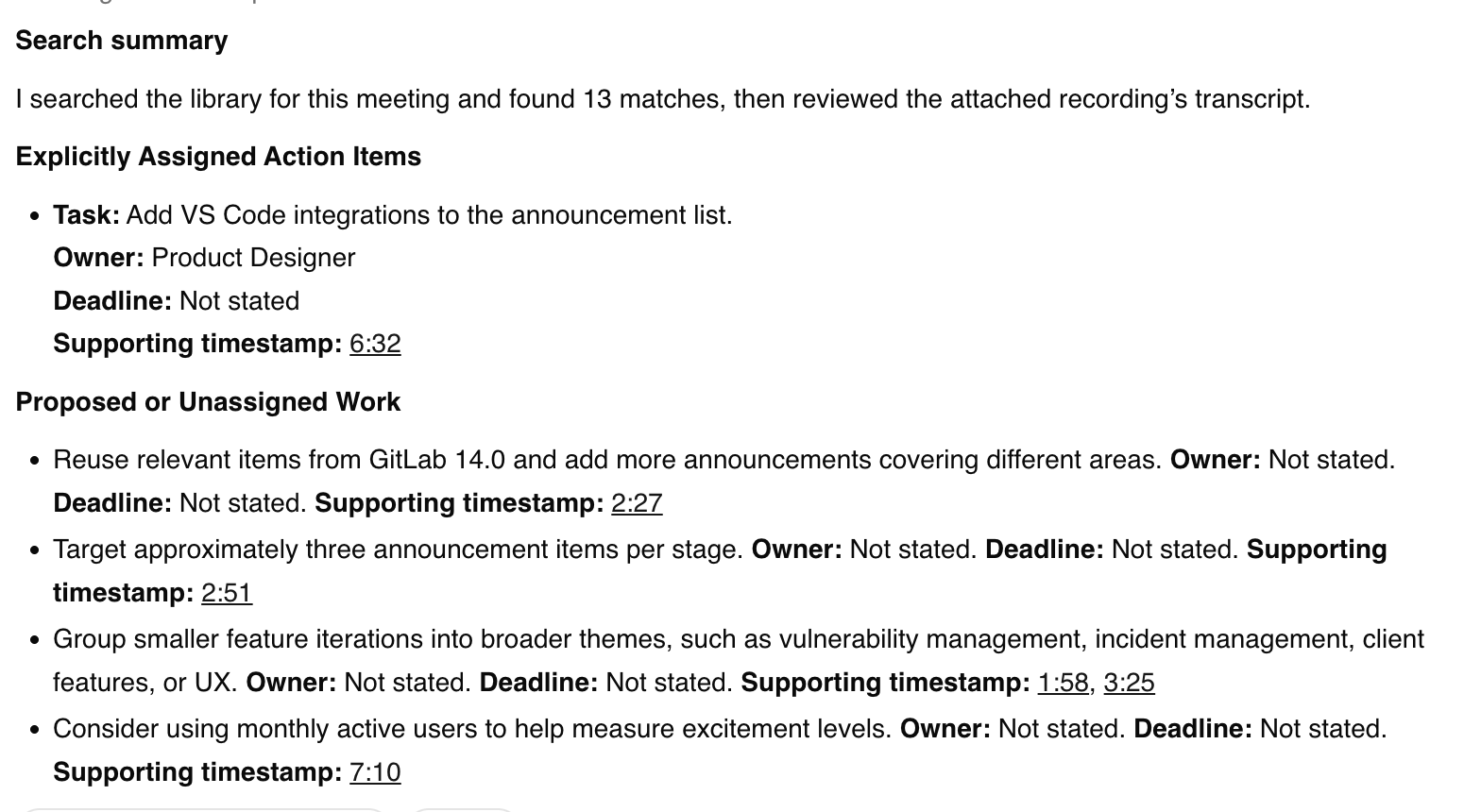
Fireflies reported no explicitly assigned action items and listed 5 proposed or unassigned tasks, with missing owners and deadlines marked “Not stated”. ScreenApp listed an assigned VS Code task, a Product Designer role and a supporting timestamp, with no deadline.
Don’t read this as a score. ScreenApp’s answer searched the whole library and cited other recordings, so we cannot say it used only this meeting. And Fireflies’ transcript has a speaker volunteering to add VS Code, so “unassigned” may be wrong too.
Fireflies action items

ScreenApp action items
Privacy and Sharing
Our uploaded recording in Fireflies was set to “Teammates & Anyone with Link”. Check that setting on yours. We switched it to “Only Owner” and the label changed, but we did not test access from a second account, and your workspace default may differ.
ScreenApp’s sharing and download controls were inspected, but recipient access and exported file contents were not verified. Public screenshots show cropped responses, excluding account details. The input meeting video is not republished. Neither product underwent a security or compliance audit in this comparison.
How We Tested
Date
23 September 2026
Plans tested
Fireflies Free and ScreenApp Pro
Browser
Chrome incognito on macOS
Input
Same trimmed meeting MP4, matched by SHA-256
Runs
One completed upload per product
Prompts
Summary, then action items
Test date: 23 September 2026. Input: the same approximately 8-minute trimmed Product Marketing Meeting MP4 in both tools. Its byte identity was recorded with a SHA-256 hash. ScreenApp had processed this file previously, so reuse and possible caching limit performance comparisons.
Environment: Chrome incognito on macOS, in Sri Lanka. Browser and OS versions are retained in the run record; connection speed was not measured. Accounts: Fireflies Free, English (Global), and ScreenApp Pro with its default transcription settings. We did not activate the Fireflies paid trial.
Method: assisted browser interaction for completed uploads, with the earlier manual Fireflies attempt recorded separately. We saved native outputs before asking the identical prompts below. Saved response text and reviewed screenshots support the observations; no continuous screen recording was captured.
Read the Test Prompts
Summary: Summarize this meeting in no more than 180 words. Use headings Discussion, Agreed Decisions, and Unresolved Proposals. Include only information supported by the transcript. Do not invent decisions, owners or deadlines.
Action items: List only explicitly assigned action items from this meeting. For each, give the task, owner, deadline including timezone if stated, and supporting timestamp. Write "Not stated" for missing details. Separately list proposed or unassigned work. Do not invent commitments.
Limitations: an exploratory pilot with different plans and settings, reused media, no controlled repetitions, no reliable comparative timing, no human audio-verified reference and no word error rate. ScreenApp’s action response was not isolated to one file. Live calls, integrations, exports and recipient access were not tested end to end.
The test ran on 23 September 2026. Pricing and the feature sources were checked again on 9 October 2026. The tables distinguish published features from observed behavior. ScreenApp publishes this comparison and has a commercial interest in the products being compared.
Frequently Asked Questions
Is ScreenApp a good Fireflies alternative?
For screen recordings, uploads and asking questions across a library, yes. For a team that lives in Zoom and needs notes pushed to a CRM, Fireflies fits better, because it connects to 100+ apps, including Slack, Notion, HubSpot, Salesforce and Google Drive and ScreenApp has no native apps for those. See when switching makes sense.
Can I use Fireflies without the bot joining my call?
Fireflies lists a Chrome extension recording without the Fireflies bot. To stop the bot joining Zoom calls, see how to remove Fireflies from Zoom. ScreenApp records from your own computer, so no bot is involved.
Can Fireflies transcribe uploaded videos?
Yes. Our Free account took the MP4 and produced a transcript. Fireflies lists MP3, MP4, WAV and M4A files, with size limits that depend on the plan.
Can I download transcripts on Fireflies Free?
Fireflies lists transcript, summary and recording downloads on Pro. ScreenApp exports PDF, DOCX, TXT, SRT and VTT on every plan.
Which has the lower Pro price?
Fireflies Pro has the lower listed price at both billing frequencies, but it is per seat. For one person, Fireflies is cheaper. For a team, multiply by seats before comparing. Compare the current plan prices.
Which is more accurate?
This test cannot say. You would need a human-checked transcript and repeated runs, and ScreenApp’s action-item answer searched other recordings, so the two answers were not working from the same material.
Check Your Own Recording
Open ScreenApp or explore Fireflies. Run the same file and prompts through both, then check decisions, owners and timestamps against the recording. For Fireflies on its own, read our Fireflies review. Comparing Otter too? See Otter vs Fireflies vs ScreenApp.