
Scroll tables sideways to compare both products.
Otter vs Fireflies vs ScreenApp
Consider Otter if price matters most and you mainly record live meetings.
Otter Pro has the lowest listed Pro price of the three. Its free Basic account accepted our uploaded meeting and answered both prompts. Uploads are where it is tight: Basic allows 3 file imports for the life of the account, and our single upload left 2.
Consider Fireflies if you want uploads and AI notes on a free account.
Fireflies Free accepted the same file and returned a transcript, a native summary and answers to both prompts. Its Pro price sits between the other two. Its action-item answer was the odd one out: it found no assigned task where Otter and ScreenApp each found one.
Consider ScreenApp if you want the recording, the transcript and the AI answers in one place, or you ask questions across many recordings.
Pro accepted the file on both test days and returned an assigned task with an owner label and a timestamp each time. It is the most expensive Pro plan here, and on one day its answer searched the whole library instead of the one file.
All three handled the same file and answered the same two prompts. None of that tells you which is more accurate; the method section explains why.
Which One Should You Pick?
They overlap more than most three-way comparisons, so the deciding question is what you do after the meeting.
- You want the cheapest paid plan and live captions in Meet or Zoom: Otter. Pro is $8.33 per user a month on annual billing.
- You want a bot in every call, with notes pushed into a CRM or Slack: Fireflies. It connects to 100+ apps, including Slack, Notion, HubSpot, Salesforce and Google Drive.
- You record your screen, or want answers across many recordings: ScreenApp. It records screen, window, browser tab, microphone and camera, with system audio, and one AI chat can search every recording you keep.
Otter vs Fireflies, Head to Head
If it is just these two, Otter is cheaper ($8.33 against $10 per seat a month on annual billing) and covers 6 languages: English, Spanish, French, German, Japanese, and Chinese. Fireflies covers 100+ languages and has the bigger integration list. On the free plans, Otter Basic allows 3 file imports for the life of the account, while Fireflies Free takes uploads up to 100 MB within 400 minutes of storage. If your meetings are not in one of Otter’s languages, the choice makes itself.
Quick Comparison
What each tool returned from the same file and the same two prompts. ScreenApp appears twice because it was the comparison partner on both test days. Word counts use whitespace splitting, headings included, and none of these answers has been checked against a full listen to the audio.
| Result | Otter Basic, 22 Sep | Fireflies Free, 23 Sep | ScreenApp Pro, 22 Sep | ScreenApp Pro, 23 Sep |
|---|---|---|---|---|
| Upload accepted | Yes, after file-picker retries | Yes, on the second attempt | Yes | Yes |
| Transcript reached the end | Text saved | 23 paragraphs, last at 7:45 | Text saved | Last passage at 7:51 |
| Summary length | Not counted | 168 words | Not counted | 168 words |
| Assigned tasks found | One | None | One | One |
| Proposed or unassigned tasks | Listed, not counted | 5 | Listed, not counted | Listed, not counted |
| Owner given for the task | Not stated | No task to assign | Developer, a transcript role label | Product Designer, a transcript role label |
| Supporting timestamp | 0:00:00 | None; its transcript places the offer at 6:31 | 6:32 | 6:32 |
| Deadline given | Not stated | Not stated | Not stated | Not stated |
| Where the answer looked | The one conversation | The one meeting | The one recording | The whole library, 13 matches |
Sources, checked 2026-09-28: Our upload test results, Fireflies comparison methodology
Feature Comparison
Everything each product lists, side by side. Otter comes from its pricing page, checked 14 October 2026; Fireflies from its pricing, security and integrations pages, checked 9 October 2026; ScreenApp from our pricing page and product documentation. “Not listed” means we did not find it on those pages, not that the product lacks it.
| Feature | Otter | Fireflies | ScreenApp |
|---|---|---|---|
| Recording and capture | |||
| Meeting bot | Otter: Yes, for Zoom, Microsoft Teams, and Google Meet | Fireflies: Yes: Zoom, Google Meet, Microsoft Teams and 10+ other meeting platforms | ScreenApp: Yes: meeting bot for Zoom, Google Meet and Microsoft Teams |
| Recording without a bot | Otter: Yes: its desktop app records without a bot joining the call | Fireflies: Yes: a Chrome extension recording without the Fireflies bot | ScreenApp: Yes: screen, window, browser tab, microphone and camera, with system audio |
| Live transcription | Otter: Yes: live transcription in the Otter app, plus live notes and captioning for Google Meet and Zoom | Fireflies: Yes: real-time notes and live transcription, listed on Free | ScreenApp: Yes: live transcript while recording (beta) |
| Apps | Otter: Mac and Windows desktop apps, iOS and Android apps and a Chrome extension | Fireflies: desktop, Android and iOS apps and a Chrome extension, all listed on Free | ScreenApp: Mac (Apple silicon) and Windows apps, iOS and Android apps and a Chrome extension that records tab, screen, mic and camera |
| Files and imports | |||
| File uploads | Otter: 3 lifetime imports on Basic, 10 a month on Pro | Fireflies: MP3, MP4, WAV and M4A, up to 100 MB of video on Free and 2 GB on paid plans | ScreenApp: 500 uploads a month on Pro, plus YouTube, Vimeo and direct media links |
| Longest recording | Otter: 30 minutes on Basic, 90 on Pro | Fireflies: 2 hours per meeting on Free and Pro, 3 on Business and 4 on Enterprise | ScreenApp: 45 minutes on Free, 2 hours on Pro |
| Transcription | |||
| Transcription languages | Otter: 6 (English, Spanish, French, German, Japanese, and Chinese) | Fireflies: 100+ | ScreenApp: 100+ |
| Speaker labels | Otter: Yes, from Basic | Fireflies: Yes: speaker identification in meetings and audio files | ScreenApp: Yes: speaker identification, with renaming |
| Custom vocabulary | Otter: Yes: custom vocabulary for names, jargon and acronyms, 5 terms on the free Basic plan and more on paid plans | Fireflies: Not listed on the Fireflies pages we checked | ScreenApp: Yes: custom vocabulary for transcription |
| Translation | Otter: Not listed on the Otter pages we checked | Fireflies: Not listed on the Fireflies pages we checked | ScreenApp: Yes: transcript and caption translation into 99 languages |
| AI notes and questions | |||
| Summaries | Otter: Yes: automated summaries with action items and outlines | Fireflies: Yes: AI summaries, limited on Free and unlimited from Pro | ScreenApp: Yes: AI chat with any recording, plus action items with an owner and deadline, and decisions listed separately |
| Questions across meetings | Otter: Yes: AI Chat within and across meetings | Fireflies: Yes: AskFred, an AI assistant that answers questions about past meetings, limited on Free | ScreenApp: Yes: one AI chat that searches and answers from every recording in your library, or a single folder |
| Exports and integrations | |||
| Export formats | Otter: Yes: mp3 and txt on the free plan, plus pdf, docx and srt from Pro, with bulk export from Business | Fireflies: Yes: transcript, summary and recording downloads on Pro | ScreenApp: Yes: PDF, DOCX, TXT, SRT and VTT, on every plan |
| Integrations | Otter: Yes: Zapier from Pro, with Salesforce and HubSpot sync | Fireflies: Yes: 100+ apps, including Slack, Notion, HubSpot, Salesforce and Google Drive | ScreenApp: ScreenApp works with Zapier, Slack and Notion through the API; there are no native Slack, Notion or Zapier apps |
| Connector for AI assistants | Otter: Yes: an MCP server for AI assistants on every plan, including the free Basic plan | Fireflies: Yes: an MCP server for Claude, Devin and ChatGPT | ScreenApp: Yes: an MCP connector on every plan, including Free |
| Security | |||
| Certifications | Otter: Yes: HIPAA compliance as a paid add-on on the Enterprise plan | Fireflies: Yes: SOC 2 Type II and GDPR compliance, with HIPAA compliance on Enterprise | ScreenApp: Yes: SOC 2 Type 2; HIPAA compliance and a BAA are not available |
| Single sign-on | Otter: Yes: SSO and SCIM on Enterprise, with a 100-user minimum | Fireflies: Yes: SSO and SCIM on Enterprise | ScreenApp: No: SSO and SAML are not available |
Sources, checked 2026-10-09: Otter pricing, Fireflies integrations, ScreenApp Chrome extension, Fireflies pricing, Fireflies free plan guide, Fireflies upload guide, Otter meeting assistant, ScreenApp meeting bot repository, ScreenApp desktop apps, ScreenApp mobile apps, Fireflies home page, ScreenApp pricing, ScreenApp recording limits, ScreenApp supported languages, Transcription accuracy and languages, ScreenApp audio translator, AI chat troubleshooting, Slack integration options, ScreenApp trust center
Strengths and Trade-offs
Strength
The lowest listed Pro price of the three. Basic produced transcript text, a native summary and answers to both prompts without a payment.
Trade-off
Imports are the catch. Basic lists 3 lifetime file imports and Pro lists 10 a month, so a library of old recordings does not fit the free plan. Its action answer pointed to the very start of the recording, which needs checking against the audio.
Strength
Free accepted the upload and returned everything we asked for: transcript, native summary and both prompted answers. Pro is priced per seat and sits between Otter and ScreenApp.
Trade-off
Its action answer classified the VS Code task as unassigned, even though its own transcript has a speaker volunteering for it at 6:31. Video recording is documented from Pro, not on Free.
Strength
Recording, transcript and prompted answers open together. Both action answers named the task, an owner label and a supporting timestamp, and separated proposed work.
Trade-off
Two things went against it. The owner label changed between days, Developer on 22 September and Product Designer on 23 September, for what reads as the same speaker. And the 23 September answer reported 13 library matches, so it was not confined to the one file. Pro also costs more than the other two Pro plans.
Price Comparison
Standard USD prices from each vendor’s pricing page: Otter checked 14 October 2026, Fireflies 9 October 2026. Annual columns show the monthly equivalent with annual billing. Otter and Fireflies charge per user or seat; ScreenApp lists plan prices. Confirm checkout totals and team terms before buying.
Sources, checked 2026-10-09: Otter pricing, Fireflies pricing, ScreenApp pricing
We tested Otter Basic, Fireflies Free and ScreenApp Pro. The Pro and Business rows are here for the subscription decision, not because we tested those plans. Enterprise tiers are on each vendor’s page: Otter, Fireflies and ScreenApp.
Allowances and Limits
The three vendors count different things. Otter counts minutes and imports, Fireflies counts storage and file size, ScreenApp counts transcriptions and uploads. The table puts the published figures side by side; do not read across a row as if the units matched.
| Allowance | Otter | Fireflies | ScreenApp |
|---|---|---|---|
| File uploads on the free plan | 3 imports for the life of the account | Video files up to 100 MB, within 400 minutes of storage | 3 trial uploads and 2 transcriptions |
| Free transcription allowance | 300 minutes a month | Counted as storage, not minutes transcribed | Counted as transcriptions, not minutes |
| AI questions on the free plan | 20 a month | 20 credits a month | 10 a month |
| What our one upload used | One import, leaving 2 | Free meetings label went from 3 to 2 | One Pro upload each day; allowance not reached |
Sources, checked 2026-10-14: Otter pricing, Our upload test results, Fireflies pricing, Fireflies free plan guide, Fireflies upload guide, ScreenApp pricing, Otter AI Chat FAQ
Sources: Otter plan allowances, checked 14 October 2026; Fireflies plans, checked 9 October 2026, and the Fireflies upload guide, checked 23 September 2026; ScreenApp plans. The last row is our own observation from the test accounts.
Test Results
One File, Two Prompts, Two Days
We used the same trimmed Product Marketing Meeting recording every time: 480.04 seconds long and 12,341,615 bytes, with its SHA-256 hash recorded before each upload so the bytes were identical. It went to Otter Basic and ScreenApp Pro on 22 September 2026, and to Fireflies Free and ScreenApp Pro on 23 September 2026. ScreenApp therefore appears twice in the results, once per day, and the two ScreenApp runs did not return identical answers.
After each upload we asked the same two questions in each tool’s own AI chat, summary first, then action items.
Read the Identical Test Prompts
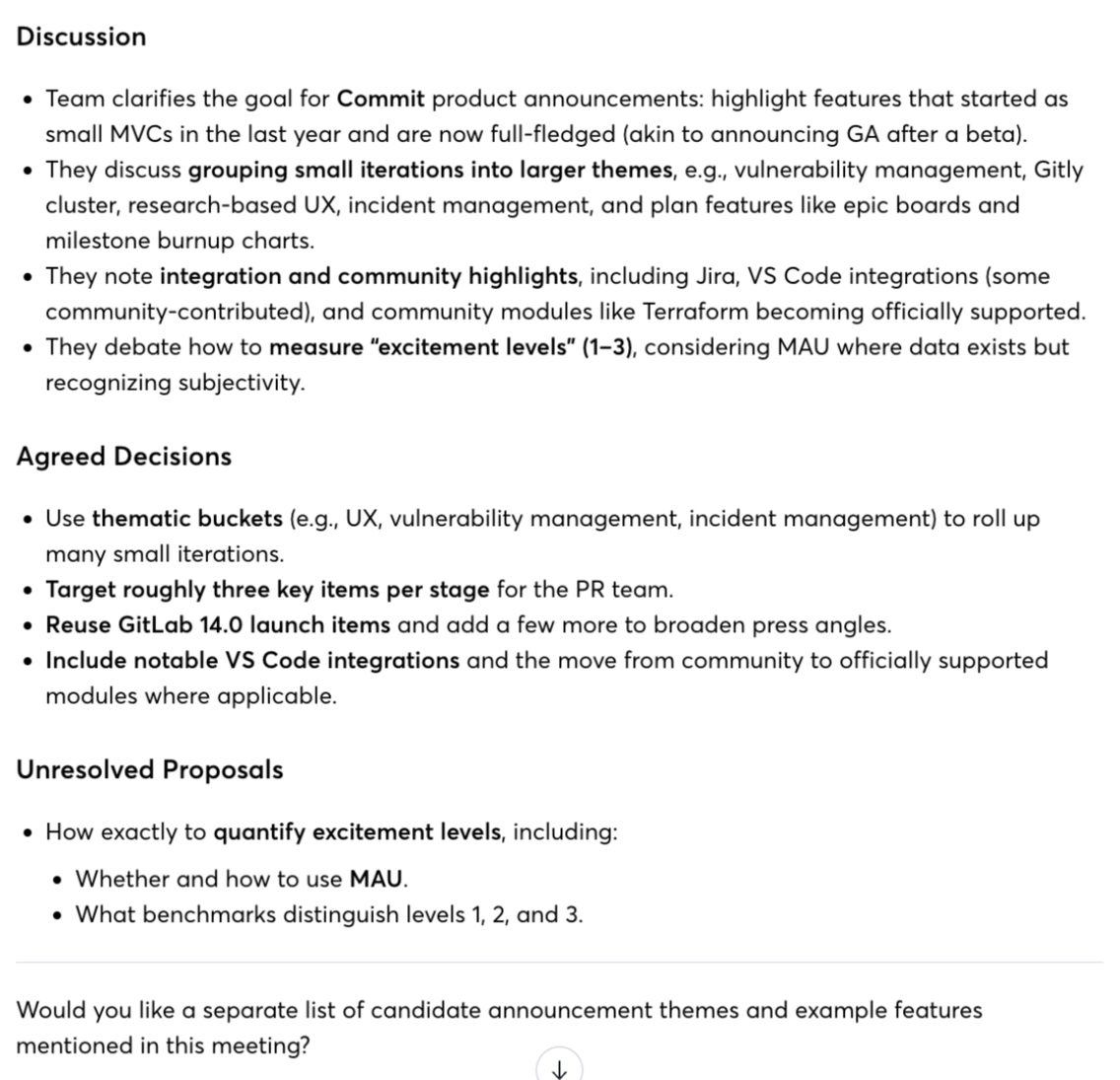
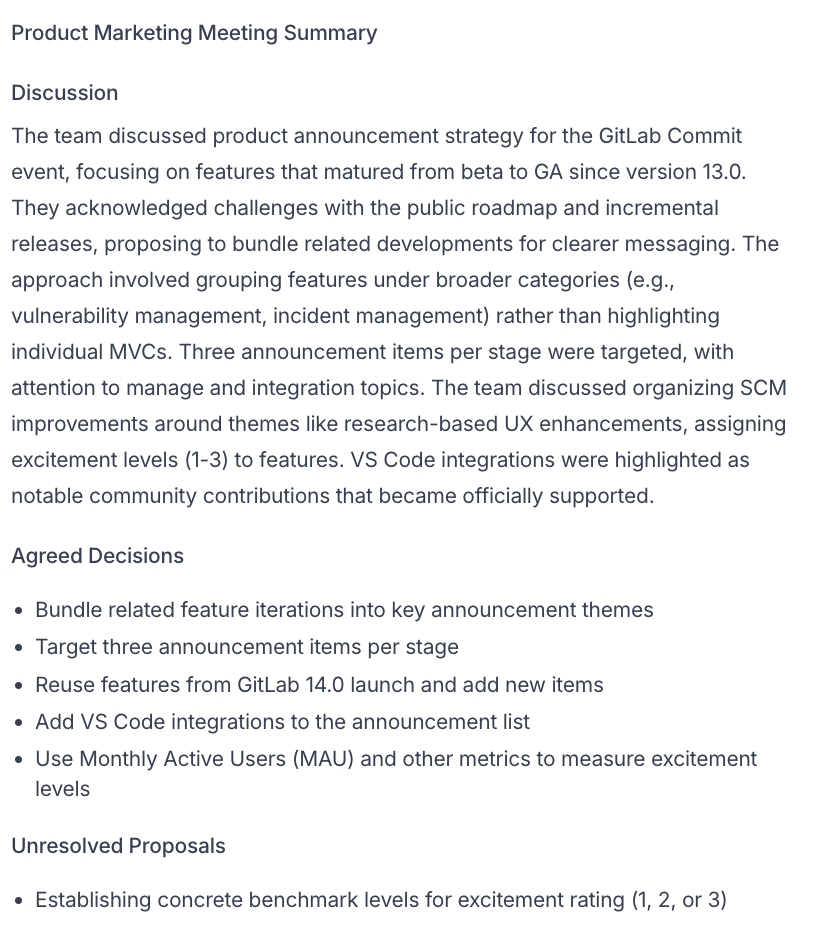
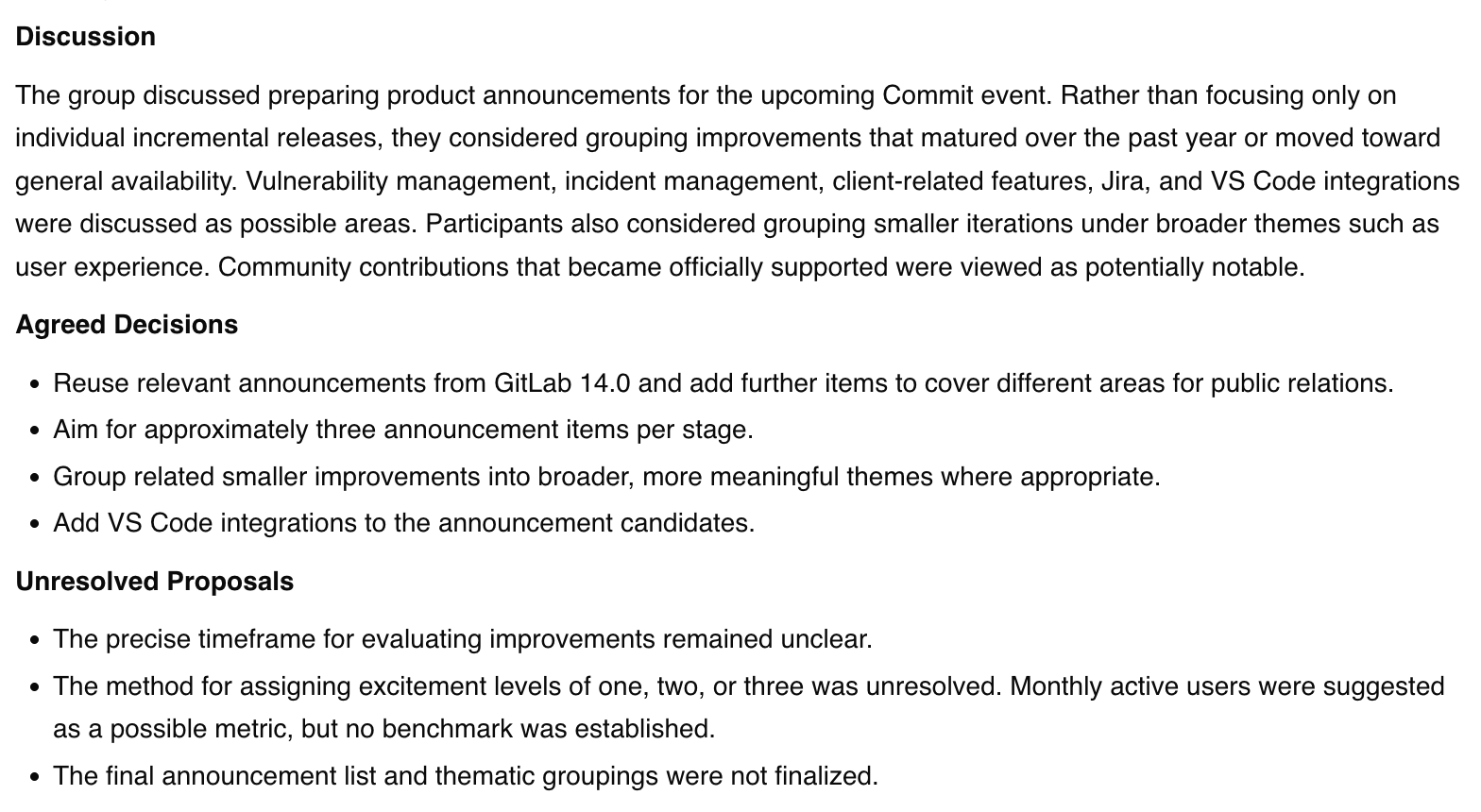
Summary: Summarize this meeting in no more than 180 words. Use headings Discussion, Agreed Decisions, and Unresolved Proposals. Include only information supported by the transcript. Do not invent decisions, owners or deadlines.
Action items: List only explicitly assigned action items from this meeting. For each, give the task, owner, deadline including timezone if stated, and supporting timestamp. Write "Not stated" for missing details. Separately list proposed or unassigned work. Do not invent commitments.
What the Answers Said
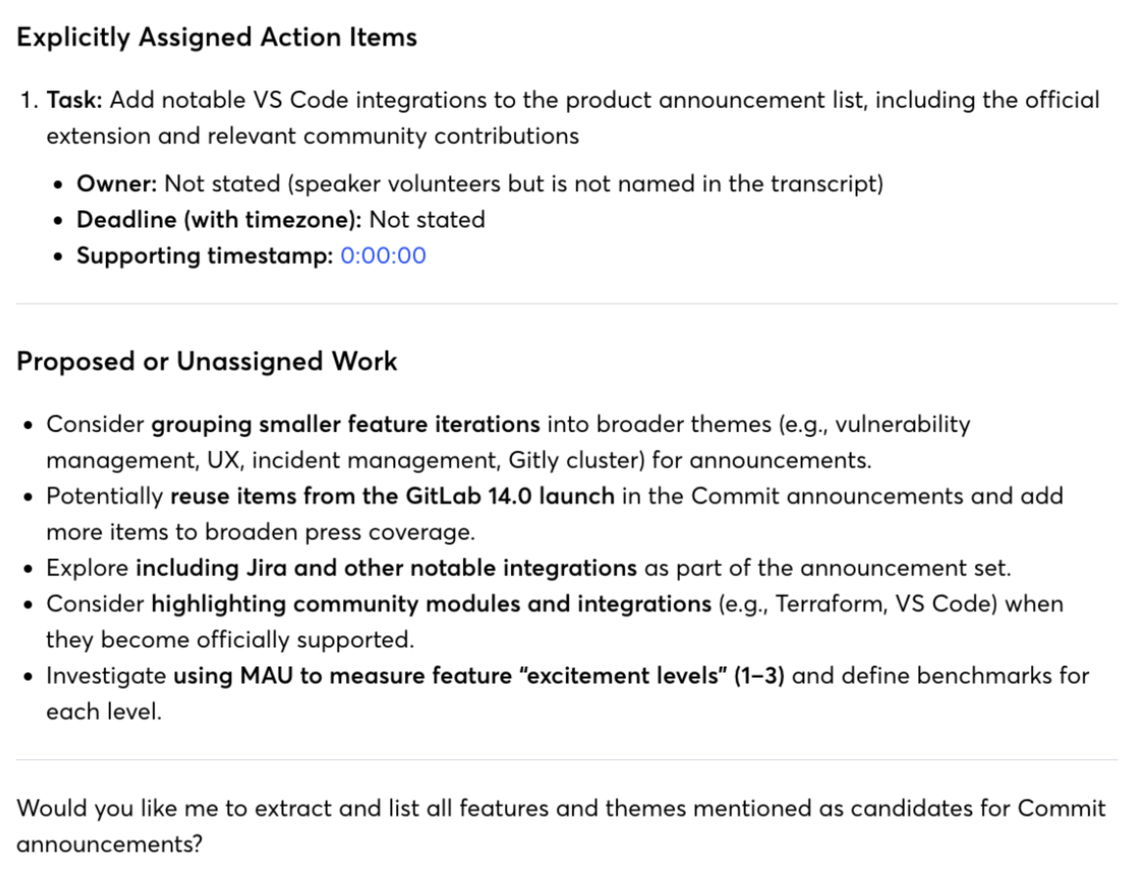
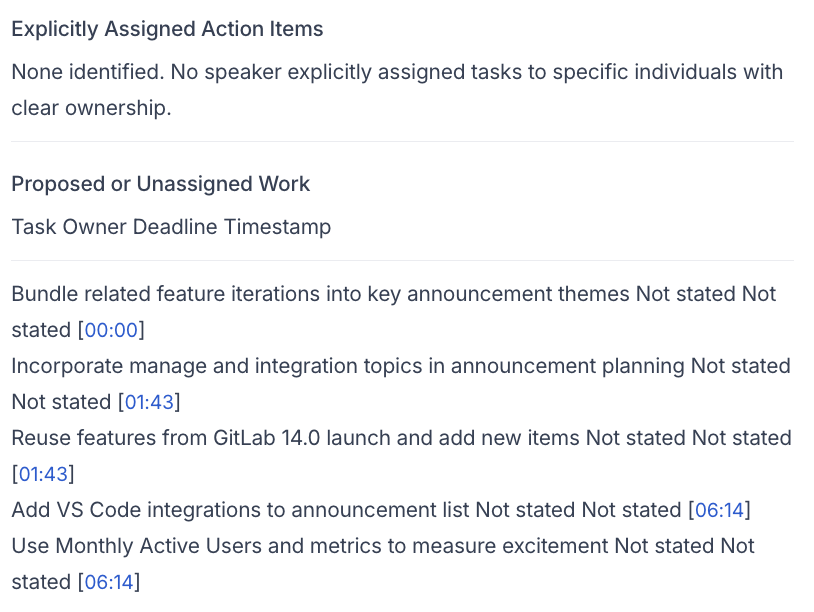
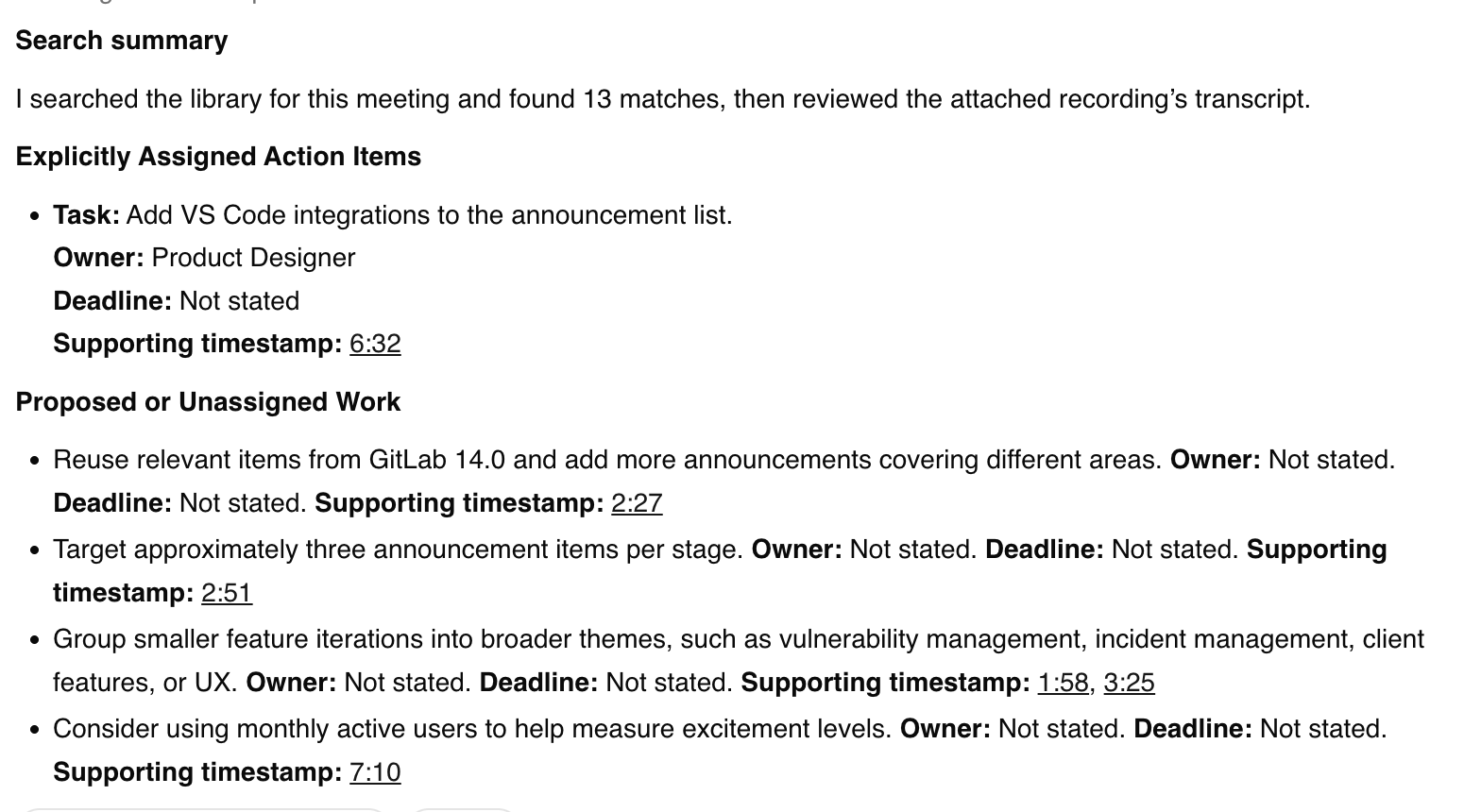
The recording contains a passage where one speaker offers to add VS Code to the announcement list. That single moment produced three different readings. Otter and ScreenApp both reported it as an assigned action item. Fireflies listed it as proposed work and reported no assigned tasks at all, even though its own transcript shows the offer at 6:31. Whether a volunteered offer counts as an assignment is a judgment call, and a human listen is the only way to settle whether either reading misrepresents the meeting.
The supporting timestamps diverged too. Otter cited 0:00:00, the start of the recording. ScreenApp cited 6:32 on both days, close to where the Fireflies transcript puts the offer. That makes Otter’s citation the outlier, but we have not confirmed the exact moment in the audio.
Owners were the third difference. Otter wrote “Not stated”. ScreenApp named a role label from its transcript, and that label was Developer on 22 September and Product Designer on 23 September for the same recording. A generated role label is not a verified identity, and the fact that it changed between uploads is a weakness worth knowing about before you rely on ScreenApp’s owner field.
On the summaries, Fireflies and ScreenApp both followed the three requested headings and landed on the same length. They disagreed on one point: Fireflies put a monthly-active-users measurement under agreed decisions, while ScreenApp left it under unresolved proposals. Otter’s summary and ScreenApp’s 22 September summary both covered grouping announcements into themes, reusing launch material and the uncertainty about measuring excitement. None of the four summaries has been scored for omissions.
Otter Action Items, 22 September
Fireflies Action Items, 23 September

ScreenApp Action Items, 22 September
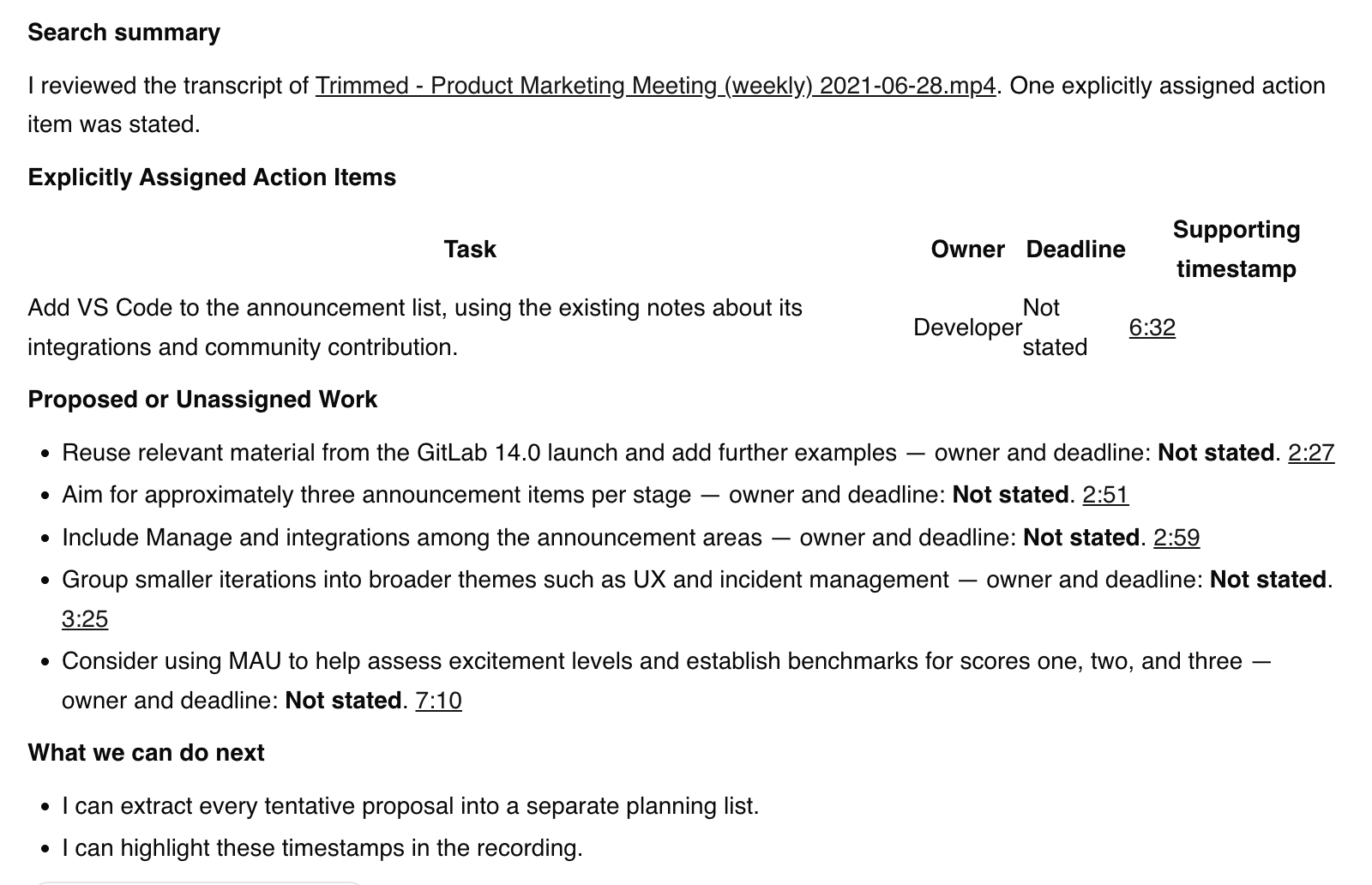
ScreenApp Action Items, 23 September
What We Did Not Test
Not tested in these runs
- Live meeting capture
- Calendar sync
- The meeting bots
- Integrations
- Export file contents
- Sharing to another person
- Languages other than English
- Speaker identity accuracy
We did not test Otter Pro or Fireflies Pro, or measure processing time. There is no word error rate, because nobody has listened to the whole clip and corrected a reference transcript.
How We Tested
Dates
22 and 23 September 2026
Plans tested
Otter Basic, Fireflies Free, ScreenApp Pro
Browser
Chrome incognito on macOS
Input
Identical MP4, matched by SHA-256
Runs
One upload per product per day
Prompts
Summary, then action items
Otter and ScreenApp ran on 22 September 2026, Fireflies and ScreenApp on 23 September, all in Chrome incognito on the same Mac in Sri Lanka. ScreenApp had processed the file before, so caching may have helped it, and we report no timing. Otter Basic was set to English (US), Fireflies Free to English (Global), and ScreenApp Pro used its defaults with library-wide chat left on.
We used assisted browser interaction in our own accounts. Otter only accepted the file through its Browse Files route after a few failed attempts, and a first manual Fireflies upload left its lists empty before an assisted upload worked. Fireflies’ terms restrict automated access; running the assisted upload was our decision in our own account and does not imply Fireflies’ consent. We saved the native summaries first, then every prompted answer as text and as a cropped screenshot.
Each run has a folder with the file hash, prompts, saved responses, screenshots and an attempt log. The source video is not republished, and the screenshots exclude account details.
Otter’s and ScreenApp’s 22 September summaries were not word-counted, and ScreenApp’s 23 September answer was not confined to the test file.
ScreenApp Pty Ltd publishes this page and sells ScreenApp. Read the results with that in mind, and check the details against your own recording.
Frequently Asked Questions
Which of the Three Is Cheapest?
Otter Pro has the lowest listed price of the three Pro plans at both billing frequencies, Fireflies Pro is next, and ScreenApp Pro is the highest. All three have a free tier, but the free tiers ration different things: imports on Otter, storage and file size on Fireflies, transcriptions and uploads on ScreenApp. See the price table and the allowances.
Which Is the Most Accurate or the Fastest?
We do not know, and would rather not guess. None of the transcripts was scored against a reference a person corrected, and the upload retries plus ScreenApp’s earlier run make any timing misleading. The action-item differences above are things to check, not a ranking.
Is Otter or Fireflies Better?
Otter is cheaper and has live captions in Meet and Zoom, but covers 6 languages. Fireflies covers 100+ and connects to more tools. See the head-to-head.
Can All Three Transcribe an Uploaded Video?
Do They All Join Zoom, Google Meet and Microsoft Teams?
All three document a meeting assistant for Zoom, Google Meet and Microsoft Teams, and all three document a way to record without a bot joining the call. We tested none of this. This page covers uploaded files only.
Why Does ScreenApp Appear Twice in the Results?
Because the Otter and Fireflies runs happened on different days, and the file was uploaded to ScreenApp again on each day as the comparison partner. Keeping both runs visible is more honest than merging them, and it exposed the owner-label change described above.
Try the Same File Yourself
Open ScreenApp, explore Otter or explore Fireflies. Upload one recording to each, ask the same two questions, and check the owners, timestamps and decisions against the audio before you trust any of them. For each tool on its own, see Otter vs ScreenApp and Fireflies vs ScreenApp, and for a wider field, our AI meeting notetaker comparison.