

Download Video in Brave Without an Extension
People run Brave to keep their browsing to themselves. So the last thing you want for saving a video is an extension that can read every site you visit. Brave is Chromium, so it can run Chrome downloader extensions, but installing one means granting broad access to your browsing, which rather defeats the point.
This tool works differently. You paste one link, and only that link leaves your browser. ScreenApp fetches the video on its servers and puts the MP4 in your library. Nothing is installed in Brave.
No extension
Nothing installed in Brave, so nothing reads your other browsing.
Streamed video handled
HLS streams are stitched into one MP4, audio included.
Desktop and Android
Works from Brave on a computer or a phone.
Transcript and AI
Every import gets a transcript you can search and ask about.
To be exact about privacy: the import runs on ScreenApp’s servers, so the link and the video pass through your ScreenApp account. It is not a browser-local download. What you avoid is an extension with access to everything else you browse.
Brave Shields, and Why the Site’s Download Button Breaks
Brave Shields blocks ads and trackers at the browser level, which is great for browsing and occasionally awkward for video. Shields can break a site’s player or block the scripts an on-page download button needs, so the button never loads or does nothing. Pasting the link here avoids depending on the site’s player.
And the universal reason underneath it: most video is streamed as HLS, an .m3u8 playlist split into many chunks, with the player pointing at a temporary blob: address. There is no single file for Save As to grab. ScreenApp reads the stream on its servers and stitches it into one MP4 with its audio.
Depends on the player
If Shields blocks the player scripts, the download button never loads, and there may be no single file to save anyway.
Depends on the link
ScreenApp fetches the stream on its servers and builds the MP4, so a broken player does not matter.
How to Download a Video in Brave
- Copy the link. In Brave, copy the video or page URL from the address bar. On Brave mobile, use the share menu and copy the link.
- Paste it here. Paste it into the field on this page and sign in with a free account.
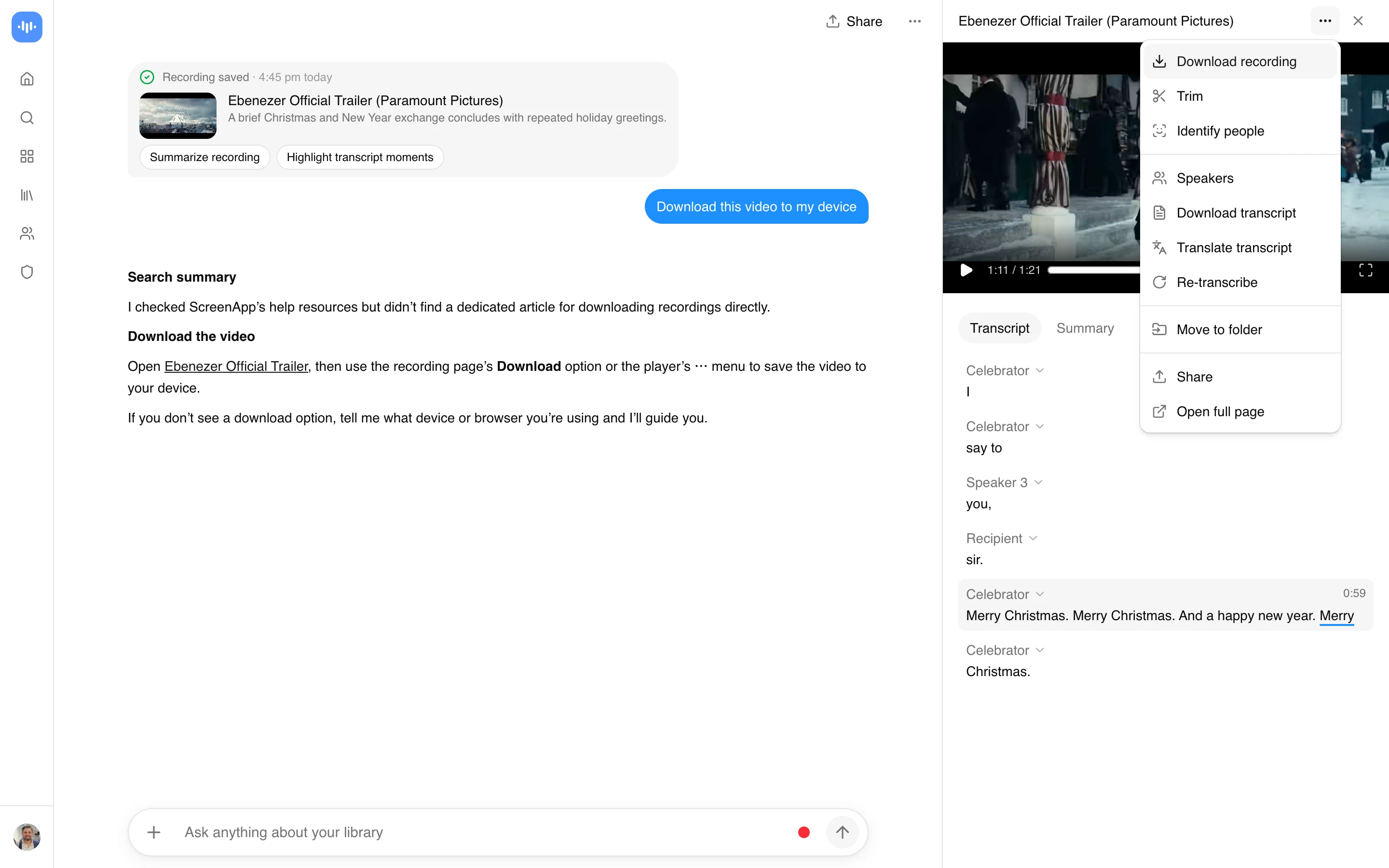
- Save the MP4. The video imports into your library with a transcript. Downloading the MP4 needs a paid plan, from $19/month billed annually.
Video will not load?
Click the lion icon
In the Brave address bar.
Lower Shields for this site only
Leave them on everywhere else.
Copy the link again
Then paste it here.
Aggressive blocking sometimes stops the page from serving the stream at all. That is a Brave setting, not the tool.
Do More Than Save It
The download is step one. The same import can hand the video to AI: a transcript and summary with the AI video summarizer, questions with timestamped answers in the AI video watcher, scene and content detection with the video analyzer, or a formatted write-up with video to document. The free plan covers 2 transcriptions of recordings up to 45 minutes each.
What It Can and Cannot Do
Good at
- Saving public web video from a link
- Streamed HLS video stitched into one MP4
- Working in Brave with no extension
- A transcript and AI on every import
Not built for
- A browser-local download: the import runs on ScreenApp servers
- Free downloads: Paid plans only
- Several links in one paste: one link at a time; playlist URLs are not imported as a batch
- DRM or login-only video: Netflix, Disney+ and private video are off-limits
Who Downloads Video in Brave
Privacy-minded users, since that is who Brave attracts. They want the file without installing an extension that reads their browsing.
Brave users on Android, where “how to download videos in Brave browser” is a common question and extensions are not really an option.
People whose download button Shields quietly broke, and who need a route that does not depend on the site’s own player working.
Privacy and Copyright
Download only web video you have the right to keep: your own content, public video you are authorized to use, or material in the public domain. Saving copyrighted video without permission can infringe the owner’s rights and breach the source site’s terms, and that responsibility is yours.
On privacy, the import runs on ScreenApp’s servers: the link is sent to your ScreenApp account, the video is fetched there, and you download it from your library. The video, and any transcript or summary you generate from it, is covered by ScreenApp’s privacy policy.