

Cut a Clip from a YouTube Video
Paste a YouTube link, or upload a video file you already have, and pick the part you want. Drag two handles over the timeline, or ask the AI chat for the moment in words and it finds the start and end in the transcript. ScreenApp cuts that section out as its own video.
Most clips people cut are under three minutes: a funny moment for a Short, a product reveal from a keynote, the chorus of a song. The source can be much longer; the free plan takes videos up to 45 minutes.
What you get:
- Import from YouTube, Vimeo, TikTok, Instagram, Facebook and most other public video links (Twitch, Loom, Dropbox, Google Drive, Pinterest, X, Threads, Douyin, Kuaishou, Bilibili) through a generic importer, or upload a file from your device
- A clip at the original resolution and quality, cut without re-encoding, so it is ready in seconds
- Save the clip as a new file named “Trimmed” next to the original, or replace the original with it
- The transcript is cut to the same range, so the clip’s text matches its video
- no watermark on any recording or export
- 3 imports or uploads on the free plan
How to Cut a Clip from a YouTube Video
- Paste the link: Paste a YouTube, Vimeo, TikTok, Instagram or Facebook URL, or upload a video file from your device.
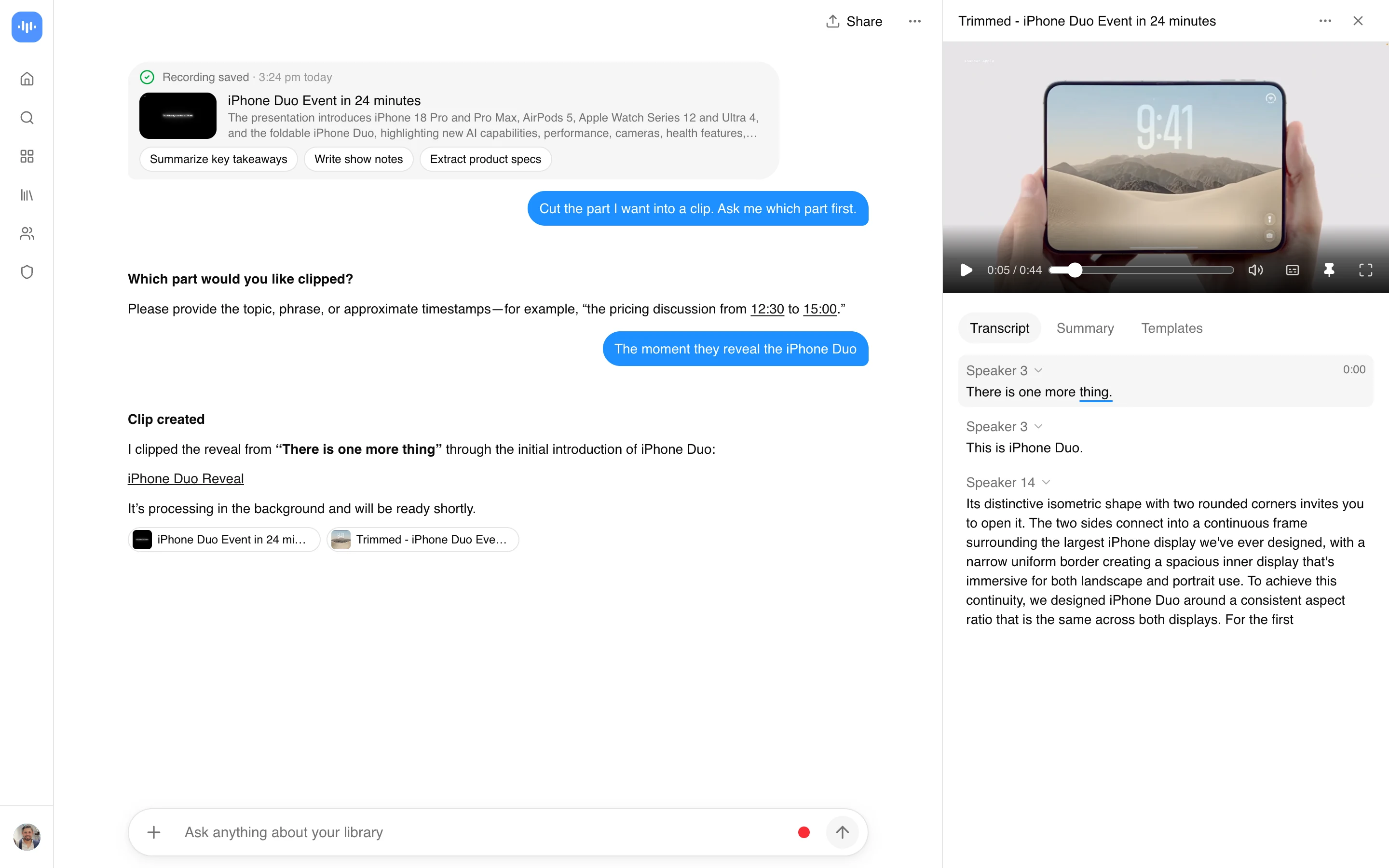
- Set the start and end: Once the video has imported, click the scissors on the player and drag the two handles to the part you want. Or ask the AI chat for it in words (“clip the part where they reveal the phone”) and it finds the start and end in the transcript.
- Save and download the clip: Keep the clip as a new file or replace the original, then download it as MP4. Downloading needs a Pro or Max plan; see the free and paid plans.
You need a ScreenApp account to import and trim a video. The free plan lets you try the import and the editor; downloading the finished clip is a paid feature.
YouTube Video Cutter vs Other Tools
| Feature | ScreenApp | ClipsCutter | TubeChop | Adobe Express |
|---|---|---|---|---|
| Free video length limit | Up to 45 min | Not stated | Clips expire after 7 days | Up to 1 hour |
| Cheapest paid plan | $19/month annual | $4.99/month (first 3 months) | $15/year | $9.99/month |
Sources, checked 2026-09-23: ScreenApp recording limits, ScreenApp pricing, adobe.com/express/feature/video/trim, clipscutter.com/pricing, tubechop.com, adobe.com/express/pricing
- vs ClipsCutter: ClipsCutter does not require a YouTube account and its free plan does not state a daily clip limit; Pro raises the clip length to 1 hour. ScreenApp needs an account to import and trim, and downloading the result needs a paid plan.
- vs TubeChop: TubeChop does not let you download a clip at all, free or paid; it only generates a shareable, time-limited link. ScreenApp’s trimmed file downloads as an MP4 once you are on a paid plan.
- vs Adobe Express: Adobe Express accepts videos up to 1 hour long and its Premium plan is $9.99 a month. ScreenApp adds a transcript and AI notes on the same recording, not just the trim.
Who Cuts YouTube Video Clips
Short-form creators are the largest group. They take a long compilation, stream or episode and cut it into many clips under a minute or two, one per moment, to post as Shorts, Reels or TikToks.
Gamers cut the highlight out of a stream or a gameplay recording, from a single play to a few minutes of funny moments, instead of uploading the whole session.
Video editors cut very short scenes, often only a few seconds each, from a film, series or trailer to use in their own edits and fan videos.
Music and dance fans cut the part of a song or music video they need, such as the section for a first dance, a cheer routine or a ringtone.
People trimming their own recordings cut the dead time off screen recordings, training videos, meeting recordings and camera footage, and keep only the part worth sharing.