


Scroll tables sideways to compare both products.
Happy Scribe vs ScreenApp
Pick Happy Scribe if the transcript or subtitles are the thing you deliver.
It transcribes 150+ languages, translates into 80+, and can hand the transcript to a person to check. Basic is $8.50 a month on annual billing.
Pick ScreenApp if you record your screen and come back to ask questions later.
It records screen, window, browser tab, microphone and camera, with system audio, keeps the video next to the transcript, and one AI chat can answer from every recording you keep.
Both handled our upload, and both answered the same two prompts. One run cannot say which is more accurate. The method section explains why.
Looking for a Happy Scribe Alternative?
Happy Scribe is good at the job it was built for: subtitles and translation. People usually look elsewhere for one of the reasons below, and it is worth checking whether Happy Scribe already covers yours.
- The free plan ran out. Free includes a 10-minute trial of AI transcription and 3 AI Chat files a month. ScreenApp Free is also a trial, with 2 transcriptions and 3 uploads. If you need free for good, neither is it.
- Minutes feel tight. Basic includes 1,440 AI minutes a year and extra minutes cost $0.20 each. ScreenApp Pro counts files instead: 50 transcriptions and 500 uploads a month. For a few long recordings, files are cheaper. For many short clips, minutes can be.
- You want to record your screen, not just upload files. That is what ScreenApp is built for. Happy Scribe has a notetaker for Zoom, Google Meet and Microsoft Teams that auto-joins from Google or Outlook calendars, and says it supports recording Zoom, Meet and Teams calls from a Mac or phone with no bot joining, so try that before you switch.
When to Stay with Happy Scribe
If subtitles or translations are what you hand over, stay. Happy Scribe exports TXT and SRT on Free, plus PDF and DOCX on Basic, and 15+ formats from Pro. ScreenApp exports PDF, DOCX, TXT, SRT and VTT. The same goes if you want a person to check the transcript: Happy Scribe sells human proofreading from $2.00 a minute in 65+ languages, and that is not on ScreenApp’s pricing page.
Quick Comparison
| Area | Happy Scribe | ScreenApp |
|---|---|---|
| Uploaded meeting | ObservedMP4 transcribed in English (US) | Observedsame MP4 transcribed in a new conversation |
| Transcript | Observedspeaker-labelled editor with closing passage available after scrolling | Observedspeaker-labelled transcript alongside the saved recording |
| Questions and notes | Observedboth identical prompts answered in AI Chat | Observedboth identical prompts answered in the upload conversation |
These three rows are what we saw in our own accounts on 29 September 2026. Everything else each product lists is in the full table below.
Feature Comparison
Everything each product lists, side by side. The Happy Scribe column comes from its pricing, security, integrations and home pages, checked 12 October 2026. The ScreenApp column comes from our pricing page and product documentation. “Not listed” means we did not find it on those pages, not that Happy Scribe lacks it.
| Feature | Happy Scribe | ScreenApp |
|---|---|---|
| Recording and capture | ||
| Meeting bot | Happy Scribe: Yes: a notetaker for Zoom, Google Meet and Microsoft Teams that auto-joins from Google or Outlook calendars | ScreenApp: Yes: meeting bot for Zoom, Google Meet and Microsoft Teams, joining from Google Calendar and Microsoft Outlook calendars |
| Recording without a bot | Happy Scribe: Happy Scribe says it supports recording Zoom, Meet and Teams calls from a Mac or phone with no bot joining, and lists a browser-based recorder | ScreenApp: Yes: screen, window, browser tab, microphone and camera, with system audio |
| Apps | Happy Scribe: Yes: iOS and Android apps, with the desktop app marked Soon on the pricing page | ScreenApp: Yes: Mac (Apple silicon) and Windows apps, iOS and Android apps and a Chrome extension that records tab, screen, mic and camera |
| Recording length | Happy Scribe: 45 minutes per meeting on Free, 90 on Basic, no limit from Pro | ScreenApp: 45 minutes on Free, 2 hours on Pro and 3 on Max |
| Files and imports | ||
| Imports | Happy Scribe: Yes: YouTube, Vimeo, Google Drive, Box and Dropbox | ScreenApp: Yes: YouTube, Vimeo and direct media links |
| Uploaded media allowance | Happy Scribe: 1,440 AI minutes a year on Basic, 7,200 on Pro | ScreenApp: 500 uploads and 50 transcriptions a month on Pro |
| Transcription and subtitles | ||
| Transcription languages | Happy Scribe: 150+ | ScreenApp: 100+ |
| Speaker labels | Happy Scribe: Yes: automatic speaker detection | ScreenApp: Yes: speaker identification, with renaming |
| Translation | Happy Scribe: Yes: into 80+ languages | ScreenApp: Yes: transcript and caption translation into 99 languages |
| Custom vocabulary | Happy Scribe: Yes: 1 style guide and 1 glossary on each plan, unlimited on Business | ScreenApp: Yes: custom vocabulary for transcription |
| Human proofreading | Happy Scribe: Yes: human proofreading from $2.00 a minute in 65+ languages | ScreenApp: Not on ScreenApp's pricing page |
| AI notes and questions | ||
| AI Chat | Happy Scribe: Yes: 3 files a month on Free, 10 on Basic, unlimited from Pro, with a choice of ChatGPT, Claude, Mistral or GLM models from Pro | ScreenApp: Yes: AI chat with any recording, plus action items with an owner and deadline, and decisions listed separately |
| Questions across recordings | Happy Scribe: Yes: Happy Scribe lists AI Chat and MCP questions across every meeting a team recorded | ScreenApp: Yes: one AI chat that searches and answers from every recording in your library, or a single folder |
| Documents from a recording | Happy Scribe: Not listed on the Happy Scribe pages we checked | ScreenApp: Yes: documents in Markdown, TXT, PDF, DOCX and PPTX |
| AI dubbing | Happy Scribe: Not listed on the Happy Scribe pages we checked | ScreenApp: Yes: translated synthetic speech with a separate voice for each speaker, saved as a new audio or video file |
| Exports and integrations | ||
| Export formats | Happy Scribe: Yes: TXT and SRT on Free, plus PDF and DOCX on Basic, and 15+ formats from Pro, with hardcoded MP4 subtitles watermarked on Free | ScreenApp: Yes: PDF, DOCX, TXT, SRT and VTT, on every plan |
| Integrations | Happy Scribe: Yes: Zapier (5,000+ apps), YouTube, Vimeo, Google Drive, Box and Dropbox | ScreenApp: ScreenApp works with Zapier, Slack and Notion through the API; there are no native Slack, Notion or Zapier apps |
| API and AI assistants | Happy Scribe: Yes: a REST API on paid plans, plus an MCP server for Claude and ChatGPT | ScreenApp: Yes: API keys, plus an MCP connector on every plan, including Free |
| Security | ||
| Certifications | Happy Scribe: Yes: SOC 2 Type 2 and GDPR compliance, with a data centre in the European Union | ScreenApp: Yes: SOC 2 Type 2; HIPAA compliance and a BAA are not available |
| Single sign-on | Happy Scribe: Yes: SSO/SAML through sales on Business and Enterprise | ScreenApp: No: SSO and SAML are not available |
Sources, checked 2026-10-12: Happy Scribe pricing, ScreenApp Chrome extension, ScreenApp pricing, Happy Scribe home page, ScreenApp meeting bot repository, ScreenApp meeting bot, ScreenApp desktop apps, ScreenApp mobile apps, ScreenApp recording limits, ScreenApp supported languages, Transcription accuracy and languages, ScreenApp audio translator, AI chat troubleshooting, Video to document, AI video dubbing, Slack integration options, Happy Scribe integrations, Happy Scribe security, ScreenApp trust center
Read down the Happy Scribe column and most of it is about producing text: languages, subtitles, translation, people who check the work. ScreenApp’s column is about the recording itself and asking questions across many of them.
Strengths and Trade-offs
- The editor is built for fixing text. It showed timestamps and speaker labels on our upload, and lists real-time collaborative editing, comments and highlights.
- It pulls files straight from YouTube, Vimeo, Google Drive, Box and Dropbox, so you do not download first.
- The trade-off: AI Chat is rationed on the lower plans, at 3 files a month on Free and 10 on Basic.
- The recording, transcript and AI answers sat together in one conversation in our test, so we could check an answer against the video.
- It goes past text: translated synthetic speech with a separate voice for each speaker, saved as a new audio or video file, and documents in Markdown, TXT, PDF, DOCX and PPTX.
- The trade-off: fewer export formats (PDF, DOCX, TXT, SRT and VTT) and no human proofreading on its pricing page.
Price Comparison
USD web prices, checked 12 October 2026 from Sri Lanka. “Annual billing” is the monthly equivalent of a yearly purchase.
| Plan | Annual billing | Relevant allowance |
|---|---|---|
| Happy Scribe Free | Free | 10 trial AI minutes; 3 AI Chat files a month |
| Happy Scribe Basic | $8.50/month equivalent | 1,440 AI minutes a year; 10 AI Chat files a month |
| Happy Scribe Pro | $19/month equivalent | 7,200 AI minutes a year; unlimited AI Chat |
| Happy Scribe Business | $59/month equivalent | 72,000 AI minutes a year; team controls |
| ScreenApp Free | $0 | 3 uploads and 2 transcriptions to try; 10 AI chats/month |
| ScreenApp Pro | $19/month equivalent | 500 uploads, 50 transcriptions and 50 AI chats/month |
| ScreenApp Max | $34/month equivalent | Published unlimited uploads, transcriptions and AI chats, subject to plan terms |
Sources, checked 2026-10-12: Happy Scribe pricing, ScreenApp pricing
Happy Scribe’s paid plans sell extra AI minutes at $0.20 a minute. Seats: 1 user seat on Free and Basic, 3 on Pro and 5 on Business. ScreenApp Pro is $30 on monthly billing.
Test Results
We uploaded the same 480.04-second English MP4 to both. Both transcripts reached the end of the meeting. Happy Scribe’s editor first showed only a few minutes, which looked like a cap until scrolling loaded the rest. It was not a cap. It is just how the editor loads.
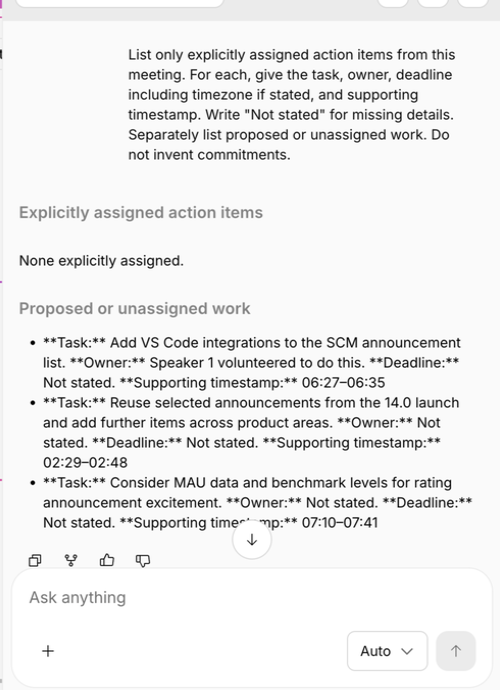
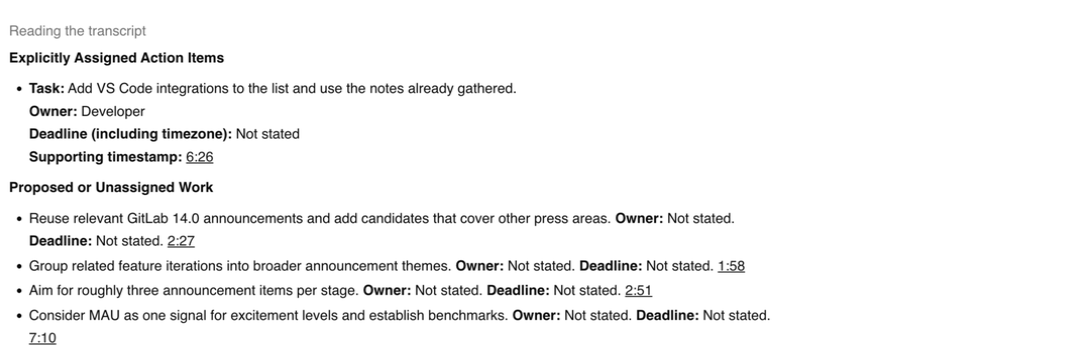
Both summaries used the headings we asked for. The action-item answers split on one real point. Near the end, someone offers to add VS Code integrations to the announcement list. Happy Scribe called it proposed work by Speaker 1, with nobody assigned. ScreenApp called it an assigned task for “Developer” and cited 6:26, though its own transcript puts the offer at 6:32. Happy Scribe’s reading is closer to what the transcript shows: an offer, not an assignment. We would still want the audio before calling either one wrong.
Both answers are in the screenshots at the top.
Recording, Exports and Sharing
Both offered a Word export, and Happy Scribe reported its file ready. We could not open either file, because the test browser was blocked from the Downloads folder. One thing to check on Happy Scribe Free: its pricing page lists DOCX in the Free plan card but only TXT and SRT in the comparison grid.
Happy Scribe shares through workspace access and invitations. ScreenApp gives a read-only link, with an option to include the recording. We did not test either from a second account, so check the access setting before you share anything sensitive.
Privacy and Security
Happy Scribe lists SOC 2 Type 2 and GDPR compliance and runs on a data centre in the European Union. ScreenApp has SOC 2 Type 2. Neither test told us anything about retention or deletion, so read Happy Scribe’s privacy policy and ScreenApp security if you handle regulated data. The screenshots here exclude account details and participant video.
How We Tested
Date
29 September 2026
Plans tested
Happy Scribe trial and ScreenApp Pro
Browser
Chrome incognito on macOS
Input
Same English MP4 bytes
Uploads
One per product
Prompts
Summary, then action items
We ran both tests one after the other on the same Mac and connection in Sri Lanka, without measuring network speed. The Happy Scribe account showed a 10-minute trial allowance; we did not confirm its exact plan name. ScreenApp was on Pro and had seen this file in earlier tests, so caching is possible.
Happy Scribe ran machine transcription in English (US), with no translation, glossary or style guide. ScreenApp used its default upload settings. We scrolled each transcript to the end, then sent the same summary and action-item prompts. The internal test record keeps file hashes, interface text, recordings and screenshots; only the two answer crops are public.
Read the Test Prompts
Summary: Summarize this meeting in no more than 180 words. Use headings Discussion, Agreed Decisions, and Unresolved Proposals. Include only information supported by the transcript. Do not invent decisions, owners or deadlines.
Action items: List only explicitly assigned action items from this meeting. For each, give the task, owner, deadline including timezone if stated, and supporting timestamp. Write "Not stated" for missing details. Separately list proposed or unassigned work. Do not invent commitments.
What This Test Does Not Establish
Not tested in this pilot
- Live meeting capture
- Subtitles
- Translation
- Integrations
- Human proofreading
- Whether downloaded exports opened correctly
There is no human-checked transcript, word error rate, timing comparison or repeat run. With different plans and a reused file, this is a first look, not a quality score.
Frequently Asked Questions
Is Happy Scribe free?
There is a Free plan, but it is mostly a trial: a 10-minute allowance for AI transcription, 3 AI Chat files a month, meeting recordings up to 45 minutes and hardcoded MP4 subtitles watermarked on Free.
Is there a free Happy Scribe alternative?
Not one we can point to for regular use. ScreenApp Free is also a trial, with 2 transcriptions and 3 uploads. Try both on a real file, then pay for the one whose allowance fits. See when switching makes sense.
Can Happy Scribe transcribe an uploaded video?
Yes. Our MP4 came back with a full transcript, no live meeting needed. It also imports from YouTube, Vimeo, Google Drive, Box and Dropbox.
Which costs less?
Happy Scribe Basic has the lower listed price. But it meters minutes, and ScreenApp meters files, so the cheaper one depends on how long your recordings are. Compare the plans.
Which is more accurate?
This test cannot say. You would need a human-checked transcript and several runs. The two AI answers did disagree on one action item, which is a reason to check the audio, not a score.
Check Your Own Recording
Open ScreenApp or explore Happy Scribe. Upload the same recording to both, then check the transcript and any assigned work against the audio. For Happy Scribe on its own, read our Happy Scribe review. Weighing Otter or Rev too? See Happy Scribe vs Otter vs ScreenApp and Rev vs ScreenApp.