

Scroll tables sideways to compare both products.
Transkriptor vs ScreenApp
Consider Transkriptor if your work centers on editable transcripts, subtitles, translation or a monthly allowance of transcription minutes.
Its Lite plan costs less than ScreenApp Pro, and its published Pro plan includes AI summary and chat. In our Trial account, the editor showed speaker-labelled text and playback, but the full transcript, AI tools and TXT download led to upgrade prompts.
Consider ScreenApp if you want to keep a recording and ask questions about it in the same workspace.
Our Pro account accepted the same video and answered both test prompts. Its visible transcript stopped at 3:18 in an eight-minute recording on all three attempts, so we cannot claim it provided a complete transcript in this pilot.
These were different plans with different language settings. The results below describe what we could see in the tested accounts, including the incomplete transcripts and Transkriptor’s upgrade gates.
Quick Comparison
| Workflow | Transkriptor | ScreenApp |
|---|---|---|
| MP4 upload | Observedthree accepted on Trial | Observedthree accepted on Pro |
| Transcript in this test | Observed5:35 preview; full text gated | Observedvisible text ended at 3:18 despite an 8:00 player |
| Speaker labels and editing | Observedlabelled transcript editor and playback; identity accuracy unverified | Observedlabels in recording transcript; identity accuracy unverified |
| AI summary and questions | Published on Pro; Trial showed upgrade prompts | Observedboth test prompts answered on Pro |
| Recording and meetings | Publishedmeeting bot and recording options; not tested | Publishedscreen, window, browser tab, microphone and camera, with system audio; not tested |
| Languages | Published100+ for transcription; other languages not tested | Published100+ documented languages; other languages not tested |
| Subtitles and translation | Publishedboth available; not tested | Not compared in this upload pilot |
| Sharing | Observedcontrols inspected; recipient access not tested | Observedcontrols inspected; recipient access not tested |
| Exports | TXT request met an upgrade gate on Trial | TXT requested; downloaded contents not verified |
Sources, checked 2026-09-30: Our upload test results, ScreenApp Chrome extension, Transkriptor pricing, ScreenApp supported languages
Observed seen in our upload testPublished from the vendor's own pages, not tested
Published capabilities come from Transkriptor’s pricing and feature list and ScreenApp pricing. The upload rows describe only these accounts and this file.
Feature Comparison
Everything each product lists, side by side. The Transkriptor column comes from Transkriptor’s pricing, security and home pages, checked 9 October 2026. The ScreenApp column comes from our pricing page and product documentation. “Not listed” means the feature does not appear on those pages, not that Transkriptor lacks it; “Not checked” means we have not looked.
| Feature | Transkriptor | ScreenApp |
|---|---|---|
| Recording and capture | ||
| Screen recording | Transkriptor: Not listed; Transkriptor offers audio or video recording in the browser | ScreenApp: Yes: screen, window, browser tab, microphone and camera, with system audio |
| Meeting bot | Transkriptor: Yes: a meeting bot for Zoom, Google Meet and Microsoft Teams | ScreenApp: Yes: meeting bot for Zoom, Google Meet and Microsoft Teams, joining from Google Calendar and Microsoft Outlook calendars |
| Apps | Transkriptor: Yes: web, iOS and Android apps, with transcriptions synced across devices | ScreenApp: Yes: Mac (Apple silicon) and Windows apps, iOS and Android apps and a Chrome extension that records tab, screen, mic and camera |
| Live transcription | Transkriptor: Not listed on the Transkriptor pages we checked | ScreenApp: Yes: live transcript while recording (beta) |
| Files and imports | ||
| Monthly transcription allowance | Transkriptor: 300 minutes on Lite, 2,400 on Pro, 3,000 per Team seat | ScreenApp: 50 transcriptions and 500 uploads a month on Pro |
| Cloud files and links | Transkriptor: Yes: Google Drive, OneDrive and Dropbox files by link, plus automatic Google Drive transcription; YouTube videos by link | ScreenApp: Yes: YouTube, Vimeo, TikTok, Instagram, Facebook and most other public video links (Twitch, Loom, Dropbox, Google Drive, Pinterest, X, Threads, Douyin, Kuaishou, Bilibili) through a generic importer |
| Transcription | ||
| Transcription languages | Transkriptor: 100+ | ScreenApp: 100+ |
| Translation | Transkriptor: Yes: translation into 100+ languages | ScreenApp: Yes: transcript and caption translation into 99 languages |
| Speaker labels | Transkriptor: Yes: multiple speaker identification, with editable text and speaker tags | ScreenApp: Yes: speaker identification, with renaming |
| Custom vocabulary | Transkriptor: Yes, on the Team plan | ScreenApp: Yes: custom vocabulary for transcription |
| AI notes and questions | ||
| Summaries and AI chat | Transkriptor: Yes: AI summary, custom summary templates and AI chat on Pro; call analysis on Team: speaker talk time, AI filters and sentiment detection | ScreenApp: Yes: AI chat with any recording, plus action items with an owner and deadline, and decisions listed separately |
| Questions across a library | Transkriptor: Not checked | ScreenApp: Yes: one AI chat that searches and answers from every recording in your library, or a single folder |
| Documents from a recording | Transkriptor: Not listed on the Transkriptor pages we checked | ScreenApp: Yes: documents in Markdown, TXT, PDF, DOCX and PPTX |
| AI dubbing | Transkriptor: Not listed on the Transkriptor pages we checked | ScreenApp: Yes: translated synthetic speech with a separate voice for each speaker, saved as a new audio or video file |
| Exports and integrations | ||
| Export formats and subtitles | Transkriptor: Yes: TXT, SRT, Word or plain text, plus subtitles created from video | ScreenApp: Yes: PDF, DOCX, TXT, SRT and VTT, on every plan |
| Integrations | Transkriptor: Yes: Google Drive, OneDrive, Dropbox, Slack, Notion, HubSpot, Salesforce, Zoho, SharePoint and Trello | ScreenApp: ScreenApp works with Zapier, Slack and Notion through the API; there are no native Slack, Notion or Zapier apps |
| Connector for AI assistants | Transkriptor: Yes: a connector for working with transcripts in Claude | ScreenApp: Yes: an MCP connector on every plan, including Free |
| API | Transkriptor: Not checked | ScreenApp: Yes: API keys, up to 1,000 requests per minute per API key |
| Security | ||
| Certifications | Transkriptor: Yes: SOC 2 and ISO 27001 certified and GDPR compliant | ScreenApp: Yes: SOC 2 Type 2 |
| Model training | Transkriptor: Transkriptor says transcriptions are never used to train AI models | ScreenApp: ScreenApp says customer content is not used to train AI models |
| Single sign-on and HIPAA | Transkriptor: Not listed on the Transkriptor pages we checked | ScreenApp: No: SSO and SAML are not available, and HIPAA compliance and a BAA are not available |
Sources, checked 2026-10-09: ScreenApp Chrome extension, Transkriptor pricing, ScreenApp supported languages, Transkriptor home page, ScreenApp meeting bot repository, ScreenApp meeting bot, ScreenApp desktop apps, ScreenApp mobile apps, ScreenApp pricing, ScreenApp audio translator, Transcription accuracy and languages, AI chat troubleshooting, Video to document, AI video dubbing, Transkriptor security, Slack integration options, ScreenApp API documentation, ScreenApp trust center, ScreenApp privacy policy
The short version: Transkriptor is a transcription service first, with a big integration list, translation and subtitles. ScreenApp is a recorder first, built around asking questions about the files it keeps.
Strengths and Trade-offs
- Its editor combines timestamped text, speaker tags and playback. The published Lite plan includes translation and transcript sharing. Pro lists summary, chat and custom summary templates.
- Published Team features include a shared workspace, custom vocabulary and call analysis. Those workflows were not tested.
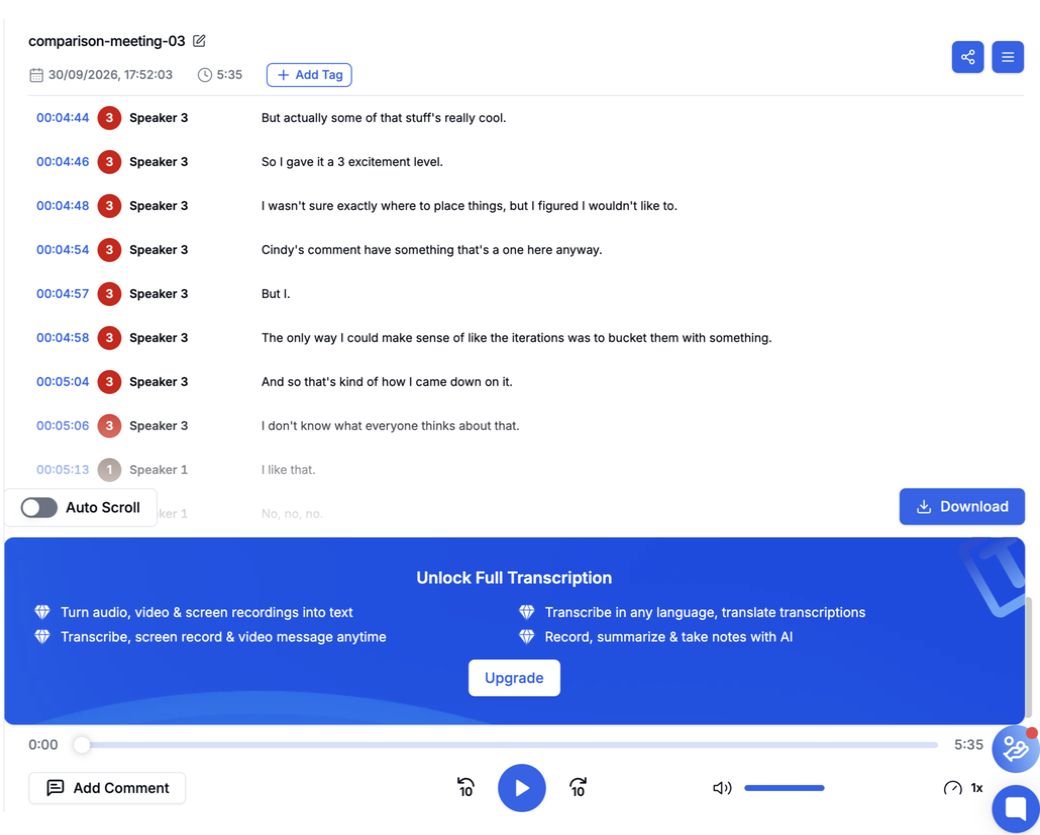
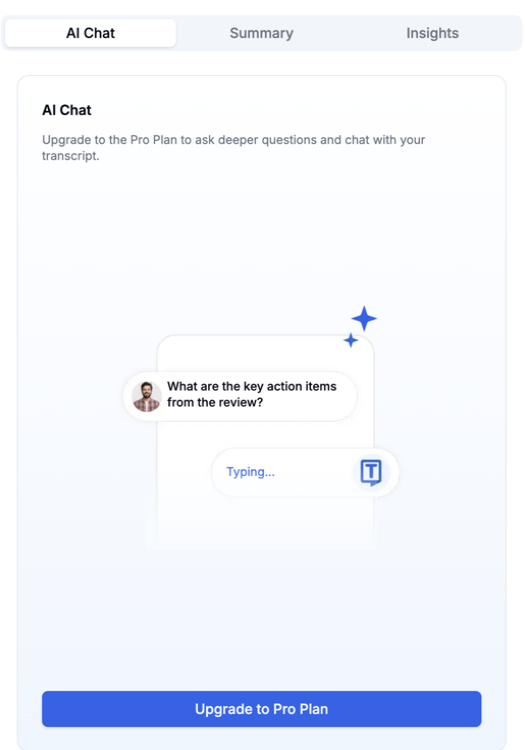
- The Trial account produced only a preview of this meeting. It showed “Unlock Full Transcription,” and both AI tabs requested Pro. The TXT control was visible, but the download attempt also reached an upgrade screen. A paid account may behave differently.
- The tested Pro account retained the recording and returned a structured summary and action response. Screen recording and uploads are listed on its current pricing page.
- Pro has separate monthly allowances for uploads, transcriptions and AI chats. Compare all three with your expected use.
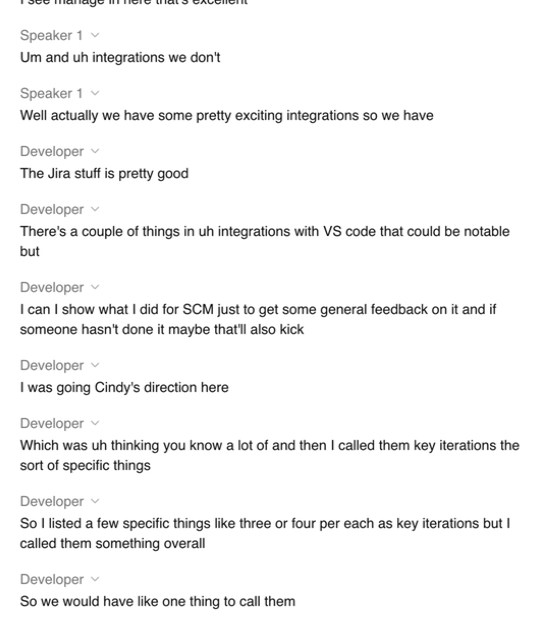
- “Transcript ready” appeared, yet the last visible line in each uploaded recording was at 3:18. The assistant's answers therefore need checking against the source video. Its action answer reported 4 library matches, so we did not establish that it used only this upload.
Price Comparison
USD web prices checked on 30 September 2026 from Sri Lanka. Transkriptor meters transcription minutes and Team seats. ScreenApp lists separate upload, transcription and AI allowances. The figures below describe subscriptions, not the cost of this one test.
| Plan | Monthly billing | Annual billing | Published allowance |
|---|---|---|---|
| Transkriptor Free trial | Free | Trial | 90 minutes advertised; full access was gated in our account |
| Transkriptor Lite | $9.99/month | Check checkout for annual terms | 300 transcription minutes/month; editing, translation and sharing |
| Transkriptor Pro | $19.99/month | $99.99/year ($8.33/month equivalent) | 2,400 minutes/month; AI summary and chat |
| Transkriptor Team | $30/seat/month | $20/seat/month equivalent | 3,000 minutes/seat/month; team controls |
| ScreenApp Free | $0 | Free | 3 uploads and 2 transcriptions to try; 10 AI chats/month |
| ScreenApp Pro | $30/month | $228/year ($19/month equivalent) | 500 uploads, 50 transcriptions and 50 AI chats/month |
| ScreenApp Max | $69/month | $408/year ($34/month equivalent) | Published unlimited uploads, transcriptions and AI chats, subject to plan terms |
Sources, checked 2026-09-30: Transkriptor pricing, ScreenApp pricing
Transkriptor’s annual Lite price was not clear on the source page, so we have left it out. Its Pro annual total is the vendor’s displayed figure. Confirm currency, taxes and checkout terms before buying.
Test Results
The same 480.04-second MP4 was submitted 3 times in each account. ScreenApp reported the transcript ready on all three. Its player showed 8:00, but scrolling to the end of the visible transcript repeatedly led to 3:18. Transkriptor showed a 5:35 preview and an upgrade banner; its last visible transcript block began at 5:24. Neither observation confirms that all spoken content was available for review.
Transkriptor Trial Preview
ScreenApp Visible Transcript
Summary and Action Items
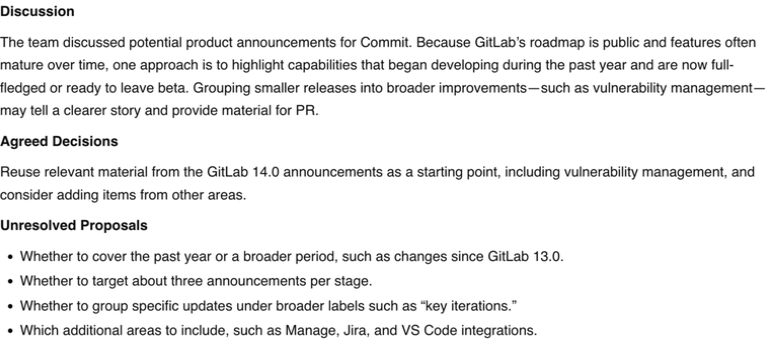
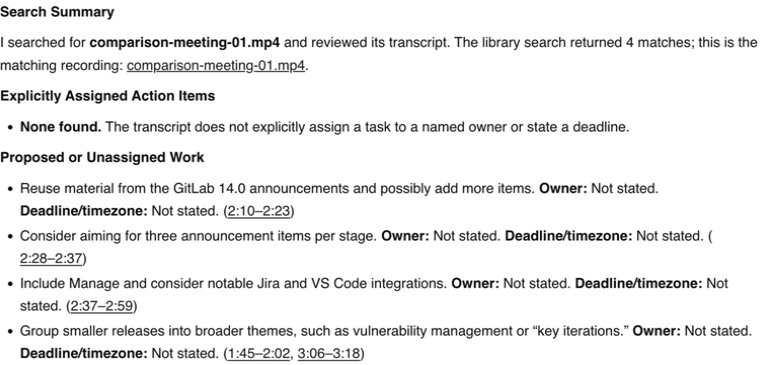
Only ScreenApp Pro accepted the identical prompts. Its summary used the requested Discussion, Agreed Decisions and Unresolved Proposals headings and ran 130 whitespace-delimited words excluding headings, or 135 with headings. Its action answer reported no explicitly assigned owner or deadline and listed 4 proposed items. We have not checked them against the full recording.
The action answer named the intended file, but it searched the whole library, so we could not confirm it used only this upload. Transkriptor’s Trial showed Pro prompts for both AI Chat and Summary, so it produced no answer to compare.
Transkriptor AI Access
ScreenApp Summary
ScreenApp Action Response
Recording, Exports and Sharing
Transkriptor publishes a meeting bot for Zoom, Google Meet and Microsoft Teams, plus web and mobile access. Its pricing page also lists 100+ languages, subtitle creation, translation and links to cloud files. ScreenApp publishes screen, webcam and microphone capture. We did not test live meetings, device recording, translation, cloud links or language accuracy.
Transkriptor’s Trial displayed PDF, Word, TXT, SRT and other export controls. Clicking TXT reached an upgrade screen. ScreenApp offered a TXT download, but the local Save dialog was canceled without verifying a file. Share menus were inspected in both products; no link was sent or recipient access tested.
Sources checked 30 September 2026: Transkriptor plans and features, ScreenApp plans and ScreenApp recording options.
Privacy and Security
Both services received the same uploaded video. The public screenshots are cropped product views without account email, browser chrome or participant video. The source meeting and original screen recordings stay in the local evidence folder. We did not test deletion, retention or sharing permissions; review Transkriptor security and ScreenApp security for those questions.
How We Tested
Date
30 September 2026
Plans tested
Transkriptor Trial and ScreenApp Pro
Browser
Chrome incognito on macOS
Input
Same 480.04-second file
Uploads
3 per tool, alternated
Prompts
Summary, then action items
Procedure: three uploads each, alternated across the tools, using the same 480.04-second file and computer. Transkriptor’s first run used onboarding; later runs used its dashboard. We scrolled transcript panels to the end and inspected the available AI, export and share controls. The summary and action prompts below were submitted only in ScreenApp because the Transkriptor Trial blocked them.
Read the identical prompts
Summary: Summarize this meeting in no more than 180 words. Use headings Discussion, Agreed Decisions, and Unresolved Proposals. Include only information supported by the transcript. Do not invent decisions, owners or deadlines.
Action items: List only explicitly assigned action items from this meeting. For each, give the task, owner, deadline including timezone if stated, and supporting timestamp. Write "Not stated" for missing details. Separately list proposed or unassigned work. Do not invent commitments.
What This Test Does Not Establish
Not done in this test
- Time complete transcripts
- Obtain export files
- Create a human reference
- Verify the assistant's output against the whole audio
This reused source may have benefited from unknown caching. Plans and language settings were unequal. A delayed local Save dialog invalidated several later captures; those originals were excluded and clean review captures were taken afterward. This test does not rank typical speed, accuracy or overall quality.
Frequently Asked Questions
Can Transkriptor transcribe an uploaded video?
Yes. It accepted the MP4 in all three Trial attempts and displayed a transcript preview. Full access to this file was gated in our Trial account.
Does Transkriptor include AI summaries on Lite?
Its current pricing page lists AI summary, custom templates and AI Chat under Pro. Our Trial account also directed us to Pro for those controls. We did not test Lite or a paid Pro account.
Did ScreenApp transcribe the whole eight-minute file?
We could not verify that. Its player showed eight minutes and reported the transcript ready, but the visible transcript ended at 3:18 after scrolling in each attempt. We did not inspect a downloaded full transcript.
Which tool is more accurate or faster?
This pilot establishes neither. The source has no human-corrected reference, the visible outputs were incomplete, and the plans and language settings differed. We did not produce comparable full-transcript completion times.
Which plan costs less?
Transkriptor Lite has a lower listed monthly price than ScreenApp Pro, and Transkriptor Pro has a lower listed annual total. The allowances count different things, and our Trial test cannot establish paid-plan output quality. Compare the plans against your own files, minutes and AI use.
Check Your Own Recording
Open ScreenApp or explore Transkriptor. Check the transcript, summary and any action owner against the recording before relying on them.