

Scroll tables sideways to compare both products.
Trint vs ScreenApp
Consider Trint for collaborative transcript editing and caption workflows.
Its published plans include transcription, translation, AI summaries and a caption editor. Team adds shared drives and collaborative work. Trint also offers live transcription; it is not limited to uploading finished recordings.
Consider ScreenApp for recording, transcripts and questions about your files.
Its published recording options include screen, window, browser tab, microphone and camera, with system audio. In our upload pilot, the Pro account exposed the meeting's closing discussion and answered both prompts.
The main finding is a trial restriction: Trint exposed only the first 5 minutes of the same 480.04-second file. That prevents a fair comparison of full-meeting summaries. It does not establish what a paid Trint account would produce.
Quick Comparison
| Workflow | Trint | ScreenApp |
|---|---|---|
| Uploaded meeting | Observedreadable transcripts, trial-limited | Observedreadable transcripts through the closing discussion |
| AI notes | Observedsummary and action answer | Observedsummary and action answer |
| Transcript editing | Publishedcollaborative transcript editor | Publishedtranscript corrections, line removal and speaker reassignment saved to the recording |
| Recording and live capture | Publishedlive transcription and mobile/desktop apps; not tested | Publishedscreen, window, browser tab, microphone and camera, with system audio; not tested here |
| Translation and captions | Publishedtranslation and caption editor; not tested | Subtitle export controls observed; translation not tested |
| Exports | Document, CSV, subtitle and editing formats shown in menu | TXT, Word, PDF, VTT and SRT shown in menu |
| Sharing | Collaborator permissions and read-only link controls observed | Read-only conversation link generated; recipient access untested |
Sources, checked 2026-09-16: ScreenApp Chrome extension, Transcript cleaner
Observed seen in our upload testPublished from the vendor's own pages, not tested
Published capabilities come from Trint’s plans, Trint’s transcription workflow, ScreenApp pricing and ScreenApp transcript editing. Pricing and linked Trint sources were checked on 9 October 2026. Menu visibility is not proof that a downloaded file works.
Feature Comparison
Everything each product lists, side by side. The Trint column comes from Trint’s plans, transcription, live, apps, integrations and security pages, checked 9 October 2026. The ScreenApp column comes from our pricing page and product documentation. “Not listed” means the feature does not appear on those pages, not that Trint definitely lacks it; “Not checked” means we have not looked. These are published features, not results of our test, except where a cell says so.
| Feature | Trint | ScreenApp |
|---|---|---|
| Recording and capture | ||
| Screen video recording | Trint: Not listed on the Trint pages we checked; Trint Live transcribes from the microphone or screen, but does not list video recording | ScreenApp: Yes: screen, window, browser tab, microphone and camera, with system audio |
| Live transcription | Trint: Yes: live transcription from the microphone or screen in the mobile and desktop apps. 1 hour a month on Pro, per seat on Team | ScreenApp: Yes: live transcript while recording (beta) |
| Meeting bot | Trint: Not listed on the Trint pages we checked | ScreenApp: Yes: meeting bot for Zoom, Google Meet and Microsoft Teams, joining from Google Calendar and Microsoft Outlook calendars |
| Desktop and mobile apps | Trint: Yes: desktop and mobile apps for Trint licence holders | ScreenApp: Yes: Mac (Apple silicon) and Windows apps, plus iOS and Android apps |
| Browser extension | Trint: Not listed on the Trint pages we checked | ScreenApp: Yes: Chrome extension that records tab, screen, mic and camera |
| Working through a lost connection | Trint: Yes: Trint Live keeps transcribing through a lost connection until you are back online | ScreenApp: Yes: records offline on iOS and Android and uploads when the connection returns |
| Files and imports | ||
| Upload formats | Trint: Yes: MP3, M4A, MP4, AAC and WAV audio, and MP4, WMA, MOV and AVI video | ScreenApp: Yes: video files in MP4, M4V, MOV, AVI, WEBM, MKV, FLV, TS, MTS, M2TS, 3GP, 3GPP, 3G2, WMV, ASF, VOB, OGV, RM, RMVB, MPG, MPEG, M2V, F4V, MXF, and audio files in MP3, M4A, MP4A, M4B, AAC, WAV, OGG, OPUS, FLAC, AIFF, WMA, WEBMA, MKA, AC3, EAC3, WV, AMR, DSF, DFF |
| File limits | Trint: Yes: files under three hours or 3GB | ScreenApp: Recordings up to 2 hours on Pro and 3 hours on Max |
| Import from links | Trint: No: Trint does not accept links to video files, including YouTube links | ScreenApp: Yes: YouTube, Vimeo and direct media links |
| Import from cloud storage | Trint: Yes: Zoom cloud recordings, Box, Dropbox, Google Drive and Zapier, plus newsroom systems such as AP ENPS | ScreenApp: Not checked |
| Transcription | ||
| Transcription languages | Trint: 50+ | ScreenApp: 100+ |
| Translation | Trint: Yes: unlimited translation into 70+ languages on every plan | ScreenApp: Yes: transcript and caption translation into 99 languages |
| Automatic language detection | Trint: Yes: automatic language recognition on the Business plan | ScreenApp: Not checked |
| Speaker labels | Trint: Speaker-change detection, a setting seen in our test | ScreenApp: Yes: speaker identification, with renaming |
| Transcript editing | Trint: Yes: real-time transcript editing with up to 5 team members on Team and unlimited on Business, plus shared drives | ScreenApp: Yes: transcript corrections, line removal and speaker reassignment saved to the recording |
| Subtitles and captions | Trint: Yes: a Caption Editor for video subtitles on every plan | ScreenApp: Subtitle files in PDF, DOCX, TXT, SRT and VTT |
| AI notes and questions | ||
| Summaries | Trint: Yes: AI-powered summaries on every plan | ScreenApp: Yes: action items with an owner and deadline, and decisions listed separately |
| Questions about a transcript | Trint: Yes: an AI Assistant that summarizes, analyzes and extracts insights from transcripts with text prompts | ScreenApp: Yes: AI chat with any recording, plus one AI chat that searches and answers from every recording in your library, or a single folder |
| Documents and slides from a recording | Trint: Not listed on the Trint pages we checked | ScreenApp: Yes: documents in Markdown, TXT, PDF, DOCX and PPTX, plus PowerPoint presentations |
| AI dubbing | Trint: Not listed on the Trint pages we checked | ScreenApp: Yes: Translate the speech in your recording into another language. |
| Sharing and collaboration | ||
| Collaboration | Trint: Yes: real-time transcript editing with up to 5 team members on Team and unlimited on Business, plus shared drives | ScreenApp: Yes: team workspaces and share links |
| Guests without an account | Trint: Yes: collaborators or clients can give feedback without a Trint account | ScreenApp: Read-only share links, as seen in our test |
| Integrations | ||
| Integrations | Trint: Yes: Zoom cloud recordings, Box, Dropbox, Google Drive and Zapier, plus newsroom systems such as AP ENPS | ScreenApp: ScreenApp works with Zapier, Slack and Notion through the API; there are no native Slack, Notion or Zapier apps |
| API | Trint: Yes, on the Business plan | ScreenApp: Yes: API keys, up to 1,000 requests per minute per API key |
| Connector for AI assistants | Trint: Not listed on the Trint pages we checked | ScreenApp: Yes: an MCP connector on every plan, including Free |
| Calendar connection | Trint: Not listed on the Trint pages we checked | ScreenApp: Yes: Google Calendar and Microsoft Calendar |
| Security | ||
| Certifications | Trint: Yes: ISO 27001 and Cyber Essentials certified, with data encrypted in transit and at rest | ScreenApp: Yes: SOC 2 Type 2 |
| Single sign-on | Trint: Yes: SSO and SCIM on the custom Business plan | ScreenApp: No: SSO and SAML are not available |
| HIPAA | Trint: Not listed on Trint's security page | ScreenApp: No: HIPAA compliance and a BAA are not available |
Sources, checked 2026-10-09: ScreenApp Chrome extension, Transcript cleaner, Trint live transcription, Trint plans, ScreenApp meeting bot repository, ScreenApp meeting bot, Trint apps, ScreenApp desktop apps, ScreenApp mobile apps, Trint transcription and file formats, ScreenApp supported file types, ScreenApp pricing, Trint integrations, ScreenApp supported languages, ScreenApp audio translator, Transcription accuracy and languages, AI chat troubleshooting, Video to document, AI video dubbing, Slack integration options, ScreenApp API documentation, Trint security, ScreenApp trust center
Plan availability is shown where the vendor states it. Several Trint features, including the API, single sign-on and automatic language recognition, are on the custom Business plan only.
Strengths and Trade-Offs
Strength
Trint is worth considering when several people need to review a transcript or prepare captions. The editor exposed speaker-change handling, export choices and collaborator permissions during our test. Its published Team plan adds shared drives and real-time collaboration.
Trade-off
The trial is less useful for evaluating a whole meeting: every tested upload stopped at the same accessible-transcript limit. The action answer also supplied timestamps beyond that exposed transcript. Those references need checking against the audio before using the answer to assign work.
Strength
ScreenApp Pro exposed the closing discussion on every upload. Its action answer provided a task, speaker label and timestamp, with the missing deadline left unstated. That gives a reviewer a passage to inspect.
Trade-off
The timestamp did not match the visible transcript segment containing the offer, and Speaker 3 is not a verified person's identity. ScreenApp's broader visible coverage came from a paid account compared with a restricted trial. We did not test whether its editing or collaboration meets the same needs as Trint's paid workflows.
Pricing and Plan Allowances
Prices checked 9 October 2026. Annual figures are monthly equivalents billed annually. Trint prices below reproduce the dollar amounts displayed in our Sri Lanka session; its screen did not explicitly identify the currency code. ScreenApp prices are USD. Confirm currency and taxes before treating these as a direct cost comparison.
| Plan | Monthly billing | Annual billing, per month | Usage and conditions |
|---|---|---|---|
| Trint Pro | $100 | $79 | Per seat; individual plan. Unlimited transcription under fair use; 1 hour live transcription/month |
| Trint Team | $90 | $69 | Per seat; 2 to 5 members. Shared drives, collaboration; 1 hour live transcription per seat/month |
| Trint Business | Custom | Custom | Advanced live workflows and enterprise administration; contract terms |
| ScreenApp Free | $0 | $0 | 2 transcriptions and 3 uploads to try; 10 AI chats/templates monthly |
| ScreenApp Pro | $30 | $19 | 50 transcriptions, 500 uploads and 50 AI chats/templates monthly |
| ScreenApp Max | $69 | $34 | Unlimited transcriptions, uploads and AI chats/templates under fair use |
| ScreenApp Enterprise | From $199/month | Contract terms | Usage and users by contract |
Sources, checked 2026-10-09: Trint plans, ScreenApp pricing
Trint lists transcription in 50+ languages and translation in 70+ languages across these plans. Its unlimited-transcription footnote covers day-to-day use; archive projects, continuous live transcription and bulk-volume work require a separate discussion. We did not test these language counts or paid allowances.
ScreenApp’s recording-session limits are 45 minutes on Free, 2 hours on Pro and 3 hours on Max. Uploads, transcriptions and AI chats are separate allowances.
The Trint trial guide describes a 7-day trial with limited transcript access. It still calls the trial Advanced, while the current account pricing screen calls it Pro. We tested the trial’s actual accessible output, not either paid plan.
Same-File Test Results
| Observation | Trint Trial | ScreenApp Pro |
|---|---|---|
| Readable uploads | 3, each trial-limited | 3, each exposing closing discussion |
| Visible coverage | First 5 minutes | Last visible transcript entry 7:51 |
| Summary words, including headings | 119 | 180 |
| Requested summary maximum | 180 | 180 |
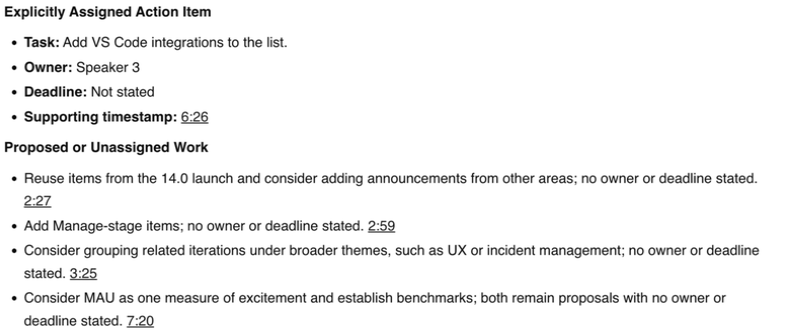
| Action response | No explicit assignments reported; proposed work listed | Add VS Code integrations; Speaker 3; deadline not stated |
| Download verification | CSV requested; payload unverified | TXT requested; payload unverified |
Both summaries met the requested length. The word counts do not measure accuracy, and unequal coverage prevents ranking summary completeness. The last visible timestamp is an observation about the interface, not a measured coverage percentage.
The Trial Limit
Trint displayed “Unlock your full transcript” on the tested uploads. No paid upgrade was purchased, so the missing portion remains untested on Trint.
Trint trial access limit

Summary Outputs
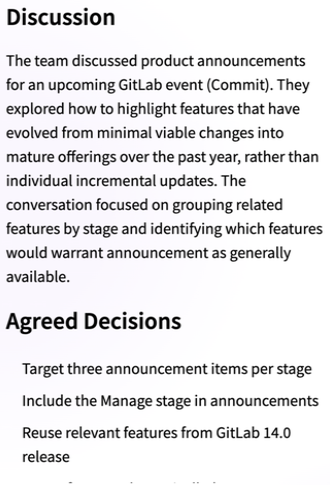
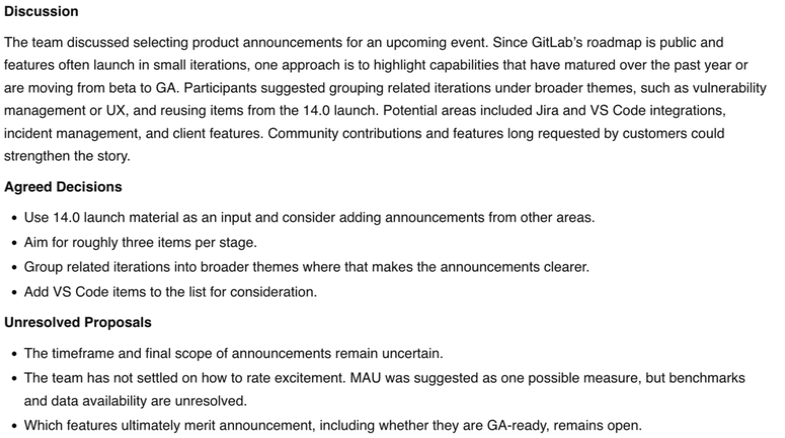
The first completed pair received the same request for Discussion, Agreed Decisions and Unresolved Proposals, within the stated word limit.
Trint summary excerpt
ScreenApp summary
Action Items and Timestamp Checks
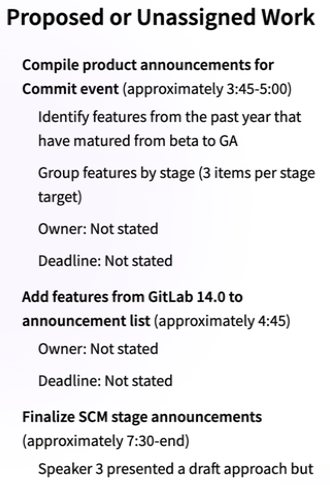
Trint reported no explicit assignments, then listed proposed work with approximate references including 7:30-end and 8:00-end, despite the exposed transcript ending earlier. Their grounding remains unverified. We have not classified these as audio-confirmed errors.
ScreenApp cited 6:26 for the offer to add VS Code integrations. The visible offer appears in the 6:32 segment instead. Its owner label also requires identification. Check both products’ answers against the recording before assigning tasks.
Trint proposed-work excerpt
ScreenApp action answer
Exports, Sharing and Untested Workflows
Trint’s export menu offered document, CSV, subtitle and editing formats. ScreenApp offered text, document and subtitle choices. We requested a CSV from Trint and TXT from ScreenApp but did not verify the downloaded payloads. Saved text extracts document the visible answers; they are not verified vendor exports.
Trint exposed collaborator roles and read-only link controls. No invitations were sent. ScreenApp generated a read-only conversation link, but access from a recipient account was not tested. Those observations do not establish equivalent permissions or security controls.
Not tested in this pilot
- Live meetings
- Search
- Integrations
- Translation
- Retention
- Deletion
For sensitive recordings, check the vendor’s contract, sharing settings and retention options against your requirements. This pilot is not a security audit.
Methodology and Limitations
Date
9 October 2026
Plans tested
Trint Trial and ScreenApp Pro
Browser
Chrome Incognito, same Mac and network
Input
Same English meeting, untrimmed
Uploads
3 per tool
Prompts
Summary and action items, first pair
The exact stored sample was uploaded without trimming or transcoding. Trint used English with American spelling, speaker-change detection on and the custom dictionary off. ScreenApp used its Pro defaults. Some processing overlapped, bandwidth was not measured and previous use of the file could have affected processing.
Only the first completed pair received the identical summary and action prompts. Repeat uploads checked whether readable transcripts appeared and where visible coverage ended; they were not repeated evaluations of every feature.
What the prompts asked for
The summary request specified Discussion, Agreed Decisions and Unresolved Proposals, a maximum of 180 words and only supported information. The action request asked for explicit assignments with task, owner, deadline or timezone and supporting timestamp, using “Not stated” for missing details and keeping proposed work separate.
Screenshots show reviewed output excerpts with account details and browser chrome excluded. Private recordings include interrupted or incomplete capture attempts, so they do not support a processing-time comparison. No human-corrected transcript, verified speaker identities or paid Trint rerun was available. These limits apply to every result above.
Frequently Asked Questions
Does the Trint trial show the whole recording?
Not in this test. It exposed the first 5 minutes of each upload and displayed an unlock notice. We did not test the remaining portion on a paid Trint account.
Can Trint transcribe live?
Yes. Its current published plans include live transcription, with different allowances and advanced options by plan. We tested file uploads only.
Which tool is more accurate or faster?
This pilot establishes neither. Trial coverage differed, reliable comparative timing was unavailable and no human-corrected audio reference was used.
Did both tools export the transcript successfully?
Export menus were visible and downloads were requested, but downloaded files were not verified. We cannot report a successful export check.
Which should I try for my workflow?
Try Trint if collaborative transcript review and caption preparation are central. Try ScreenApp if your workflow centers on recording, notes and questions. Use the same file and check access limits before comparing the answers.
Check Your Own Recording
Run the same test on your own recording
Upload the same file
Use one recording in both tools.
Confirm the transcript
Check the accessible transcript covers the whole file.
Check against the audio
Verify the summary, task owners and timestamps.
Open Trint or open ScreenApp to start.