


Scroll tables sideways to compare both products.
Sonix vs ScreenApp
Pick Sonix if you transcribe now and then and would rather not subscribe.
Pay-as-you-go is $10 an hour of audio, with the full editor, 54+ languages and automated subtitles and captions, with SRT and VTT export. AI analysis only comes with a subscription.
Pick ScreenApp if you record your screen and come back to ask questions later.
It records screen, window, browser tab, microphone and camera, with system audio, keeps the video next to the transcript, and one AI chat can answer across every recording you keep.
The real split is billing: hours of audio on Sonix, files and chats on ScreenApp. Our test could not compare the AI answers, for a reason explained below.
Choosing Between Sonix and ScreenApp
Sonix is a strong transcription editor. These are the points that usually decide it.
- You transcribe occasionally. Sonix pay-as-you-go is $10 an hour of audio, with no subscription. ScreenApp has no pay-as-you-go option, so for a handful of files a year Sonix is the simpler buy.
- You want AI notes on every recording. Sonix’s AI analysis is not on pay-as-you-go; Core includes 5 AI hours a month. ScreenApp Pro includes 50 AI chats a month alongside 50 transcriptions.
- You record, not just upload. Sonix’s live transcription is an enterprise early-access request. ScreenApp records your screen, mic and camera, and has a meeting bot.
When Sonix Is the Better Pick
If subtitles and translation are the deliverable, Sonix fits: it has automated subtitles and captions, with SRT and VTT export and one-click translation of finished transcripts into 54+ languages. Teams that need a shared, searchable transcript archive also get full-text search across every transcript in the workspace.
Quick Comparison
What each product did with the same 480.04-second meeting file on 28 September 2026. Everything each product lists is in the full table below.
| Check | Sonix Trial | ScreenApp Pro |
|---|---|---|
| Completed uploads | 3 | 3 |
| Transcript access | Text loaded through the final passage; survey obscured normal controls | Panel opened and transcript text saved through the final passage |
| Summary prompt | Not submitted: account survey blocked planned interaction | Answer used Discussion, Agreed Decisions and Unresolved Proposals headings |
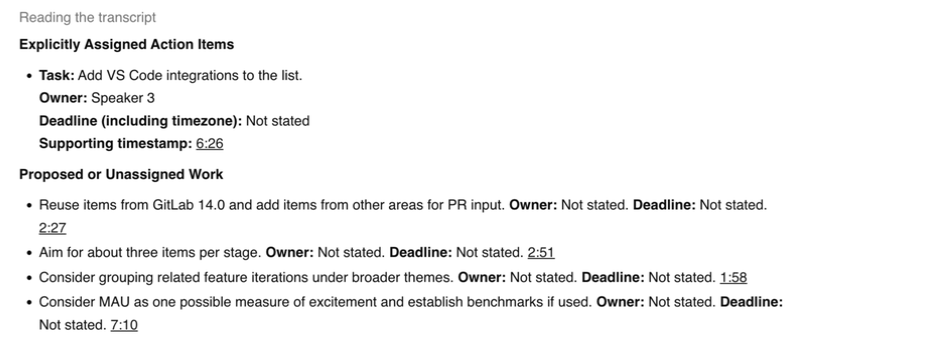
| Action-item prompt | No matched response collected | Answer identified adding VS Code integrations, assigned a numbered speaker and left the deadline unstated |
| Repeat consistency | Completion repeated; wording not scored | Completion repeated; speaker labels varied |
Sources, checked 2026-09-28: Our upload test results
Feature Comparison
Everything each product lists, side by side. The Sonix column comes from its pricing, detailed features and security pages, checked 14 October 2026. The ScreenApp column comes from our pricing page and product documentation. “Not listed” means we did not find it on those pages, not that Sonix lacks it.
| Feature | Sonix | ScreenApp |
|---|---|---|
| Recording and capture | ||
| Live recording | Sonix: Yes: enterprise real-time transcription advertised with a request for early access | ScreenApp: Yes: meeting bot for Zoom, Google Meet and Microsoft Teams, plus live transcript while recording (beta) |
| Screen and device recording | Sonix: Not listed on the Sonix pages we checked | ScreenApp: Yes: screen, window, browser tab, microphone and camera, with system audio |
| Apps | Sonix: Browser editor | ScreenApp: Mac (Apple silicon) and Windows apps, iOS and Android apps and a Chrome extension that records tab, screen, mic and camera |
| Files and imports | ||
| Uploads and imports | Sonix: Yes: uploads, plus select Dropbox as a file source when uploading, or connect it through Zapier to transcribe new files automatically | ScreenApp: Yes: 500 uploads a month on Pro, plus YouTube, Vimeo and direct media links |
| Free to try | Sonix: 30 minutes of transcription | ScreenApp: 2 transcriptions and 3 uploads |
| Transcription and subtitles | ||
| Transcription languages | Sonix: 54+ | ScreenApp: 100+ |
| Speaker labels | Sonix: Yes, with speaker voiceprints on Advanced | ScreenApp: Yes: speaker identification, with renaming |
| Translation | Sonix: Yes: one-click translation of finished transcripts into 54+ languages | ScreenApp: Yes: transcript and caption translation into 99 languages |
| Subtitles | Sonix: Yes: automated subtitles and captions, with SRT and VTT export | ScreenApp: Subtitle files among its exports: PDF, DOCX, TXT, SRT and VTT |
| Search | Sonix: Yes: full-text search across every transcript in the workspace | ScreenApp: Yes: search across recordings by name or transcript |
| AI notes and questions | ||
| AI analysis | Sonix: Yes: custom prompts, summaries, action-item extraction and questions across recordings, on subscriptions only | ScreenApp: Yes: AI chat with any recording, plus action items with an owner and deadline, and decisions listed separately |
| Questions across recordings | Sonix: Yes, in AI Workspace | ScreenApp: Yes: one AI chat that searches and answers from every recording in your library, or a single folder |
| AI dubbing | Sonix: Not listed on the Sonix pages we checked | ScreenApp: Yes: translated synthetic speech with a separate voice for each speaker, saved as a new audio or video file |
| Exports and integrations | ||
| Export formats | Sonix: Yes: DOCX, PDF, TXT, SRT, VTT | ScreenApp: Yes: PDF, DOCX, TXT, SRT and VTT, on every plan |
| API and publishing | Sonix: Core adds API access, subtitles burned into video and an embeddable media player | ScreenApp: Yes: API keys, plus an MCP connector on every plan, including Free |
| Team features | Sonix: Advanced adds workspace search, speaker voiceprints, version history, permissions and shared folders | ScreenApp: Library questions can target a folder; there are no native Slack, Notion or Zapier apps |
| Security | ||
| Certifications | Sonix: Yes: SOC 2, GDPR and HIPAA compliance | ScreenApp: Yes: SOC 2 Type 2; HIPAA compliance and a BAA are not available |
| Model training | Sonix: Sonix says customer data is not used for training | ScreenApp: ScreenApp says customer content is not used to train AI models |
| Administration | Sonix: Pro adds webhooks, billing administration, per-user quotas, a medical model and SOC 2 report access | ScreenApp: No: SSO and SAML are not available |
Sources, checked 2026-10-14: Sonix pricing, Sonix plan features, ScreenApp Chrome extension, ScreenApp pricing, Sonix real-time transcription, ScreenApp meeting bot repository, ScreenApp desktop apps, ScreenApp mobile apps, sonix.ai/resources/transcribe-dropbox-audio-automatically/, ScreenApp supported languages, Transcription accuracy and languages, ScreenApp audio translator, Sonix AI analysis, AI chat troubleshooting, AI video dubbing, Sonix security, ScreenApp trust center, ScreenApp privacy policy
Strengths and Trade-offs
- All three uploads completed, and the transcript reached the end of the meeting each time.
- Pay-as-you-go keeps the full editor, subtitles and exports without a monthly bill.
- The trade-off: transcription hours and AI hours are separate allowances, and AI is not available without a subscription.
- The recording, transcript and both AI answers sat together in one conversation.
- It goes past text: translated synthetic speech with a separate voice for each speaker, saved as a new audio or video file, and documents in Markdown, TXT, PDF, DOCX and PPTX.
- The trade-off: speaker labels changed between uploads, and there is no pay-as-you-go plan for occasional use.
Price Comparison
USD web prices, checked 14 October 2026 from Sri Lanka. Annual totals are paid yearly. Sonix bills hours of audio; ScreenApp counts transcriptions, uploads and AI chats.
| Plan | Monthly Billing | Annual Billing |
|---|---|---|
| Sonix Pay As You Go | $10/media hour | No subscription |
| Sonix Core | $25/month | $275/year |
| Sonix Advanced | $50/month | $550/year |
| Sonix Pro | $80/month | $880/year |
| Sonix Enterprise | Custom quote | Contract terms |
| ScreenApp Free | $0 | $0 |
| ScreenApp Pro | $30/month | $228/year ($19/month equivalent) |
| ScreenApp Max | $69/month | $408/year ($34/month equivalent) |
| ScreenApp Enterprise | From $199/month | Contract terms |
Sources, checked 2026-09-28: Sonix pricing, ScreenApp pricing
Sources: Sonix pricing and ScreenApp pricing. Sonix subscriptions include a user; extra seats cost $25 monthly or $275 yearly and do not add hours. Additional subscription hours cost $10 per hour.
Included Usage
| Plan | Transcription / Uploads | AI Allowance |
|---|---|---|
| Sonix Trial | 30 minutes to try | Trial entitlements; AI not verified in this account |
| Sonix Core | 5 hours/month; 60 hours/year on annual billing | 5 AI hours/month; 60 hours/year on annual billing |
| Sonix Advanced | 20 hours/month; 240 hours/year on annual billing | 25 AI hours/month; 300 hours/year on annual billing |
| Sonix Pro | 40 hours/month; 480 hours/year on annual billing | 100 AI hours/month; 1200 hours/year on annual billing |
| ScreenApp Free | 2 transcriptions; 3 uploads to try | 10 AI chats/templates/month |
| ScreenApp Pro | 50 transcriptions; 500 uploads/month | 50 AI chats/templates/month |
| ScreenApp Max | Unlimited transcriptions; Unlimited uploads, subject to fair use | Unlimited AI chats/templates, subject to fair use |
Sources, checked 2026-09-28: Sonix pricing, ScreenApp pricing
Sonix translation draws on transcription hours; AI usage measures the duration of recordings analyzed. Annual Sonix allowances are available for the year upfront. ScreenApp’s Free uploads and transcriptions do not renew monthly; its Free AI allowance does. See Sonix allowance rules and ScreenApp plan limits.
Test Results
All 3 uploads completed on both products, and each transcript reached the closing passage. That shows the files went through, not that the words were right.
What the AI Result Shows
ScreenApp answered both prompts on the first upload. Its action answer separated proposed work from the assigned task and cited the file we selected.
A later ScreenApp upload labelled a speaker “Product Lead” where the first used numbered speakers, and we did not check which was right. Sonix showed a transcription confidence score, which is its own estimate, not a measured accuracy.
On Sonix, an onboarding survey covered the controls and blocked the prompts, so there is no Sonix answer to compare. Do not read that gap as a ScreenApp win.
Privacy and Security
Sonix lists SOC 2, GDPR and HIPAA compliance and says customer data is not used for training. These are vendor statements, not audit findings; see Sonix security.
ScreenApp says customer content is not used to train AI models and has SOC 2 Type 2; HIPAA compliance and a BAA are not available. See ScreenApp security and the Trust Center. We did not test deletion or retention on either product.
How We Tested
Date
28 September 2026
Plans tested
Sonix Trial and ScreenApp Pro
Browser
Chrome incognito on macOS
Input
Same 480.04-second meeting MP4
Uploads
3 per tool
AI prompts
Not completed on Sonix
We ran both on 28 September 2026 in Chrome incognito on one Mac in Sri Lanka, without measuring connection speed. Sonix was on its Trial and ScreenApp on Pro, so plans and models were not matched. The file was an English product-marketing meeting, 480.04 seconds and 12,341,615 bytes, renamed for each repeat; ScreenApp had seen it before.
Sonix went first in the first and last pairs, ScreenApp in the middle one, with a ten-minute timeout. “Complete” meant the transcript reached the closing passage. The first Sonix screen recording was interrupted and kept with its error log, so no recording length is presented as a processing time. The prompts were planned for the first pair only; ScreenApp got both, and Sonix’s survey blocked its turn.
Read the Test Prompts
Summary: Summarize this meeting in no more than 180 words. Use headings Discussion, Agreed Decisions, and Unresolved Proposals. Include only information supported by the transcript. Do not invent decisions, owners or deadlines.
Action items: List only explicitly assigned action items from this meeting. For each, give the task, owner, deadline including timezone if stated, and supporting timestamp. Write "Not stated" for missing details. Separately list proposed or unassigned work. Do not invent commitments.
What This Test Does Not Establish
Not tested in this pilot
- Noisy audio
- Long files
- Other languages
- Live meetings
- Export contents
- Integrations
- Team controls
There is no human-checked transcript, word error rate, matched AI comparison or speed benchmark. Treat this as a first look, not a score. The source file and raw captures are not published.
Frequently Asked Questions
Does Sonix Have a Free Plan?
Which Is Cheaper?
For occasional files, Sonix pay-as-you-go. For regular use with AI notes, compare Sonix Core ($25 a month for 5 hours) with ScreenApp Pro against your own volume. Compare the plans.
Does Sonix Do AI Summaries?
Yes, on subscriptions: custom prompts, summaries, action-item extraction and questions across recordings. Our test could not try it, because an onboarding survey blocked the prompts.
Can Sonix Record a Live Meeting?
Not on its self-serve plans. Sonix advertises enterprise real-time transcription advertised with a request for early access. ScreenApp has a meeting bot and screen recording.
Which Is More Accurate?
This test cannot say. There was no human-checked transcript, and Sonix’s AI answers were never collected.
Check Your Own Recording
Open ScreenApp or try Sonix with a recording you are allowed to upload. Check names, decisions and assignments against the audio before relying on either output. For other transcription-first tools, see Happy Scribe, Trint and Rev.